H2C printing quality issues

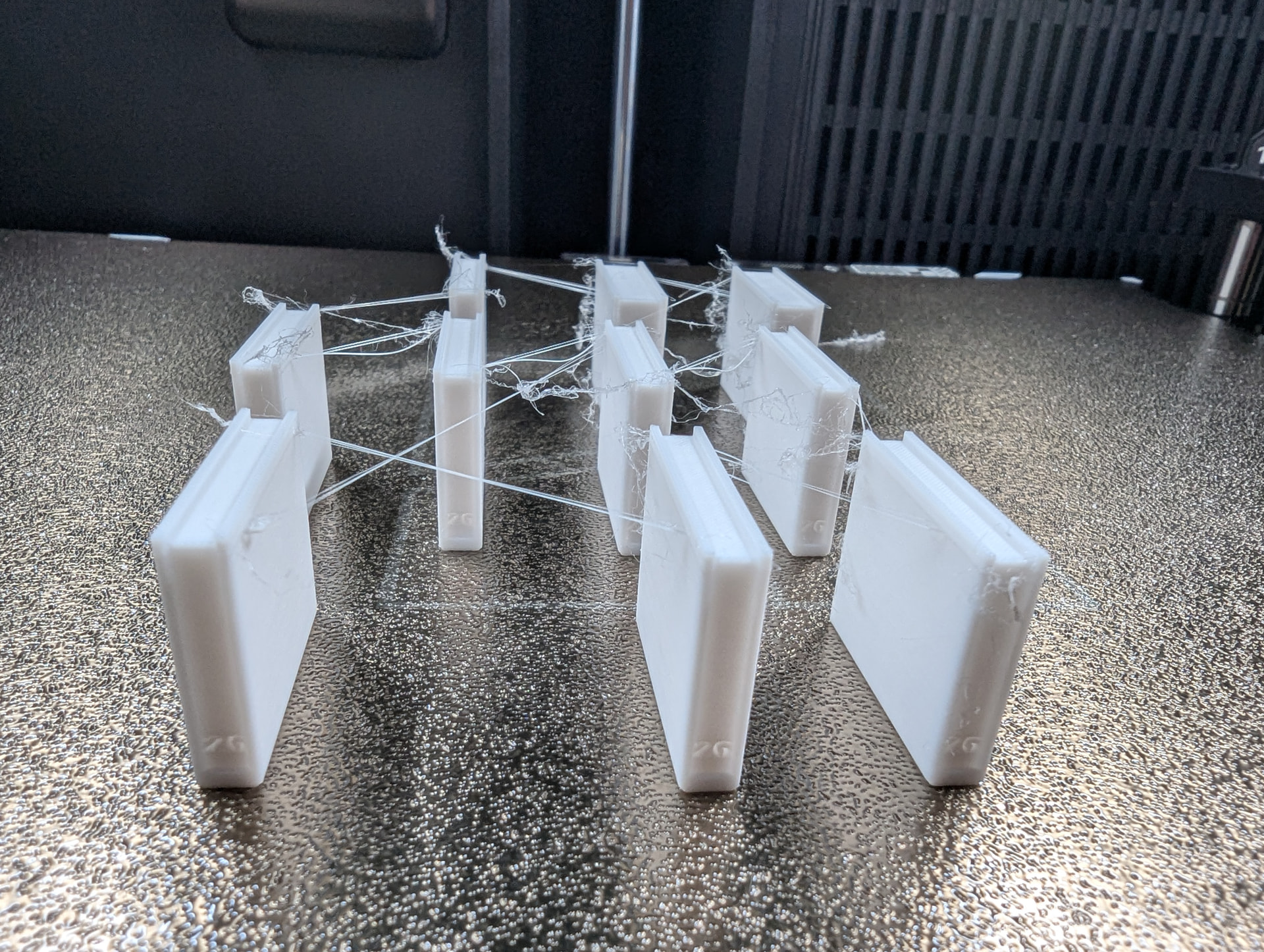
Hi everyone, I am really dissapointed with my H2C as I have issues with stringing, blobs and tolerances I never had with my X1C.
I already got a replacement H2C from the support but unfortunally I still have the same problems.
From the beginning I noticed that the walls on my prints were not as smooth and clean as on my X1C. I hat blobs around the prints. I also had problems printing relatively simple models from the Bambulab App. These were almost never a problem on my X1C but with my H2C I regulary get failed prints where the model has been moving on the build plate. At first I thought it was a bed adhesion problem (Textured AND SuperTack) but it seemed more that the print head was knocking things over.

I printed mostly with PLA or PETG. The problems were more apparent on the 0.2mm Induction Nozzle than on the 0.4mm. And even more, if I printed multiple small objects at once.

So I started some tests, contacted the Bambu support and ultimately got a replacement H2C. But with the replacemant I have the same problems.

I’m hoping that somebody can point me to a solution to my problems.

I printed these mini books for my tests: Mini books for anxiety bookshelf - Free 3D Print Model - MakerWorld

The results always looked like this:

I tried different spools of filament (also different colors) and also dried them before use (Sunlu S4 dryer). Always same results. Sometimes the toolhead also knocks one or two of the books off.

I also have random small pieces of PLA lying arount the build chamber after the prints. As if the nozzle knocks a little bit filamet off the print.

And on the 0.2mm nozzle the filament creeps up on the nozzle:

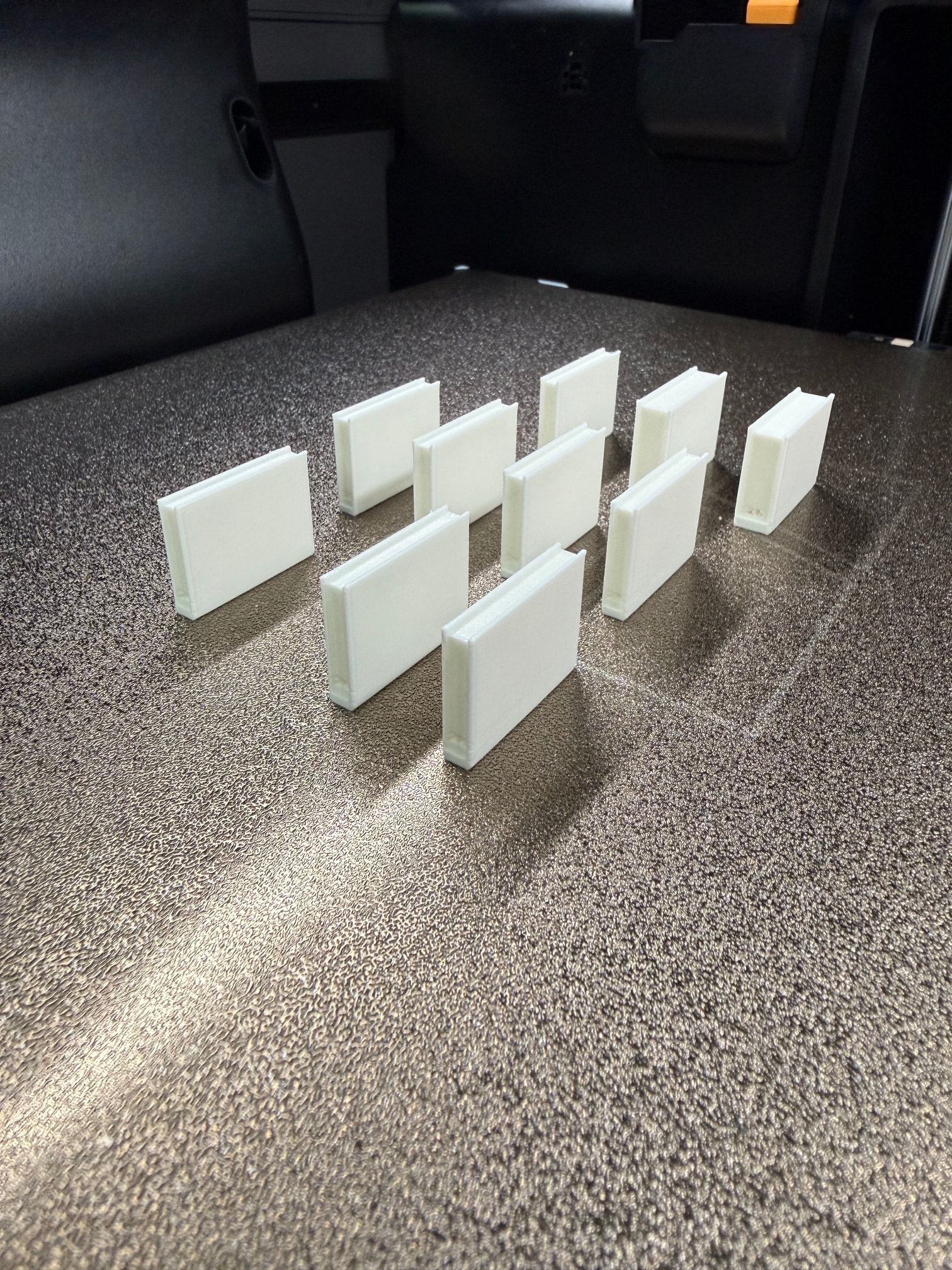
I also loaded the same spool into a X1C and printed the same 3mf file (just with X1C settings, of course). And the results were nearly flawless. Yes, there was a little bit of stringing on one of the back ones, but it was easily removed. The sided were clean and smooth. The edges were sharper than on the H2C:

I tried using the X1C settings on the H2C (slower speed and acceleration) but that changed nothing.

I recently tried to print this model a few times without success: Springy Kitty Flexi Fidget - Free 3D Print Model - MakerWorld

I grabbed the Video from the printer to see what happened and it looks like after a specific height, the nozzle is hitting the model:

Any help or tips are appreciated.

There’s a very good chance this is due to the setting “reduce infill retraction”. May even be the reason for the crazy stringing, assuming your filament is dry and you’re running it with a proper profile.

This setting is supposed to turn off retraction and Z hop when the print head travels over infill areas. It doesn’t stay within the infill boundaries. So a little bit of oozing and no Z hop is surely to lead to collisions. This setting is known for taking out tree supports and scraping infill. Try disabling it and see if anything improves.

Have you created any custom profiles for your filament? - If this is what it is like from the left nozzle, try doing it on the right nozzle, and vice versa. also select bambu basic PLA as a test, see what it does.

My opinion: probably what you don’t want to hear, but you are really going to have to calibrate your filament / tune your filament to the machine. The H2C, while the “flagship” printer, still only ships with some basic profiles for filament and even more generic when you get down into a 0.2 nozzle.

The closest settings you could “borrow” from another printer would be an H2D. The X1C is going to have a completely different type of calculation for your extruder steps for instance (digital / analog etc.) amongst a plethora of other things.

You are looking at tuning pressure advance, retraction, flow rate, and nozzle temp. The default speed for PLA / PETG should be fine along with bed temp tbh. If you were running engineering filaments that need high heat / heated chamber then you for sure would need to do that as well.

There are all sorts of models / tests on Makerworld to be able to perform temp tower, retraction, flow rate etc., and it’s not very hard to do.

My 0.02c is I would start there. That’s what I’ve had to do for all my H2C stuff for high temperature filaments (99% of what I use). And now they print great.

Thanks for your input!
I was using the default profiles. I also re-installed Bambustudio and reset it to the default profiles as I read somehere about a problem with old profies.

Bambu Basic vs Generic had no difference.

The “reduce infill retraction” was on “Auto”. I disabled it and started a new print. But this would also be on “Auto” and therefore active on the X1C.

If someone is interested: This is the 3mf file:

Mini+book+3+5+PLA -H2C-Generic-ToSupport.3mf (155,5 KB)

While I wrote this the print failed again and it knocked the model over:

My point is: I never did any special calibrations for PLA/PETG on my X1C unless I had special needs like especially low tolerances or clean surfaces. The only custom profile on my X1C was to disable the AUX fan. Nothing else. Everything just works. I am just a little bit confused that the out-of-the-box performance is so bad.

Maybe Holdall is right. But my calibrations won’t be used if I print from the app, right?

1 Like

The problem is the X1C has had 10’s of thousands of hours of fine tuning it’s profiles / updates etc., througout the years which have transferred to the printer in filament profile settings etc.

The H2C doesn’t have that yet. That’s why the only official supported profiles you find in the drop down menu are from BL and those are generic at best IMO.

There “may” be a profile you can download per the filmanet you use (usually a .3mf file or config file) from whatever filmanet manufacturer you use for the H2C you could use as a starting point.

The good thing is fine tuning your specific filmanet doesn’t really take that long.

Can you send us a photo of the white PLA spool on your H2C. Screenshot your BambuStudio settings.

Had a printer free so I tried the model.

The is ABS with my settings with high flow 0.4 nozzle at 30mm^3/s volumetric speed. 53 minutes for the print.

No issues I can see on a quick glance.

I’ve experienced this type of issue in an opposite direction, with the X2D but not on the H2C. I’m pretty sure this is not your issue but I had defined my filament incorrectly on my X2D and it kept causing the same type of issue you are having.

The Good Lord told me to check my filament settings and low and behold, I had ABS filament set as PLA and well, after changing the filament to PLA, no issues what-so-ever. Once my current print finishes, I’ll try your print on my H2C to see if I have the issue. It seems that @Tool_Maker print of your 3mf file came out perfectly.

Thank you for all your responses!

The problem is the X1C has had 10’s of thousands of hours of fine tuning it’s profiles / updates etc., througout the years which have transferred to the printer in filament profile settings etc.

Yes of course. But I was a quite early adopter of the X1C aswell and it had never such problems for me.

Your print looks amazing! Thanks for trying. 30mm^3/s - maybe I should also invest in a high flow nozzle. Thats nice :wink:

My problems were mostly visible on the 0.2mm nozzle. But you got nothing there. I try to find some time and calibrate my filament tomorrow.

Can you send us a photo of the white PLA spool on your H2C. Screenshot your BambuStudio settings.

It’s a Sunlu PLA+ White spool. Never had problems with them. As I said, the same spool hat a flawless result on the X1C. I’m unable to make a photo of it right now.

My settings for right induction 0.2mm nozzle, (normal flow):

Default Generic PLA 0.2mm Profile

0.08mm High Quality Profile. I only disabled Reduce Infill Retration. No difference between Grid or Gyroid infill.

My last print was with a 0.4mm nozzle. I’ll start a new print with the 0.2mm, set Reduce Infill Retraction to disabled and set the gyroid infill. Coming back next morning :slight_smile:

The Good Lord told me to check my filament settings and low and behold, I had ABS filament set as PLA and well, after changing the filament to PLA, no issues what-so-ever. Once my current print finishes, I’ll try your print on my H2C to see if I have the issue. It seems that @Tool_Maker print of your 3mf file came out perfectly.

Default PLA profiles. So I think thats not the problem. Would be nice if you can test it on a 0.2mm nozzle :slight_smile:

Result without Reduce Infill Retraction wasn’t better.

I tried printing this temp tower: Bambu Studio PLA Temperature Test Tower - Free 3D Print Model - MakerWorld with my 0.2mm induction nozzle.

It didn’t finish… I never had my X1C knock it over, but I think for low temperatures this can happen… maybe…

Video:

I’m currently drying a new spool of Bambulab PLA and will retry the tower this evening

If you’re running third party filament and with a 0.2 nozzle. Can you run the Flow Calibration from your Bambu Studio. Most likely the profile is not optimal for your H2.

My request may sound dumb but can to take a photo of your nozzles?

I’m now running the temp tower with Grey Bambu PLA. Freshly dried.

Here are the requested pictures of the spool and nozzle.

I received a brand new printer 2 weeks ago. It’s my third 0.2mm nozzle. The residue happens on all of them. The filament kind of creeps upwards…

Okay thats interesting. It works way better with the freshly dried Bambulab filament:

Only the strong layer lines are something that hopefully can be tuned:

This had no difference with the previous machine. So I think there was something wrong with it. And not the H2C is just not as well-tuned as the X1C.

A calibration test model which had nearly no issues on my X1C was also not so perfect. But much better than on the previous machine: All In One Calibration Test - Free 3D Print Model - MakerWorld

The floating balls failed, the rest was really good.

I dried the white and another yellow Sunlu roll over night and tried it again:

The yellow worked better than the white. But the stringing on the white was not so strongly connected and could easily be removed.

The layer lines on the yellow one were not as visible but much easier to feel.

Thanks for all your help. I will try to calibrate the Sunlu filament on the weekend. I hadn’t much time the last days.

@Tool_Maker I tried to calibrate the filament and while tuning pressure advance I got some interesting results:

I did the calibration two times, once with Sunlu (white) and once with Bambu (gray) filmanet. Then I exported only the STL model and printed the model without different Pressure Advance values, just the plain model.

A: 0.2mm Nozzle, White Sunlu filament, calibration mode

B: 0.2mm Nozzle Gray Bambu filament, calibration mode

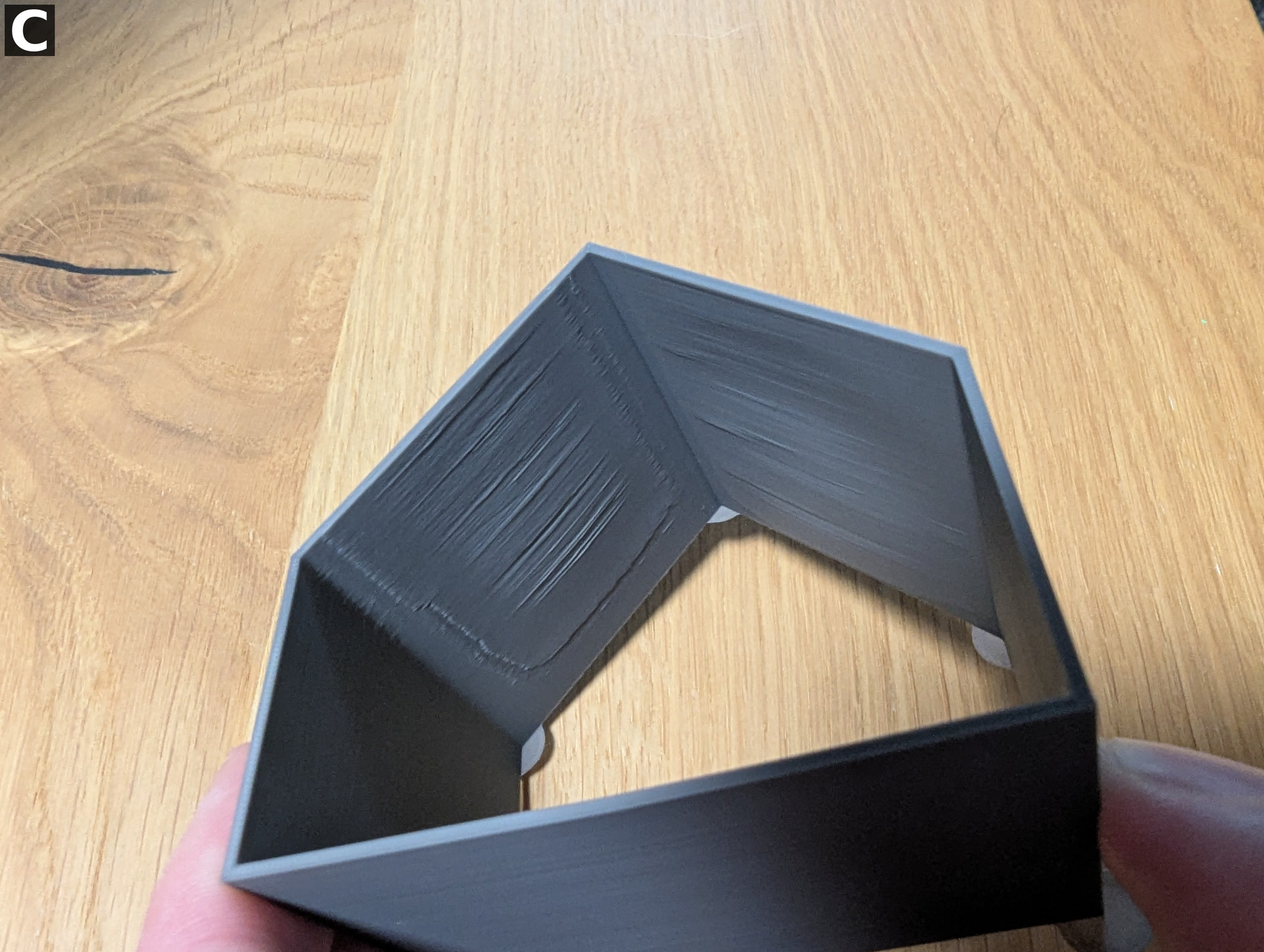
C: 0.2mm Nozzle Gray Bambu filament, only STL, Automatic Flow Dynamics Calibration enabled

D: 0.4mm Nozzle Gray Bambu filament, only STL, Automatic Flow Dynamics Calibration enabled

As you can see on the photos the diagonal walls have a lot of defects.

One side has them on the outside and the other side has them more on the inside.

This problem is not apparent on the 0.4mm Nozzle (D).

Any ideas?