My H2D doesn’t give any error when I run it directly from the machine. I haven’t attempted the high precision nozzle offset calibration though. Only the one offered when doing a full calibration including anti-vibration, noise canceling, etc. For me it just works. 
Ah, okay. I meant the precision one.
having a 0.5mm error in a 3.4mm hole is something I’d like to see fixed. I noticed some 6mm holes I printed recently were way undersize, so I for one welcome the (partial) fix.
I wasn’t aware there was ‘controllable’ (?) hole compensation in the slicer
So you prefer a solution that constantly requires oversized holes in models instead of a solution that tries to solve this issue?
I fully agree that all legacy models may suffer from this enhancement, but I sincerely prefer a solution, where I don’t want to think in my design about what printer or material I use to get the correct output.
It will give a long transition period, but rolling back your update is only delaying the inevitable.
Unless Bambu decides not to implement this feature based on the community’s feedback, you will someday have to accept this enhancement unless you never update your firmware anymore.
It would be nice to have an option in Bambu Studio that allows to disable this for certain models. They could even set it standard on all legacy models. But not ever taking this forward is basically saying “I don’t want any improvements for my printer”.
First: the feature in Bambulab Studio is disabled. Still, something changed.
Of course they shall improve the accuracy. But this kind of change must be indicated at the top of the release notes with capital letters and a big warning.
I mean, we now have 3 possibilities:
No hole compensation with old firmware.
Hole compensation with old firmware
Improved accuracy without hole compensation.
Almost every functional print has some holes included. How should I deal with this mess if I want to provide some models on makerworld? Flipping a coin and hope that the inserts will fit?
I have the same issues but I consider the improvement worthwhile if I don’t have to set a larger diameter in my design to fit. I think I will just put a warning in makerworld for any design that requires precise fit and welcome any comment from those that will get non optimum hole size and I will just add a tighter profile if required. After a while when all printers will get that improvement the tighter profile will become the regular one. For inserts I wouldn’t worry too much, the hole size is already smaller than the insert size and there should be enough melted plastic to fill the gap
I completely get the frustration, but not sure how you would ever go about implementing a fix. You’re damned if you do and damned if you don’t.
I meant that it would be good to have a new toggle in BS that allows the suppression of the firmware compensation.
With that toggle default set to disable the firmware compensation, all existing projects on Makerworld should still be functionally correct.
As @philch mentioned also, we would like to transition to the new WoW where CAD models don’t need compensation anymore. The path towards that will have plenty of hurdles, so Bambu should try to make the transition as smooth as possible.
So at the moment the only 2 solutions are either not installing the update or use the X-Y hole compensation in BS to counteract the firmware compensation.
@SupportAssistant what is the view of Bambu Labs on the transitioning to the new hole compensation in the firmware to all the legacy models on Makerworld?
Is there something foreseen for that?
One thing became clear to me now: You have to design your model for correct hole size. The hole mess afterwards should be a topic to handle on printer side.
I mean, I did only find this topic by chance. I did a 8h print and found out it is not working! That is when i started reading the release notes more carefully.
I would also appreciate a checkbox in Bambu Studio to toggle between old and new version.
Do you mean you now just make the hole size 10mm on cad and it will end up being 10mm in the final printed version now?
I used to offset everything by 0.2mm or so on CAD
With the current mess, I can not do that anymore. I will do 10.2 if i need a little play. And use a 10mm drill if it is too tight.
I used inserts or self tapping screws. If the hole is too wide, the print is trash. I will therefore have to accept that the holes might be too tight.
after the nightmare with the software after the iOS software i am going to wait.
@SupportAssistant Maybe not the right channels but when can we expect a fix or test fix in a beta version about printing with 0.2mm nozzles and the issue when it comes to calibration Pressure Advance/K value. I’ve been working on manual calibration for days now and no matter what the outcome is its not correct. I am highly experienced with these calibrations because i’ve been used to Klipper machines that require manual calibrations but for some reason on my H2D the value that shows to be the correct values is not correct. i keep having artifacts on my prints that are related to Pressure Advance/K factor. Right now i can’t even use my H2D for 0.2mm nozzle high detail prints just because of this reason not being able to get an accurate reading from the manual calibrations. This should be on the high priority list of Bambu to be fixed as i know this is an ongoing issue for more then a year now and still no fix from your end.
Will H2D track switching work through the Bambu farm client and server?
@SupportAssistant Still no beta access. 
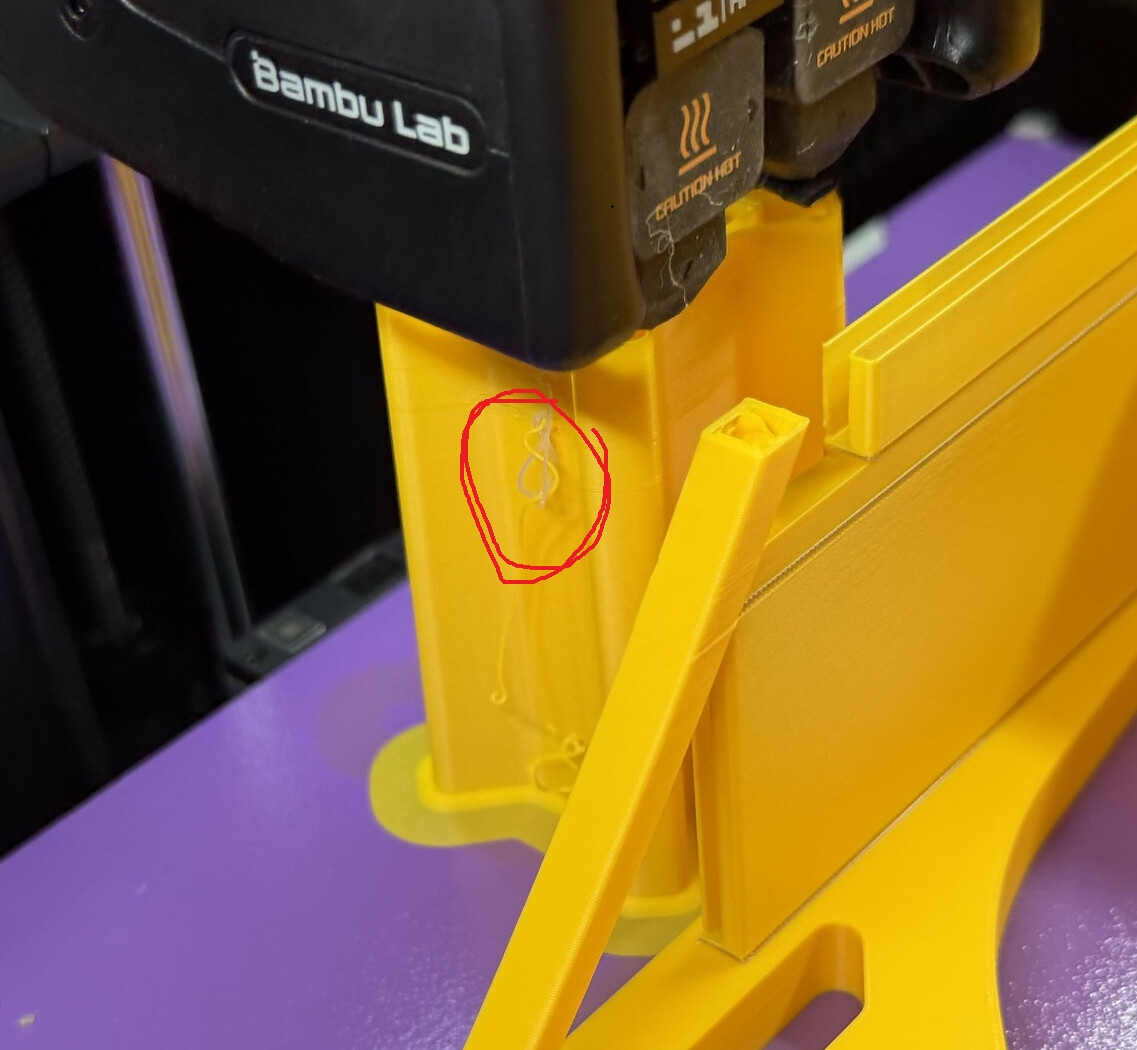
Got the Beta notification and installed, took ages to install, re-did all calibrations and the only niggle I see so far is that I get spaghetti detection errors for what I’m assuming is the strings on my prime tower as there’s nothing else on the print that could even remotely pass as spaghetti. It’s happened on two successive prints so far. I have two more similar prints and will snap an image the next time it pops up.
It happened right around this
You need to restart your printer.
But the rollout is a gradual process and not everyone receives it.
I just restarted and it’s updating mine at this moment.
Can confirm that the Spaghetti Detection is so sensitive now I’ve had to turn it off completely.
Rob
Did that. Nothin.
“Can confirm that the Spaghetti Detection is so sensitive now I’ve had to turn it off completely.“
I’m not on the beta and I had over sensitivity issues with spaghetti detection since 1.03. Sometimes I can’t even guess why it’s detecting something, so I also have it off.
I’m over a year without a false positive and have had a half dozen today. Might roll back after this project and see if that changes anything. Another thing I’m pondering is that the prime tower was very close to the print and that maybe that had something to do with it.