Hi friends, I have been having bleeding problems trying to print this duck where the filament color changes from black to yellow.
I have set the filament change purge volume to 900, set inner walls and infill to print first but yet I am still seeing banding. It looks like I just need to purge more to get rid of the black. Does anyone know how I can increase the purging? Thanks in advance!

Too lazy to fire up Studio and look, but I’m pretty sure I remember a “multiplier” value in the purge window that scales all the purges by that amount.
Thank for the reply, I think the multipliers multiply the calculated amount of purge required, but to a maximum of 900, according to the flushing volumes window
Have you tried something else, the order the filaments print?
If you use the cog/hex icon on the right of the build plate and then change the (currently) two bottom entries to change the filament sequence.
Order them by dragging and dropping, aiming for the light colours on the left, getting darker to the right.
- Yellow (left)
- Orange
- Black (right)
Repeat for first and subsequent layers.
This will print the yellow first and the black last, hopefully meaning any bleed is yellow into black, far less visible.
I would print a test, use the move tool to lower the model below the build plate so you can aim for an area of solid yellow, then yellow and orange, finally all three. Print it and stop it after you have a enough layers to review.
I would recommend going back to the default flushing values. It is likely you can go below them a bit on a second test.
You do not saw what filament supplier or type of filament you are using.
If it fails, provide those and a new photo, zoom closer and I will do my own tests with what I have.
I am using Bambu PLA lite for both black and yellow. Orange is not at the same layers so it’s just a black to yellow change for those affected by the bleed. I did think about order of filament change, but I figured if it is just between two colours it may not have an effect since the following layer it would be reversed? I’ll give it a try and take some pictures.
And good idea to cut the model to just print the concerning areas! Saves time and filament. Thank you!

This is a somewhat recent change to bambu studio. a few months ago I was able to set a higher flushing volume as I would generally use more than 900 for PETG-with-PLA-supports printing. Today the software overrides what I type with 900.
Hello,
I’m facing the same issue, printing conductive PLA from Protopasta and than going to a very light color.
Heavy bleeding, as the conductive filament requires a lot of flushing.
Is there any “switch” in the software to increase the limit or to disable the limit again?
I understand that there is a “suggtestion” - but for me it does not mean a “boundary” - isn’t it?
I’d expect a hint: are you sure to flush more than 900? or something like that - as it’s a huge amount - but unfortunately it’s really required in this specific case.
Worst case I’d need to change the g-code, isn’t it?
Thank you so much for any feedback.
Best Regards
Matthias
bug-report See post above:
- flushing is limited to only 900,
- in some specific cases not enough
- instead of fixed “cut” should stay a suggestion, maybe with a more intense warning that you exceeded the “suggestion”
- Multiplier takes no effect, does not multiply values above 900
Thank you so much for a quick bugfix.
Best Regards
Matthias
Has this been addressed yet? I can’t seem to change the purge volume more than 900 and can’t change the purge tower to print more filament.
I’m printing black and white ASA and the black will make the first white in the next layer grey..
It’s even worse going from black to transparent, unless you like a very smokey clear.
got same issue here. Im using Sunlu PLA Yellow and Bambulab Basic Black
I don’t understand why people think purging anywhere near 900, let alone more.
Can one or more of you share photos of the resulting issue?
I suspect the problem is a dark colour sitting under a light colour which visually bleeds through and nothing to do with such poop waste.
A fix to that will:
- Fix the problem
- Reduce waste
- Increase print times
I’ll suggest something nobody else has so far…check out the Steinwipe Pro by Leckiestein. It’s launching in the next few days, and what it does is for filament purges actually raises the nozzle temperature - freer-flowing purges helps purge color with less volume, and his mods add a better nozzle cleaner and can be configured to do some SERIOUS nozzle scrubbing between layers. There are a few other tweaks that may also help your situation.
Basically, he’s an absolute sorcerer when it comes to clean multicolor prints. I’ve been running his original Steinwipe system since it came out and love it, will be getting the pro as soon as it’s out.
Count this as an upvote if BL is paying any attention. Need more than 900 to purge from black to white in both pla and petg. I doubled the size of the color swatch file available on makerworld and found that what it really needs is a value of around 1200.
Give me control of my printer, ffs. Yes I know it’s waste. Can’t be helped here. It’s built into the final cost. AKA another 10 cents for the customer. I can’t print this any other way.
I don’t think you understand the problem. It’s not the color visible THROUGH the lighter color. It’s the bleed from not being able to purge enough filament to properly fully change from a dark color to a light color. Yellow and white are super prone to bleed.
You can do it in the machine profile Gcode for filament change.
When you mix PLA and PETG for supports, a small amount of contamination makes the print very weak. I use the maximum purge amount in this case,
If people are having problem with colour bleed issues, I can understand why they would be increasing purge amounts, especially with exotic aesthetic filaments.
I do. I just can’t work out why so many appear to need a value so far greater than actually required that I am throwing out wild ideas.
I do not make statements without backing them up, so here are test models with all data to show you.
900 to purge from black to white is mental, more is not realistic.
Granted, I am working from my own experience, but this is what I see.
Three tests:
- Dumb - Lowest black to white and reverse values possible.
- B2W = 63 & W2B = 63
- Result is bad, as expected
- Reasonable - Half recommended B2W and reverse (manually and using multiplier)
- B2W = 312 & W2B = 72
- Result is excellent
- Recommended - Actual recommended B2W and reverse (using the re-calculate button)
- B2W = 623 & W2B = 143
- Result is excellent, as expected
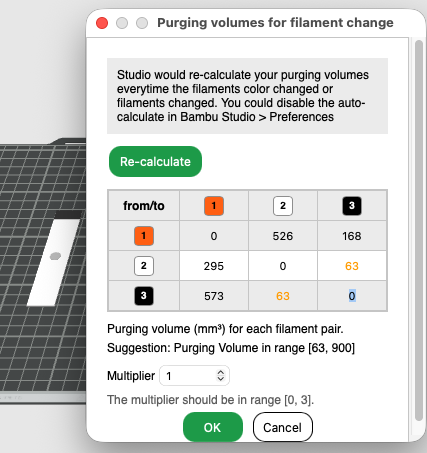
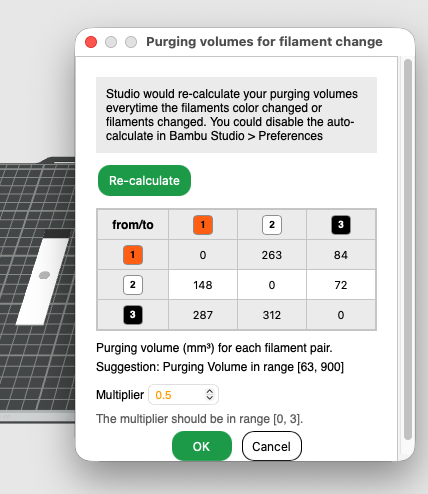
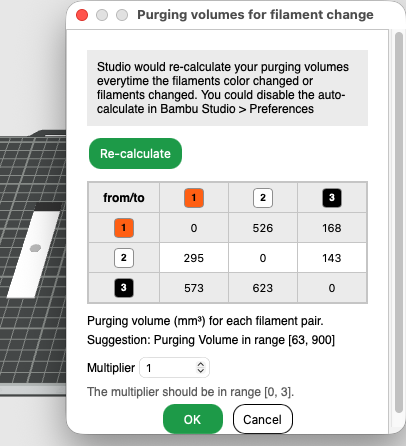
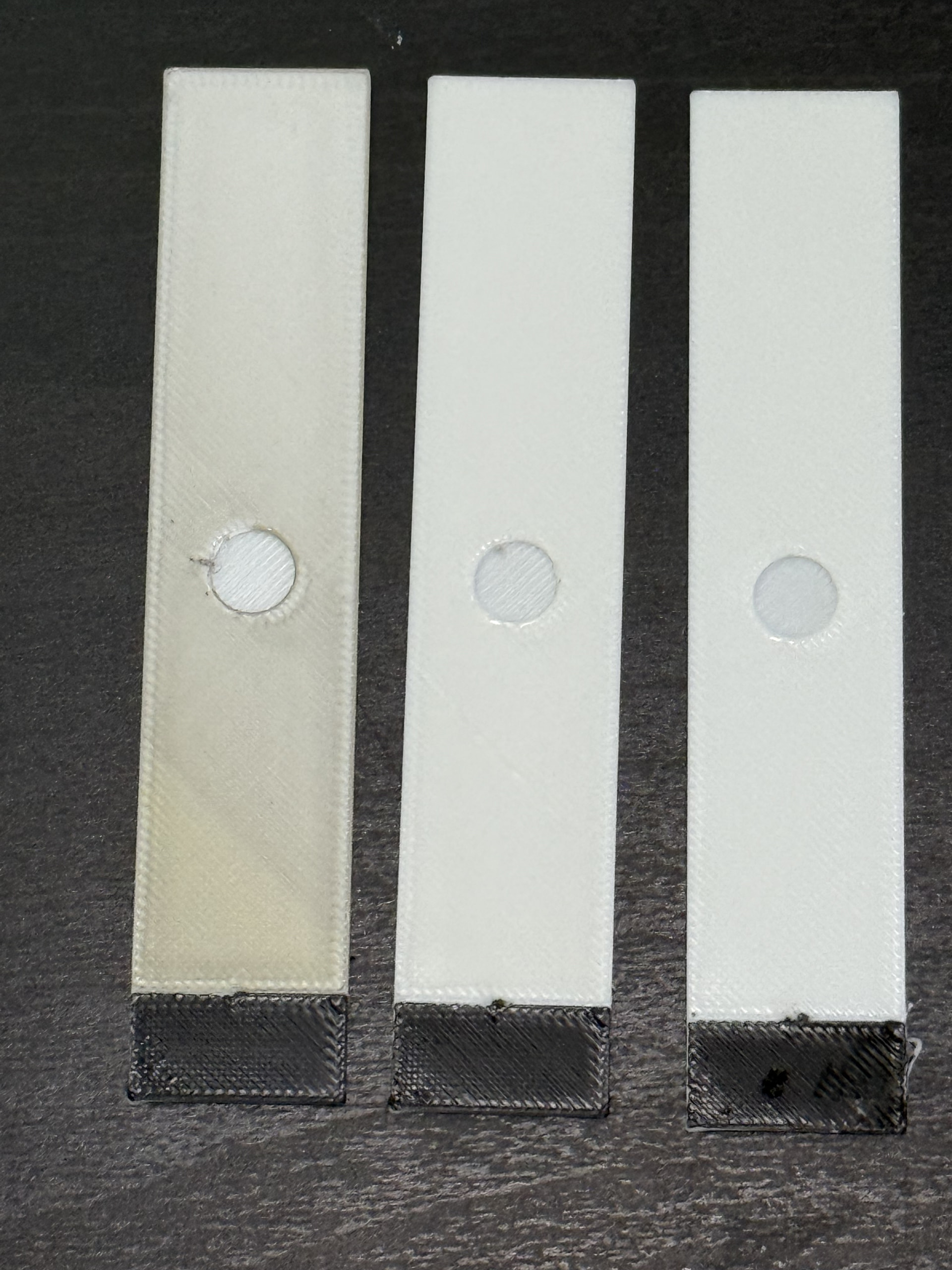
Photo:
A = Left, B = Centre & C = Right
Test model:
- 20mm wide
- 100mm tall
- 1.2 thick
- Solid model due to 3 bottom and 5 top layers
- 1 wall to focus visuals on the flat surfaces
- Model oriented so the white immediately begins in the same location as the black portion ends.
- Black portion is 20mm x 10mm at one end.
- An 8mm circle cut into the top layer of the solid white 1mm (5 layers) by 0.2mm and another 0.2mm in the top test layer
- Filament order forced to print black first to demonstrate the transition (if any)
- BL PLA Basic Black & White Used
- Test area is a single layer so any issues are clearly seen
The test model creates a solid 1mm thick white block before printing the black portion and the final white portion (a single layer) to show any discolouration.
The test hole provides a means to see a solid and clean white portion in contrast to the test 0.2mm single layer.
A = Benchmark
C = Recommendations
B = What only using 50% of those recommendations gives you - visually identical to C.
My test B is essentially 1/3rd of the number you wish to exceed, yet, I get the identical white as if I used the recommendations which are roughly 2/3rd of what you wish to exceed.
I have attached my test file so you may:
PurgingVolume.3mf (38.8 KB)
- Say my model is rubbish, and provide your own for me to try.
- See what I used to generate my examples shown here.
At the very least, you can see why there is confusion.
What filaments are you using? Brand, type, sub-type and colour name.
Examples:
Bambu Lab (brand) PLA (type) Basic (sub-type) Black (colour name).
eSun (brand) PLA (type) + (sub-type) Black (colour name).