Howdy!
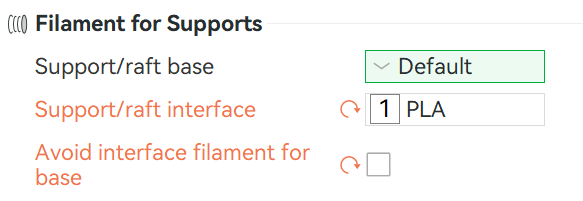
I know how to use PETG or PLA as a support interface “for the top”, but how do I do that for the bottom as well? I have a model that requires the support to be built on top of the model and the entire model is PETG. I’m using PLA as the support interface but I don’t know how to make it the interface on the bottom of the support that contacts the model, without making the whole support PLA. Any suggestions? I did think about just building my own supports when I design the model but I’m not sure how thick to make a “section of the model” to act as the interface layer.
Thanks!
I’m not at my computer but there’s two dropdowns; one for top support interface material and one for bottom support interface material. You’ll want to set both to the dissimilar material in the situation you’re describing.
Thank you for responding! But I think you mean Support/raft base? That’s the only one I see and I don’t want to do that because it adds a lot to the print time because it changes the entire support to the same as the interface. This is assuming that’s what you were talking about.
The support base will be on the model itself and I want to add a PLA interface at that base. Is there a trick?
EDIT!!
Using Google AI search (50% wrong usually), it showed me that changing the support from Tree to Normal now adds an interface layer to the bottom of the support as well as the top. This won’t always work on intricate models, but perfect for the flat surfaces I am doing. Hope this helps others as well!
Yes, that’s the one.
If you don’t want to enable that option globally, you can add a modifier for that region only and for that region set your support base to that interface material.