Does it have a button to switch between the in slots?
This link should help you out and you just feed what filament you want to use at that time or if you have more than 1 AMS it will work also.
It also has locking couplers to hold the ptfe tubes in place.
It’s more of a manual operation where you feed your filament from an external spool (or possible external dry containers to help control filament moisture).
I keep my AMS connected to one input, and then the second input is for use with my External Spool holder. Not having to remember to reconnect the AMS after using the external spool is a big bonus! I’ve forgotten to reconnect the AMS a couple of times and ended up with a lot of filament feeding onto the floor!!
However, I suggest you also use this mount to connect the 4-in-1 PTFE Adapter to your printer. It solves a couple of problems and helps to reduce possible friction in your PTFE lines which causes AMS feeding and retraction issues.
So if I have this then technically I could print with 7 different filaments at one time? 4 being and then when it came to 5-6-7 filament I would manually need to load it and remember which colors I assigned to the 5-6-7. It was saying on the store print up to 7 filaments
Kakitaaya did you get an answer for your question about the 7 different filaments? I just got my Bambu 4-in-1 PTFE Adapter and have the same question, the website doesn’t seem to be clear enough on that
Based on your question:
You would attach the 4-in-1 adapter to the printer inlet.
One of the 4 holes would be connected to your hub or AMS, leaving 3 for external spools.
The external spools could be used as follows:
- TPU ready to use
- External Dryer
- AMS HT
You choose what goes where or even if you fill all up, it is a convenience device allowing to use one or more as you see fit.
If you have a specific printer or scenario you are trying to work out, describe it.
Sorry to necro an old thread but I still have some questions after reading this thread and the wiki.
I understand that 4-in-1 PTFE adapter doesn’t automatically swap between the 4 connectors and I can only access AMS (4 colors) and 1 ext filament. My question is, if I have all 4 slots connected, lets say AMS, White, Black, and Red individual dryboxes, how does Bambu Labs products know which is which?
No problem, it is the right place to ask.
The 4-in-1 PTFE adapter does not have any mechanics or electronics inside as you already know.
Its purpose is to allow one material to be pushed through at any one time, this is the in-1 part.
The 4-in part is the ability to have four potential things attached with PTFE tubes ready.
Using your example:
- AMS
- Dry box with White
- Dry box with Black
- Dry box with Red
Each number above is a different inlet in the 4-in portion.
When you slice your model, and select filaments from the AMS, the printer and AMS work in-conjunction with each other, the printer asks the AMS to send the correct filament and the right time and pull in back ready for the next one as required.
Using your example; ports 2 through 4 are manually managed.
When you slice your model and tell the printer it is using an external spool, it is up to you to push it to the print head, load the filament and begin the job.
If the job requires a different filament during the print, you are required to unload the external filament and load the new one manually.
A 4-in-1 adapter is used to aid the hooking and unhooking of the things connected.
It is possible to connect up to four AMS units at the same time and have those automatically work together and no manual involvement.
Even with the new/upcoming slicer feature that will aid the swapping of filaments on the external spool, you are still required to manually swap the filaments as the print proceeds.
To give another example to Malcs excellent explanation. I use it a little differently. On the right and top of the unit I have ab AMS, 2 AMS-HT and 1 Sunlu S4 that are handled with the AMS hub. This is the mechanical hub. With that I have 10 spools available to be used, 4 will be manually swapped. 6 of the spools that are in AMS devices Studio will see and will be handled automatically.
on the other side, after the AMS hub I have a 4 port hub. That one has an external spool holder that I use for TPU or whatever, anything really that doesn’t need to be protected against humidity while being used. If I wanted I could still stage 3 more filaments, but I can’t really think of an instance that would be needed. I could also add another dryer like the S4 and have it feed on that side. Each spool would be manual though, like Malc said.
I’m a little confused about something. I was planning to do this…
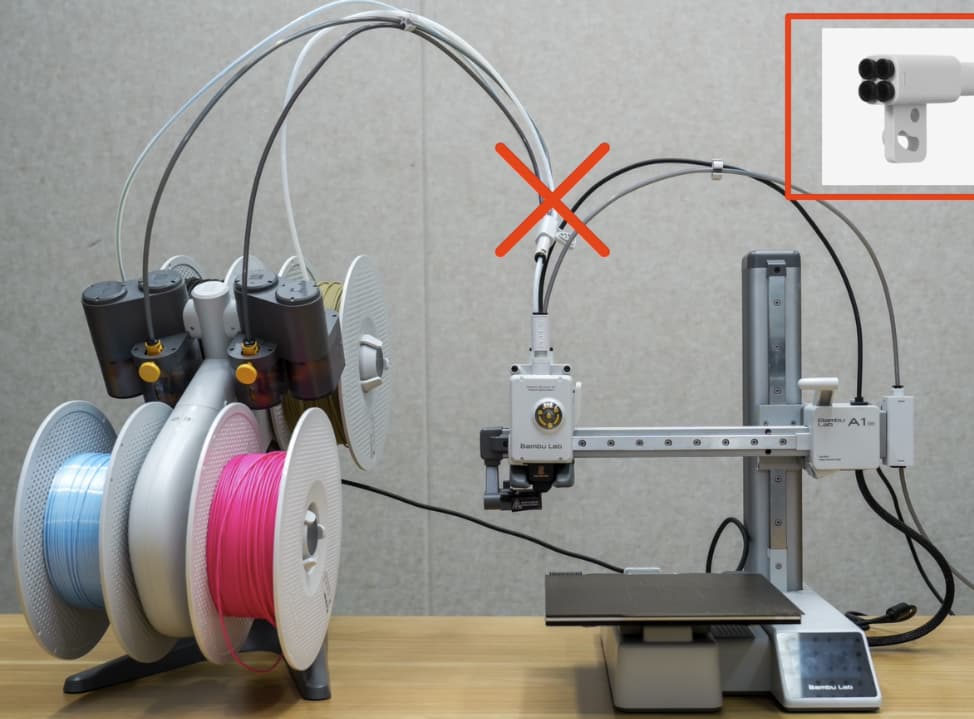
… so that I would not have to totally discard my AMS Lite but I see from the big red X That Bambu does not want this done, predicting “loading failures”. Why?
Now, I KNOW that I can’t use both the Lite and another AMS at the same time, but my thinking was, use the 4-to-1 PTFE adapter with the 4 AMS Lite tubes plugged into it, and when I want to use the Lite, turn off the system, unplug the control cable for the new filament buffer (and the new AMS) from the printer, plug in the cable from the Lite, and plug the output tube from the 4-to-1 PTFE adapter into the toolhead and turn the printer back on. The AMS Lite should work normally. Since the 4-in-1 adapter simply passively funnels four tubes to one outlet it should work just like all the adapters you can print to plumb another filament source into one of the PTFE tubes. My reasoning is that when either AMS setup is connected to the printer the other is disconnected and inert and the printer would not even know the other AMS existed. Why will this not work?
Another possibility I see, unplug ONE PTFE tube from the Lite from the toolhead, plug the tube from the new filament buffer in that open port, and swap the control cables. Will THAT work?
I just don’t want to turn my AMS Lite into an expensive doorstop.
Bambu Lab have stated why you need the new buffer and why you can’t mix the AMS Lite with any of the other AMS units.
The A series has a buffer in the print head and those gears do the work the AMS itself does.
The new buffer balances the AMS, AMS 2 Pro and AMS HT so it doesn’t damage the A1 print head.
The software connected to the firmware requires you choose between AMS Lite OR the any one ir more if AMS, AMS 2 Pro and AMS HT.
You can’t combine them or risk damaging the print head and more.
This is far more than pushing filament into a PTFE tube.
Now all the warnings are out of the way.
You could toggle between two different setups, just not at the same time.
You would need to unplug bus cables and things will get complicated.
Why do you think two different setups into a single printer would be good?
Exactly what I want to do.
I think I could handle swapping two plugs. No difficulty there.Not much harder than loading up an external spool. Indeed, think of the Lite as a glorified external spool (which I see can’t be used with the new AMS system anyway).
I envision using the Lite for the filaments I use for prototyping and functional parts, and the AMS for random colors for toys and trinkets. Also occasionally for drying. I don’t see a downside and I don’t see it as something terribly hard to manage, if it would work.
Remember, that AMS Lite cost $$$ that I don’t want to just throw away. I don’t have (and don’t need or want) another A-series printer to use it with, and doubt I could sell it
I think this will eventually get old DEPENDING on how often you need to switch. If you’re switching like once a week or two I would agree with you. Many times during the week it may begin to wear on the nerves.
Nope, I’m doing fine with it. It is totally painless, I just switched back to the Lite for a couple of PLA jobs this evening.