I knew when I bought my H2C that I would probably have to use Bambu Studio and not be able to use Orca Slicer. With my previous printer, X1C, I just stopped updating firmware once the security stuff started to continue Orca Support.
If you didn’t know, Softfever has bought an H2C and said he will add in to Orca support for it once he figure things out.
I for one am very excited. Hope someone else finds this news great as well.
Realistically unless Orca has multi hot end size supported or true monotonic infill/ironing pattern supported, otherwise I don’t see a real benefit of using it.
I would, I run my H2D in LAN mode and need to calibration→manage result to get my pressure advance values to show on the device page, when not in LAN mode I need to go to the calibration page before the values will be reflected. In OrcaSlicer they pop right up. My issue with the H2D is that OrcaSlicer doesn’t reduce the temperatures on idled nozzles so they stay at print temperature the entire print though it looks like someone is working on a fix so hopefully that will be a non issue before long.
The said PA calibration is very different in Bambu machines. It’s not a static K value unfortunately. You can get a close enough result for a certain combination, but often it would fail at different speeds which is unavoidable.
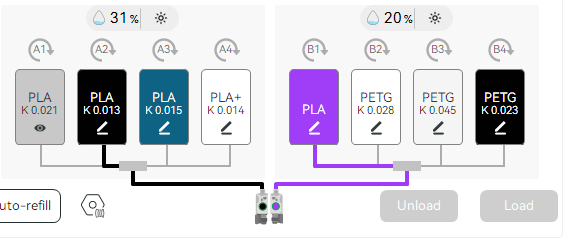
What I meant to say though not very clearly is that my preferred PA values do not automatically show up in the device screen when I load Bambu Studio. I get what shown in the image until I go to the calibration tab and open up the manage result page. After that my designated PA values show in the device tab as shown in the second image… Not sure if the PA values still apply if they don’t show up in the filament section of the device or not but I just assume they don’t.
Being able to use the built-in calibration prints in Orca would be nice. It’d also like to be able to print with different nozzle sizes on occasion but neither Orca or BS can do that yet.
I haven’t felt any need to use Orca Slicer, personally. I’ve put a lot of focus on Makerworld though, which precludes me from adopting Orca at a larger scale, but it’s not something I see as a hindrance or anything, because I don’t really see any benefit for me to use Orca. I’ve found Bambu Studio works well for me, and I certainly like it more than previous slicers that came before.
I started on Matterhackers slicer. I purchased simplfy3d back in the day. I never much liked Prusa Slicer, Cura. I did use ideamaker for a little while towards the end. Once I got my Bambu printers though I phased out the old slicers, old printers. I’ve been happy. I’m happy with my prints.
You just reminded me, another plus for OrcaSlicer is that load behavior can be controlled. i.e. can load model only to keep others print profiles from jacking up my settings. I tend to not trust others slicing so always redo any Makerworld embedded profiles when downloading models from them.
Not permanently but the embedded print profiles take over the session requiring a re-syncing of filament presets and resetting of the machine profiles if any changes were made. Depending on the profile it may actually load settings for a different model printer vs my H2D
I never thought this was much of an issue. I usually set my own settings. I have a preset, so it’s just a drop down click away and boom, I’m back completely in business.
But I concede, if you’re “importing” a 3mf, it shouldn’t treat it like you’re opening the file fresh. That’s one of the things I’m not as keen on in general. In a fresh scene, I go to add a 3mf, but instead it “opens” the 3mf. If I wanted to open it, I’d go File->Open, If I’m importing/adding, it should be adding it to the scene, regardless if the scene is empty to start with.
I like to think of it more so along the lines of personal preference. I don’t like to approach my slice the way they do, so. Haha. Just like I sure do love cheesecake, but if I’m going to bake my own cheesecake, I’m gonna use my preferred recipe.
I think the value in the print profiles is the layout, having things organized like that. I always hated trying to figure out a designer’s intended orientation for a part, or when there’s like 20 bazillion parts, and oh my gawd that can be a project in itself working through, especially if the designer wrote all the instructions in German, but you’re a damned American where even British English is too foreign for comfort.
I take a very stock approach to things, with how I set my print profiles up. The only things I really change from stock are the wall count and the infill type. The stock profiles are pretty good, and I try and design my parts so they don’t need any fancy tricks to make them work. Make it all as solid as possible.
It’s not that difficult to revert but it is a annoying. Uploading a properly oriented model doesn’t require a print profile. When designing I try to think ahead and locate my models on datums that mimic how I want them to be oriented in slicer, though it frequently doesn’t work out as my intent shifts, otherwise I’ll re-orient the model in slicer and save again prior to uploading.
Unless it’s something really crazy do the same, just use a generic profile with infill switched from grid and maybe 3 walls and inner/outer/inner if there aren’t any big overhangs. I also try to use break away supports as much as possible to minimize having to print with supports but that doesn’t always work out either.
Finally, I still have a toolchanger that I use, albeit infrequently, and it would be nice to only have to deal with one slicer.
It needs to be said that the underlying issue that’s driven this whole situation is the pace of Bambu Studio’s development. It just isn’t fast enough, there are too many bugs, and Orca has consistently released more, better, and newer features that Bambu just hasn’t been able to keep up with.
Almost everyone who uses Orca Slicer does it because it gives them better print quality and more useful options.
If Bambu Studio would have staffed up their software development group, they wouldn’t be in this mess now. It’s wild considering they could absolutely be integrating items FROM Orca because it’s open source! Most of the work is done! But nope…I don’t know what’s driving this behavior, but Bambu seems to be intent on giving customers a less capable slicer, slower updates, AND preventing customers from going elsewhere when that isn’t good enough. It’s wild.
I use to do this more back in the day, back before print profiles and all of that. When I’d upload to Thingiverse or Printables. When I started using Bambu Studio and being able to have multiple plates and all that, I stopped worrying about it so much. It kind of changed how I looked at the slicer, because I saw it more as a project manager than just strictly a slicer.
Where it really shines for me though is huge projects with tons of parts. It saves a ton of time to be able to organize all of that in the print profile. I haven’t uploaded raw 3mf files in awhile because it’s all there. With my latest project especially, it’s just so huge. I just counted, 450 parts.
orientation breaks down when doing assemblies but orcaslicer has the same functionality while including the option to either load the print profile or just the geometry
If I could, I would. However I have found Prusa slicer is just better than Orca slicer with the Core One L printer profile, so I have to use a different slicer for my Prusa anyway. And the U1 generally works good with profile in Orca, but I used the snorca variant with the support for full spectrum because the released Orca doesn’t do that.
In short, I would prefer to print on all six of my printers using a single piece of software, but In reality, that is becoming very hard to do.
I’ve never found a reason not to use Orca with my Bambu printers, other than Bambu doesn’t like that.
Revert as take it back to the default settings, i.e. process and filament settings then I adjust the settings as I see fit, not revert to default and hit print, I’m a little old school in that I prefer to manage my own print settings rather than use someone elses, not that what’s supplied is necessarily wrong or bad just a matter of preference.
Now for the novices out there that just want to download and print pre sliced profiles are probably ideal.

 If I’m importing/adding, it should be adding it to the scene, regardless if the scene is empty to start with.