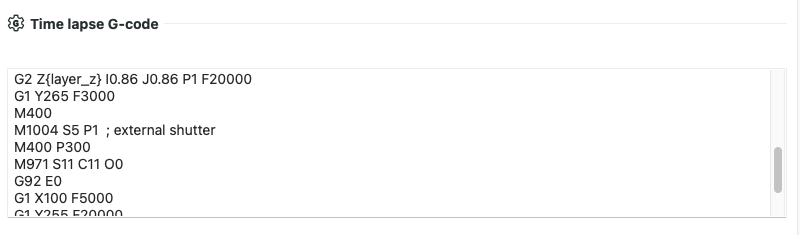
Never seen it do that unless i specifically tell it i want a timelapse and thats when the print is being sent, sounds like you’ve toggled something somewhere
What specifically are you seeing where its allocating time for a timelapse?
Only time i see it include those in the estimates is if i have deliberately gone and selected smooth as the timelapse option, although it will, afaik, just skip them if you don’t tell it you want a timelapse, just change it back to traditional and it won’t bother adding them
edit hmm looks like the A1 shows them by default, it won’t actually do the movements though if you don’t have the timelapse enabled afaik
It also looks like the movement time estimate on the A1 by default is the same as the movement time on the P1 anyway so i don’t think that estimate is actually including the timelapse timer anyway
The slicer has them in and accounted for just like any other line.
In reality it skips those actions.
It also skips the elapsed time in which they would have taken.
Thus corrupting the estimate…
Right, but like i said above, if i slice a model for my P1, i get 19 minutes of travel time with timelapse set to traditional, if i set it to smooth i get 28 minutes, if i slice the same model on the A1M i get 19 minutes of travel regardless of the timelapse setting
So i don’t think its corrupting the estimate seeing as its giving me the same estimated print time as my P1 would for the same model without any extra movements
It also shows the same 19 minutes of travel sliced on my H2D with the traditional timelapse aswell
Hmmm, i can replicate it with a really big model just not with one of my regular print models, does the A1 series slow down the motion system when dealing with larger models to avoid knocking them free? on the P/H series there is no meaningful difference in travel time
This is a good discussion and I am following. It seems @Bullocks understands what I see here.
Why not have an option in the time lapse section that says OFF?
Right now I have to select one version or another when I don’t want any at all.
I haven’t tested the printer profile change yet.
I chose my slow profile to make the numbers more noticable. The point isn’t that the speed is slow, it’s that the accounting is wrong. I’ve run into this in the past when scheduling a pause for magnet insertion on the top of a print. The slicer estimates what time it will occur, but you need to manually do a little fudge factor to be ready early since these phantom paths are included in that estimate.
Is timelapse code active when timelapse is off? I wandered why the head goes to the cormer and stops for a while every now and then. I thought it’s calibrating something.
Because it is off if its not actually used, the slicer is just incorrectly accounting for the time, those movements shouldn’t actually happen so your print time will just result in being slightly less than the estimate, but depending on the model not by enough to really matter, from what i’ve looked at comparing the A1M to either of my Pand H printers in the slicer, the amount of time moving is consistent with the non-timelapse times so you would potentially not even actually be saving any time for the actual print part