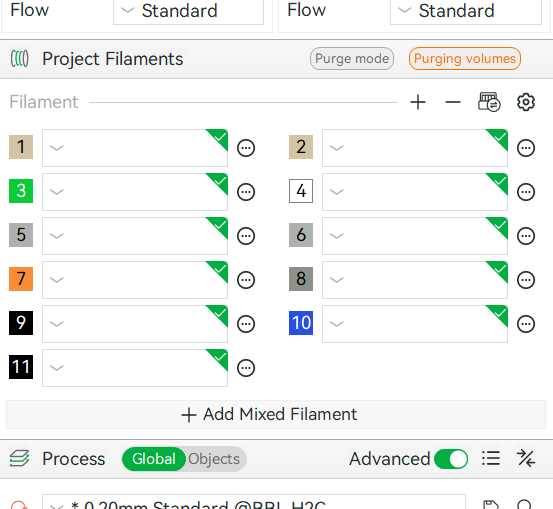
I was working with AI tweaking some filament settings and it was going well. AI suggested it could create a complete json file for me to import into Bambu Studio so I gave it a try.
After the import the Project Filaments section in the left column where the filaments are synchronized from the AMS are all blank except the correct colors are showing. If you hover your mouse over one of the filament selection boxes you will get a pop-up that shows what is in that slot. I cannot make a selection for a standard filament by clicking on the box - it does not populate the box. Unless you choose a completely custom filament, then it sticks and is visible.
I believe I have deleted the imported json file that was imported hoping that would clear up the issue but to no avail. I have done some online searching and tried to find something in this forum but I am at a dead end for ideas to try.
I am hoping someone here has suggestions of what I could try next. Any help would be greatly appreciated.
Very odd! I’m at a loss as to how even a very poorly formatted filament profile would affect the interface like that. Sorry don’t have an answer offhand and haven’t seen this reported before, but I do have some questions. Maybe someone else has run into this specifically.
Have you tried restarting Studio after deleting the offending (imported) profile?
Are you sure the imported profile didn’t get restored due to cloud sync? Check your Studio data folder (Help → Show Configuration Folder), there should be a “user” folder inside there where all your custom profiles are stored locally, either inside a numbered folder (if using Studio while logged in) or in the “default” folder if not using an account.
Is this issue tied to any particular project? Eg. if you open an older project which already had filaments assigned, and don’t sync with the printer, do you still get the blank boxes? (Or any random project downloaded from MW for example.)
How about if you manually remove all but one of the filaments (minus button) and then re-add some?
Windows? And which Studio version?
I’d also be curious to see what the AI had come up with for the filament profile which apparently caused this in the first place. That might also provide some clue as to what is happening.
Can you clarify this? “Cannot” as in… you select something but the name doesn’t appear in the box after the menu closes? Or literally can’t click on any BL filaments in the dropdown menu? Or… ?
-Max