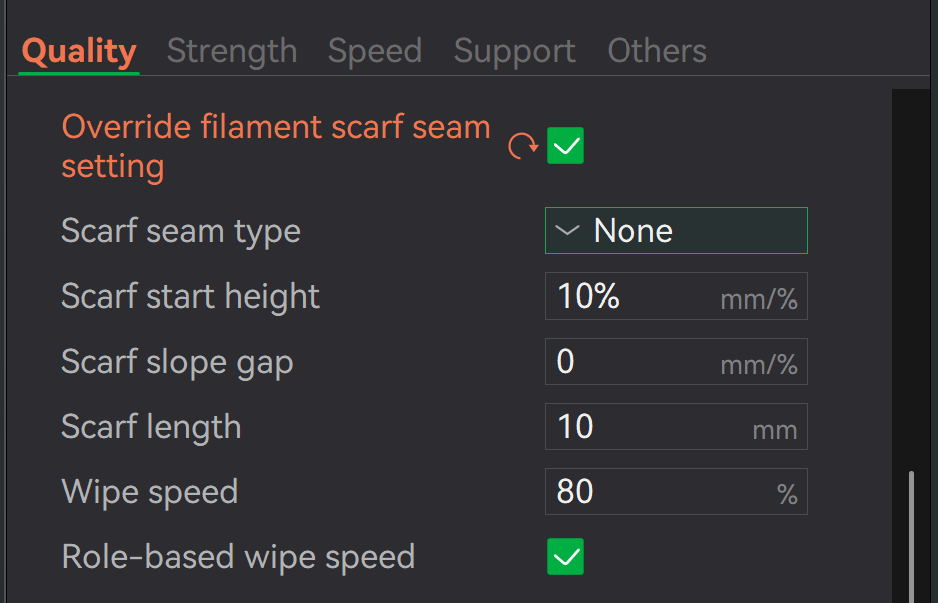
I am trying to get “invisible seams” on the outer wall of my Tubular print. Co-Pilot suggests the following (as well as other settings) but I CANNOT FIND "Outer Wall Seam: None "
My printer is X2D with a MicroSwusss HF nozzle, using Bambu ASA filament
See CoPilot advice points below:
3. Z‑Seam (outer wall seam fully suppressed)
Print Settings → Quality → Z Seam
Z Seam Type:Aligned
Z Seam Position:Back
Outer Wall Seam:None ← this is the magic switch
Seam Gap: 0.00 mm
This forces the seam onto the inner wall only, producing a perfectly smooth outer surface.
There’s no such setting in Bambu Studio, your AI is hallucinating, sorry, or perhaps referring to the wrong slicer (I don’t know which, if any, have those settings). There’s no “seam type” setting either, “Aligned” and “Back” are both in the “seam position” choices. There’s a scarf seam type, but that’s a different animal altogether.
I love how Scam Altmal and Wario Amodei want trillions of our dollars because they’re totally competent stewards of the AI industry, but they can’t program their chatbots to verify their own work, so we have to do it for them.
Strength wise on a cylinder, setting the seam to “random” might be better. You will have little seam dots on the surface but never a straight seam along the part.
A quick tip: Copilot has a great feature - it always shows you the source next to its AI response. It’s something you should always use.
Copilot is actually a relatively good option among AI tools because it directly displays the source so you can verify it. Something that other AIs don’t do.
I recreated your scenario, and in that case, you would have come across the exact source of the “none” reference: The AI messed that up in my case too, but clicking next to the text on “source” takes you to this image: This makes it clear that “none” is valid for another function.