Is there a way to enter a line break or some other way to enter a second line of text when adding text to a model in Bambu Studio? Or do I have to do it the less than convenient way of just manually adding a second line of text under the first hoping I get the positioning correct?
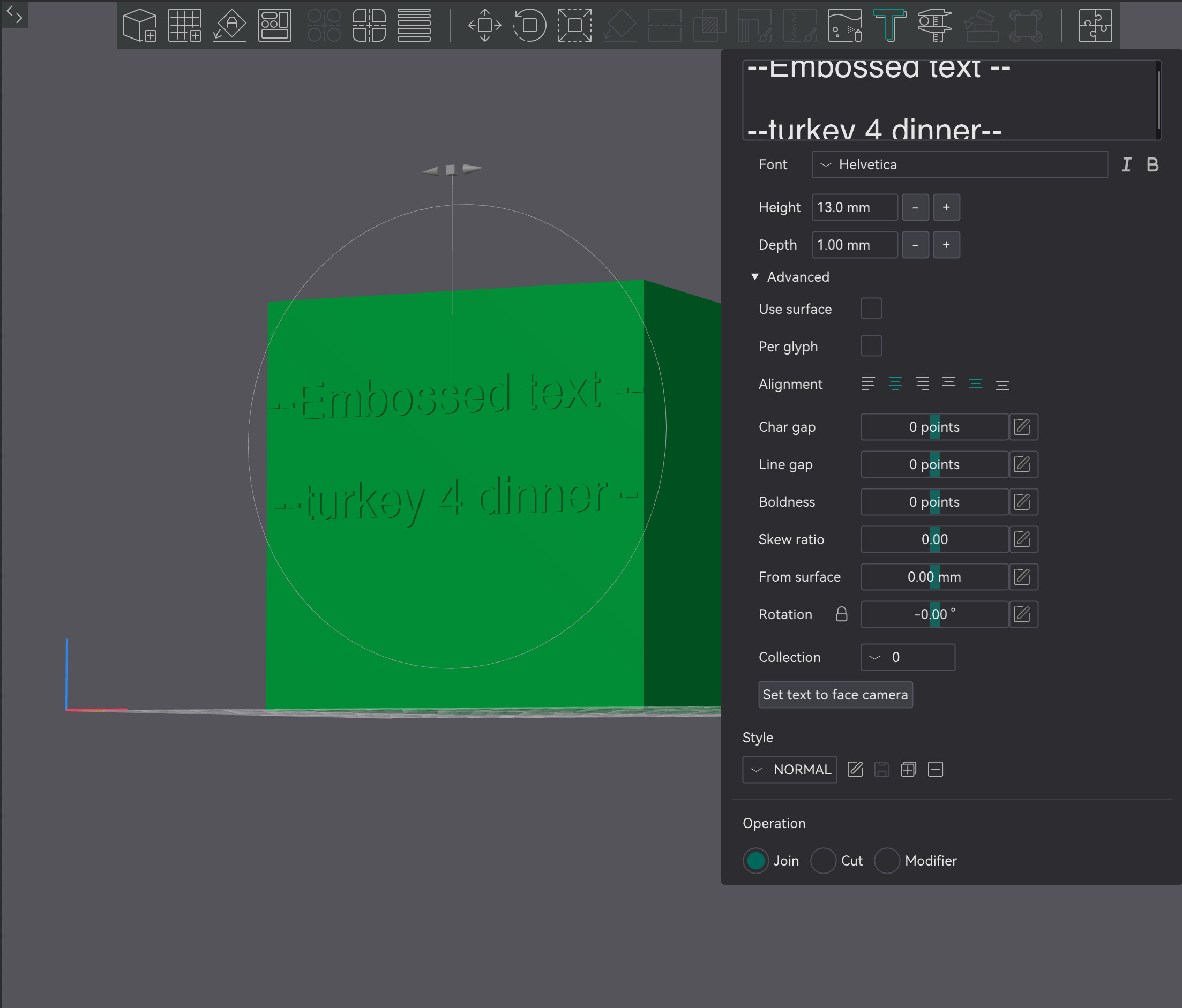
It is an open requested feature.
Thanks for letting me know!
Orca Slicer works with the H2D or P2S? I can’t seem to find either.
Unlikely as the changes to how Bambu Lab printers communicate added a layer that Orca did not wish to add, as Bambu Lab refused to work with them.
It started with the X series earlier in 2025.
The X1 series, P2S, and H2 series, at the very least, are under this new (and flawed) regime.
Looking for this same answer. AI says to copy and paste from another basic word editor with no formatting except for the Line-Returns… but that has not worked for me either (trying NotePad and Word). A little help here, please.
I have a hard enough time placing text when it is one object, but if trying to space three lines together, I have zero chance of having it look uniform.
Thanks!
Extremely frustrating that bambu devs cant even be bothered to copypasta yet another orca slicer feature. If the game plan is to use orca as your free dev team at least use all of it.
They cant be THAT obvious about it.
