Dear Forum Members,
I am the owner of a BambuLab P1P 3D Printer and have recently encountered some challenges related to the printing of overhangs. In an effort to diagnose the issue, I conducted a series of test prints. The alignment of these test prints is depicted in “Figure 1” below:

The initial image (Figure 2) represents my original print, which was successfully completed some time ago using the default settings for PLA Basic, with the inclusion of Support Structures, and utilizing OVERTURE Matte PLA Filament 1.75 mm.

However, I am now encountering line errors in my test prints when utilizing the same settings and filament as the original print. The surface exhibits unevenness and even contains holes, as evidenced in Figure 3:
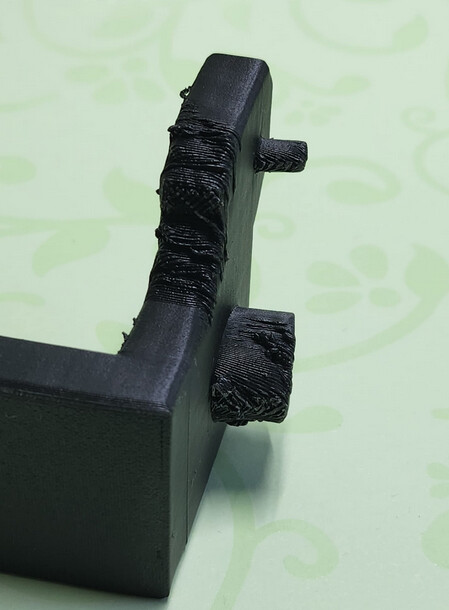
My initial suspicion was that the support structures might be inadequate, that there was insufficient airflow, or that the filament was not adequately dry. Consequently, I initiated a second print with customized settings and a different filament, namely the original BambuLab PLA Basic, with the following adjustments:
- Supports → Supports → Threshold angle 45°
- Speed → Other layers speed → Overhang speed → Overall set to 20mm/s
However, the results were nearly identical to the previous prints, as shown in Figure 4 and Figure 5:


Despite further adjustments to the settings, I have been unable to resolve the issue. For my most recent test print, I employed eSun PLA+ filament and made the following adjustments:
- Supports → Supports → Threshold angle 60°
- Speed → Other layers speed → Overhang speed → Overall set to 10mm/s
- Speed → Other layers speed → Bridge → Set to 10mm/s
The results can be seen in Figure 6 and Figure 7:


I would greatly appreciate any insights or suggestions from the community to help me address this issue. Despite conducting extensive research on Google, I have not been able to find answers to my specific problem. Thank you for your assistance.
Sincerely
Mika


