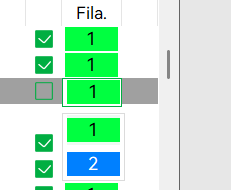
I printed lithopane but last layer is cyan and I think it should be white, because this lithopane is now so dark.
what I did wrong here?


and again those lines, looks like underextrusion in lithopane, why I get that?
I printed lithopane but last layer is cyan and I think it should be white, because this lithopane is now so dark.
what I did wrong here?
and again those lines, looks like underextrusion in lithopane, why I get that?
NO HELP here, please ???
and test it? this way I need to print whole lithopane again to see if failed. There must be some other option.
then just replace the colour
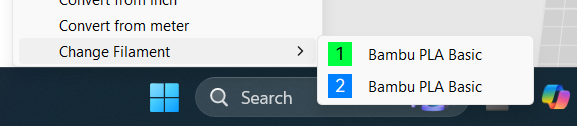
It should already show in the sliced preview using the “Filament” view. It’ll help to see where the mapping error occurs. In the color assignment of the slicer, when sending to the printer or having accidentally defined wrong colors to the slots.
I noted that you seem to be missing the green triangles in the filament names that denote an AMS loaded filament. So there are a couple of possible color mapping errors.
OK I check filament view, I asume this is it, but where I can see filament colors?
Also when I sliced I get warning that I need support. DO I really must enable support? Also I read that lithopane should bi printed vertically is that true?
Because here didnt say anything about printing vertically.
https://wiki.bambulab.com/en/knowledge-sharing/CMYK-color-lithophane-printing-instructions
And what about those lines at bottom which looks like underextrusion, what can be wrong?
thank you for helping
Yes, that is the preview. You’ll need to flip between preview and preparation to compare color assignment (you first pic shows a cyan top which should be white).
The slicers warning should not happen with a lithopane. Either the litho stl is not flat, placed at an angle or upside down.
You can check by using the lay flat button in the prepare tab, making sure you are picking the bottom (if the stl is good, it will mark only one face on the bottom), slicing, selecting line type and unchecking the boxes to the right of the legend entries except for “bridges” (and/or similar).
If there are only minor stl errors at the bottom, you may be able to get away by moving the entire stl a few 1/100mm down (leading to the bottom being “cut” by the build plate). That is likely to also resolve "1"st layer underextrusion unless it is a separate issue (build plate cleaning, filament moisture,…).
Yes, lithos should be “bi-printed vertically”: My experiences predate LithoMaker but I have always seen a lot of white followed by very few layers of white with one other color followed by a lot of white for brightness control.
Standing a litho up would lead to all colors used per layer with the risk of the thin layers not actually printing due to line widths being too small. Never mind the stability issues…