I purhcased an X2D shortly after release and have used it for about 60 hours or so. All my prints so far have been quite generic square prints (organizer for a board game). Recently I tried more complex shapes and discovered that I had severe issues with infill failing and the layer on top failing too.
Therefore I tried printing a benchy for the first time. I ended up with this benchy that is very far from acceptable. Can anyone recommend what steps I could take to resolve this issue?
PS: Just in case the issues are connected: I have also tried to use a tungsten carbide hotend where every first layer failed.
Does your nozzle size in the Slicer exe match the nozzle size you have physically mounted on the machine? This screams 0.6 sliced and 0.4 nozzle or vice versa
Is this from a pre-packaged default slicing profile, and which one?
Thank you for your reply. It is greatly appreciated.
This benchy is from the stock file that came with the printer. I just pressed “files” and chose the benchy.
I will check up on the nozzle size and see if it has somehow been adjusted to the wrong size. The printer is not at my current location so I won’t be able to check up on it until tomorrow.
Yes I have dried it. Given it multiple 12 hour dryings in the AMS2. I have also previously printed desiccant pods that are contained in the AMS2 to keep moisture low.
Just before I moved over to the more complex prints I updated the firmware and lubricated the Z Y and X axis as the printer was telling me I had to do that by now. Afterwards I did a full calibration and used the vision encoder as well.
When you say “calibrate filament in Bambu Studio” what do you mean with that? I am quite new to the studio software. I have so far just used the auto calibration tools when printing.
Double check that your part cooling fan is operating correctly and isn’t blocked. Do you have any “mods” that you have added to the printer? What speed mode are you printing this benchy at?
I have attached gcode file you can try. It’s a stock Benchy, sliced for a X2D with a textured bed and Bambu PLA. Put this file on a USB stick and print it or open in Bambu studio and print it.
@JonRaymond thank you. I will try that I have visually seen the parts cooling fan work fine earlier. However I haven’t checked after I lubricated the axis on the machine previous to me noticing these errors.
Man the endless “did you dry the filament” is driving me nuts, when it so freakin clearly has nothing to do with wet filament.
My suggestion is to observe yourself what exactly is happening during the print. From the pictures it looks like its extruding a whole lot of filament while moving at a turtle’s pace… just print again, take a video as the failure is happening, post it.
Sorry for the long delay in my answers. I have been away on holiday in the meantime.
When I got home i had the AMS2 pro dry my filament for multiple 12 hour segments throughout a week. Afterwards I tried a new print with black Bambulab PLA. It is marginally better but still terrible.
It might be an extrusion problem as @PieJuice suggests. I will try to manually calibrate flow rate. I just thought the machine was supposed to handle that aspect itself as a general rule of thumb. Before each print it does some sort of flow rate calibration.
I can also confirm that the fan on the nozzle itself is working fine and spinning to 100% during PLA prints.
Unfortunately it commonly is water and it can produce those kinds of artifacts.
Sorry if that upsets you but there are also way too many that coach others through complete rebuilds of their printers chasing phantoms. People waste time, money, and parts frequently when it actually is water.
I have to wonder if the desiccant pods could be the issue.
In an active dryer, why add desiccant? If you keep the desiccant very dry, it will be stronger at removing water than the AMS2. But if you don’t keep the desiccant very dry, it can actually add water load as the AMS2 tries to dry the filament AND the desiccant.
The relative amounts of water in stuff that matters - there’s very little in air even at high humidity. A spool of filament can hold about 100 times more water than the air in most dryers and depending on how much desiccant you are using in there, it could be another factor of 100 or so more than filament.
Desiccant with water in it can overwhelm a lot. If you aren’t monitoring the water level in your desiccant that could be the source of your issues.
How do you monitor water levels in desiccant? Put it in a sealed container with a hygrometer and see what the humidity is. If it is higher than the ultimate (low) humidity the AMS2 can reach WHEN EMPTY (no real load), there is your problem.
If the desiccant is at higher humidity, that’s largely the water the AMS2 would be removing - not really so much from the filament.
You can also put the filament in a sealed container and read its humidity. I see water effects start showing at around 25% RH at room temperature for PLA and 20% RH for PETG.
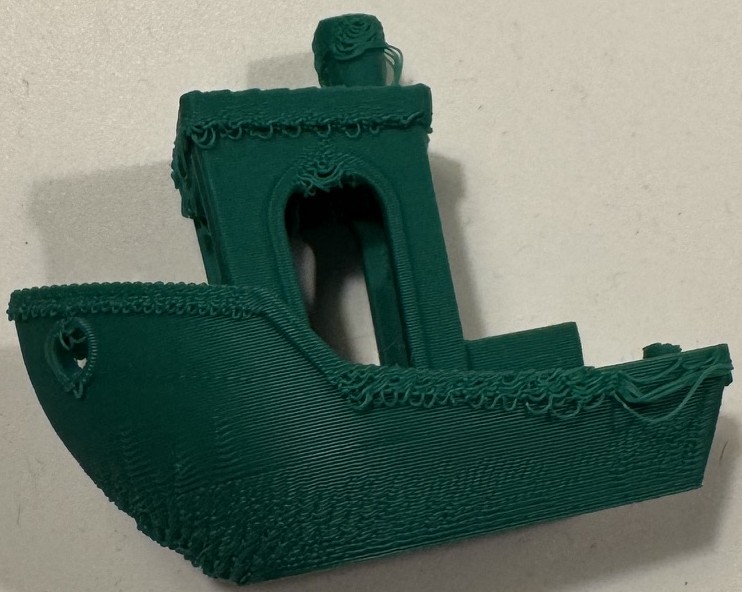


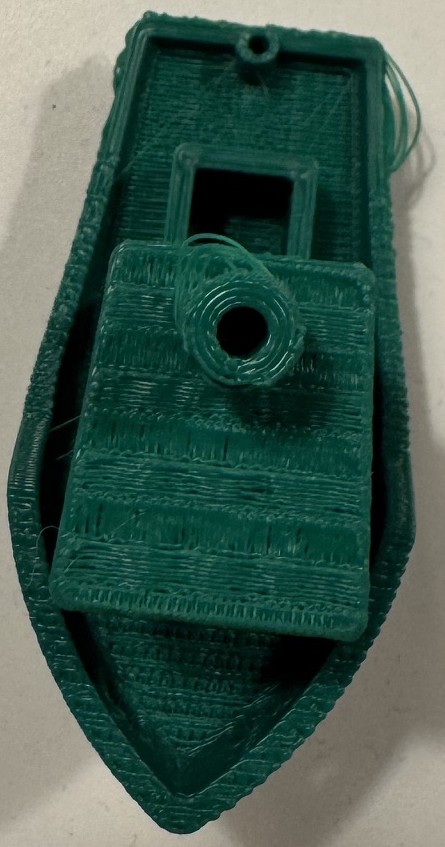
 I have visually seen the parts cooling fan work fine earlier. However I haven’t checked after I lubricated the axis on the machine previous to me noticing these errors.