Making text color

I installed what I thought was the latest version of Studio (2.2.2.56) and now wished I had left the old version alone. Among other problems with this version, I can not discover how to make text a different color than the background color of the object I am trying to add text to.
Right clicking on the text type does nothing. I have 4 different colors of filament loaded into the AMS, and all 4 colors show up on the left side of the “prepare” screen, and are synched with the AMS.
I am able to print any of the 4 colors for my project, I just can not color the text, it always prints, for example, black over black (the background color)
On the previous version of studio, I could select the text color, this version (2.2.2.56) I can not. I see text type, like courier, etc, but no color menu.
What am I missing???

there might be a different workflow but I usually use the paint tool to change colors.
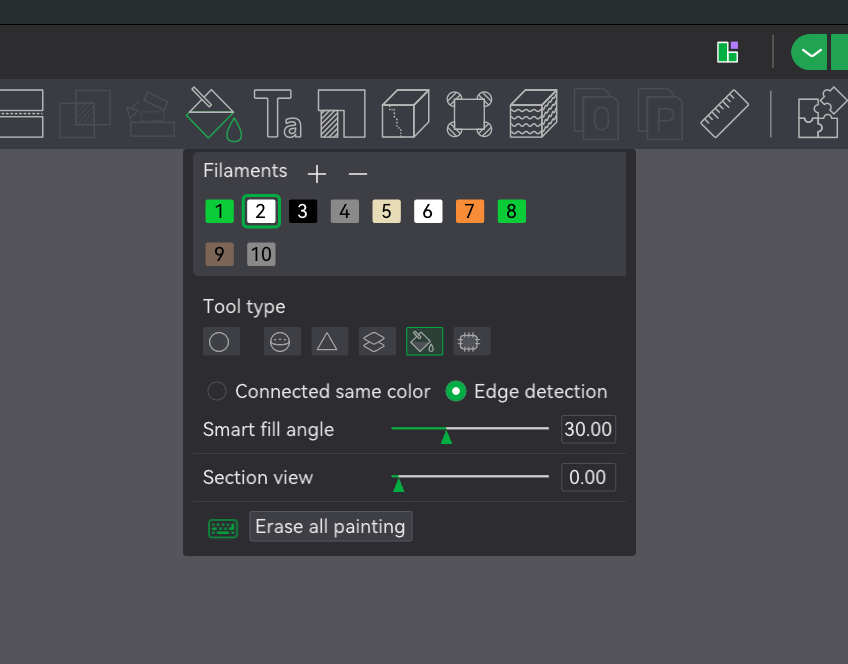
select edge detection, change the sensitivity levels until you get the entire object filled with the other color.

What version of Studio is your screen shot from? I have V2.2.2.56, and it looks nothing like this…

Text is added as a part on the original model.

  • In the prepare tab, select the objects panel (not global).

  • Locate the text object

  • Change the colour here by right-clicking and selecting the change filament option or tapping the swatch on the right side of the label and selecting the colour

  • Make sure you at least two different colour filaments.

The screenshot provided by @Dulphy is representative of your version and many previously released. It is the middle of of the toolbar in the prepare tab, zoomed in to focus your attention.

Thank you both, you are absolutely correct, that works out fine! I can now select any color of filament.
I accidentally found another solution in the TEXT icon, just create the test, move it to where you want it, and then at the bottom of the screen, click on the modify button, and you will get a color, a color, may not be the one you want, but a color.
Your method works much better.
Now, if I could just open up a new post on an AMS problem I am having…

1 Like

Just go back to the main forum page, which you can do by selecting the Topics caption (top left of the screen), which will take you here.

https://forum.bambulab.com/latest

Then press the “new topic” button.