Apologies if someone’s already asked this - I’ve tried searching around for similar top surface issues but wasn’t able to find much that related to my problem.
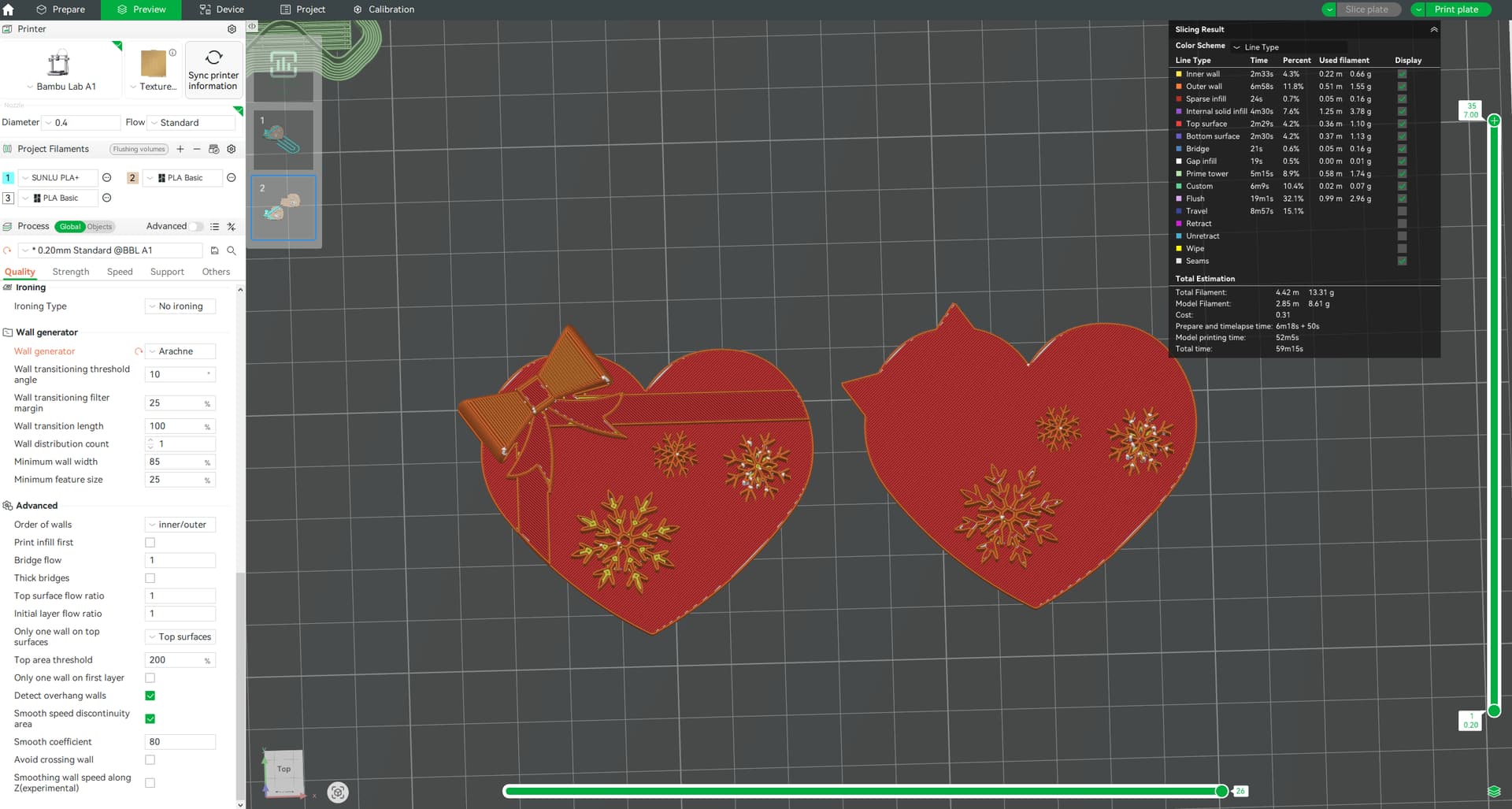
I’m making this ornament - designed in Fusion360. It mostly consists of flat geometry that’s been extruded by 1-3mm.
For some reason when slicing this, the top surface on the snowflakes are missing when the bow is present in the model. The only thing I can think of is the bow being a higher height as removing the bow brings the top surface back on the snowflake but the top surface of the heart is being recognised and printed as a top surface which is puzzling.
Switching on ironing also helps fill the gaps in the inner/outer walls of the snowflake but I would prefer not to have to use this as surely it should still be recognised as a top surface?
Only settings I’ve changed so far from the stock 0.2 profile is the wall generator to Arachne (due to the snowflake shape) and only one wall on top surfaces is set to topmost surface only.
Any help would be appreciated! Thank you!
Whatvhappens if you change from “Topmost surfaces” to “Top surfaces”?
Nothing much changes unfortunately.
1 Like
The next step would be to lower the top area threshold until the inner wall changes to a top surface pattern.
However, it may not be wise to do so as the snowflake is a rather thin structure. So printing this using a top surface pattern other than concentric may be rather difficult.
 &
& 
How do I do this? Is it a setting in the slicer? (as I can’t seem to find it  )
)
It is the setting just below “Only one wall on top surfaces” in your screenshot.
But with the snowflakes top being only 2 to 4 lines wide, you’ll probably need to lower this a lot and be rewarded with a miniscule top surface jitter replacing the smooth inner wall line type.
&
1 Like
Oh I never even noticed it right underneath, thank you!!
Exactly what I needed though, they appeared at 75%:
I will run a test print once my printers are free to test out how it looks vs the original and update here for other’s future reference, thanks so much!!
1 Like
Print comparison. No.2 is with the new setting at 75% to add the top surface onto the snowflake. It’s not perfect by any means but more than acceptable for my use.
For reference this is with a 0.4 nozzle at 0.2 layer height on the A1. The problem practically disappears with a 0.2 nozzle but it would take like 5 hours instead of 1h30 for 3 of them so yeah.
1 Like




 Glad you made it work