Hi all,
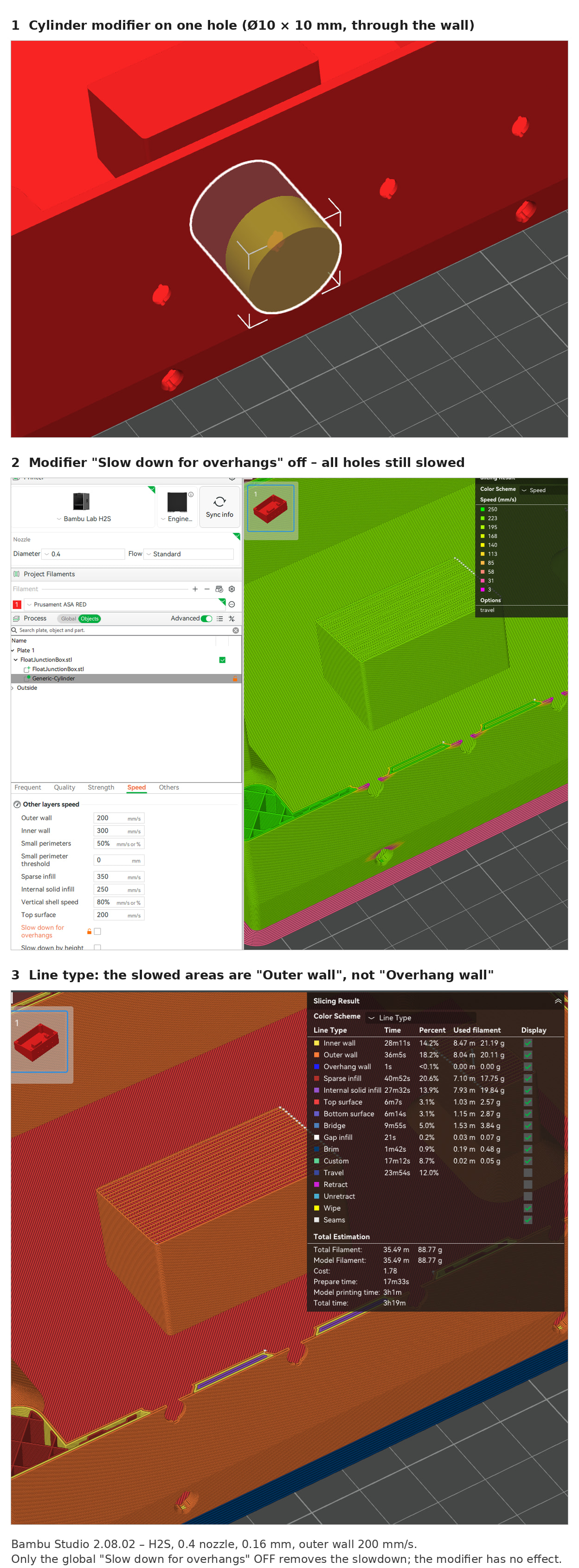
I’m trying to stop Bambu Studio from slowing down the outer wall around a few small holes, without switching off overhang slowdown for the whole part. A modifier seems like the right tool, but it doesn’t change anything in the G-code.
Setup
- Bambu Studio 02.08.02.61, H2S, 0.4 nozzle, 0.16 mm layers, classic wall generator, 2 walls
- Part: box with a 2.5 mm vertical wall and horizontal Ø4 mm holes through the wall
- Outer wall speed 200 mm/s; overhang speeds 60/30/10/10, overhang totally 10; “Smooth speed discontinuity area” on
What happens
In the upper half of each hole, the outer wall on the face slows from 200 mm/s down to 10 mm/s, ramping over about 5 mm on each side of the hole. This leaves a visible raised line next to the hole.
What I tried
- A cylinder modifier (Ø10 × 10 mm, axis through the wall) centred on one hole, with “Slow down for overhangs” switched off in the modifier. No change: that hole slows down exactly like the others.
- The same modifier enlarged to Ø20, so it covers the whole slowdown zone. No change.
- The same modifier with the outer wall speed forced to 100 mm/s. No change either.
- “Slow down for overhangs” off in the global process settings: this works. The face stays at 200 mm/s.
I checked the position in world coordinates and in the saved 3mf. The modifier sits exactly on the hole, and the setting is stored in it (enable_overhang_speed = 0).
Questions
- Is it expected that a modifier can’t change outer-wall speeds or overhang slowdown, for example because walls are generated per object rather than per modifier region?
- Is there another way to switch off overhang slowdown locally?
- The “Detect overhang walls” option mentioned in older posts doesn’t show up in my version, even in Developer mode. Has it been removed or moved?
I can share the 3mf and the G-code.
Thanks!