I am a newbie and I want to do some multi-color printing. How do I select the specific areas for the specific colors?
Hello, I have been printing for multiple years and have successfully completed many multi-color prints, however, recently I am having this problem with my multi color prints. This specific file is just in 2 colors (although it happens with more colors also). In the slicer the file looks correct, but when it prints, it seems to blend the colors instead of changing the colors. I do not have the flushing into infill (only supports). I also have the screenshots of the settings if needed. Any ideas?
I’ve been known to get lost but I think that’s where we are?
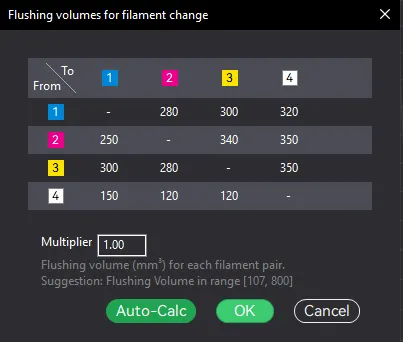
@s.jacoby Welcome to the forum! Have you modified the “flush volumes” by any chance? It looks like this:
You will have to “paint” them by hand if they didn’t come pre-colored. Can be very time consuming if your mesh isn’t great for printing or has a ton of detail (harder to use the quick fill tools in that case).