Have you found any solutions for the dual aux fans? I find they always cause my large prints to warp and come off the bed. And you can’t change the speed because it just goes back up to 100 on every nozzle change.
I haven’t had any issues with them. Setting them is weird but I’m pretty sure you need to work the settings changes in the slicer.
You have to set it in the slicer for each filament. Even then, they can still kick in! But not 100% in my experience, more like 40%. I think it depends on the chamber temp.
I think I’ll add this to the critique of Bambu Studio as well. Why the ■■■■ isn’t it easier to set those fans?
Put a clear “Left fan”, “right fan” option and call it a day.
I think it’s tied to a bunch of other variables too. Overhangs might be making them blast the cooling, small features, layer times and all that stuff. But it’s definitely not clear or intuitive that any of that affects them in the slicer.
I think it’s because extruder clogs require basically a full toolhead disassembly so they force the chamber to cool down via the aux fans (as they bring in outside air)
Great write-up.
I have at least 250 hours on mine, coming from an A1 mini, then a short-lived 3 weeks with the CC2 before I returned it and then the P2S before I returned it for the X2d, I don’t have a ton of experience.
I have had some great successes with the X2D and some really annoying failures. I think your points about the headings for the nozzles in the settings pages are handled badly too. I def had times where I messed up my profile completely by overwriting the wrong nozzle.
But my biggest complaint is the stock settings for the second nozzle with dual color. I know it’s not a true second nozzle like the first one, but I cannot for the life of me get the second nozzle to do light color work reliably. We NEED a standard setup recommendation.
Something like: Printer settings: Global change retraction distance to 4mm, zhop to 0.4 and type to Spiral. Then some recommendation on the process settings for classic/archane, not crossing walls.
If you use the default Bambu filament profiles for the X2D, it should be good out of the box for both nozzles, not just one.
What are you talking about? If you are complaining about settings, they are right there in the filament profile settings:
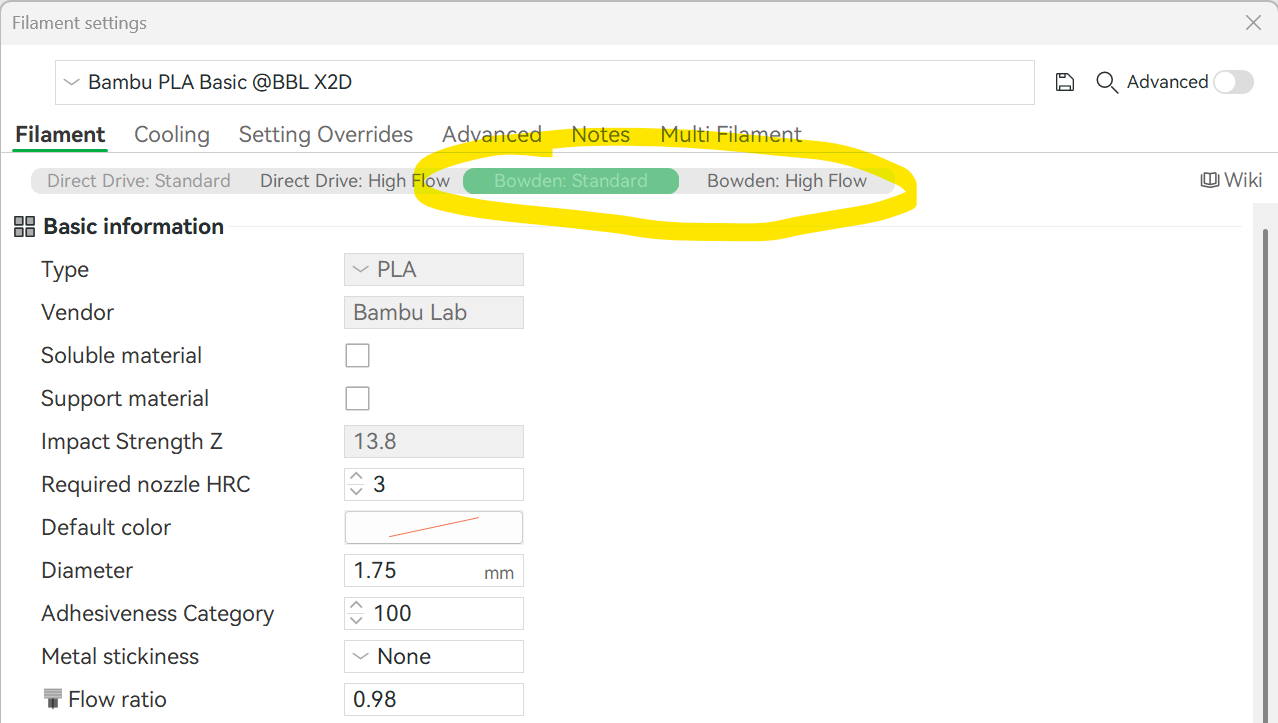
But… I know many reviewers said that the second nozzle is “fine” for the dual-color printing… at the end of the day, it is still a bowden extruder setup with all its drawbacks. Don’t expect is to work as good or as fast as the main nozzle.
I didn’t say we need settings for it, obviously there are settings, I said we need a setup recommendation for it, can you read? ffs. You wouldn’t even apply it there anyway, it would be in PRINTER settings since you would want the Bowden settings to apply to all prints in terms of retraction, etc.
I think I might know what you mean. I can’t recall the print settings having any differentiation between left or right nozzle. But I might be wrong and not at the PC right now to double check.
The only thing that I can do to “differentiate” the print speeds, etc. on the aux nozzle is cap the max volumetric flow. Then the speeds will “auto adjust” to keep to the lower flow limit.
In my case, with PETG at least, my flow cap is around 6mm^3 /s, which slows everything else down too.

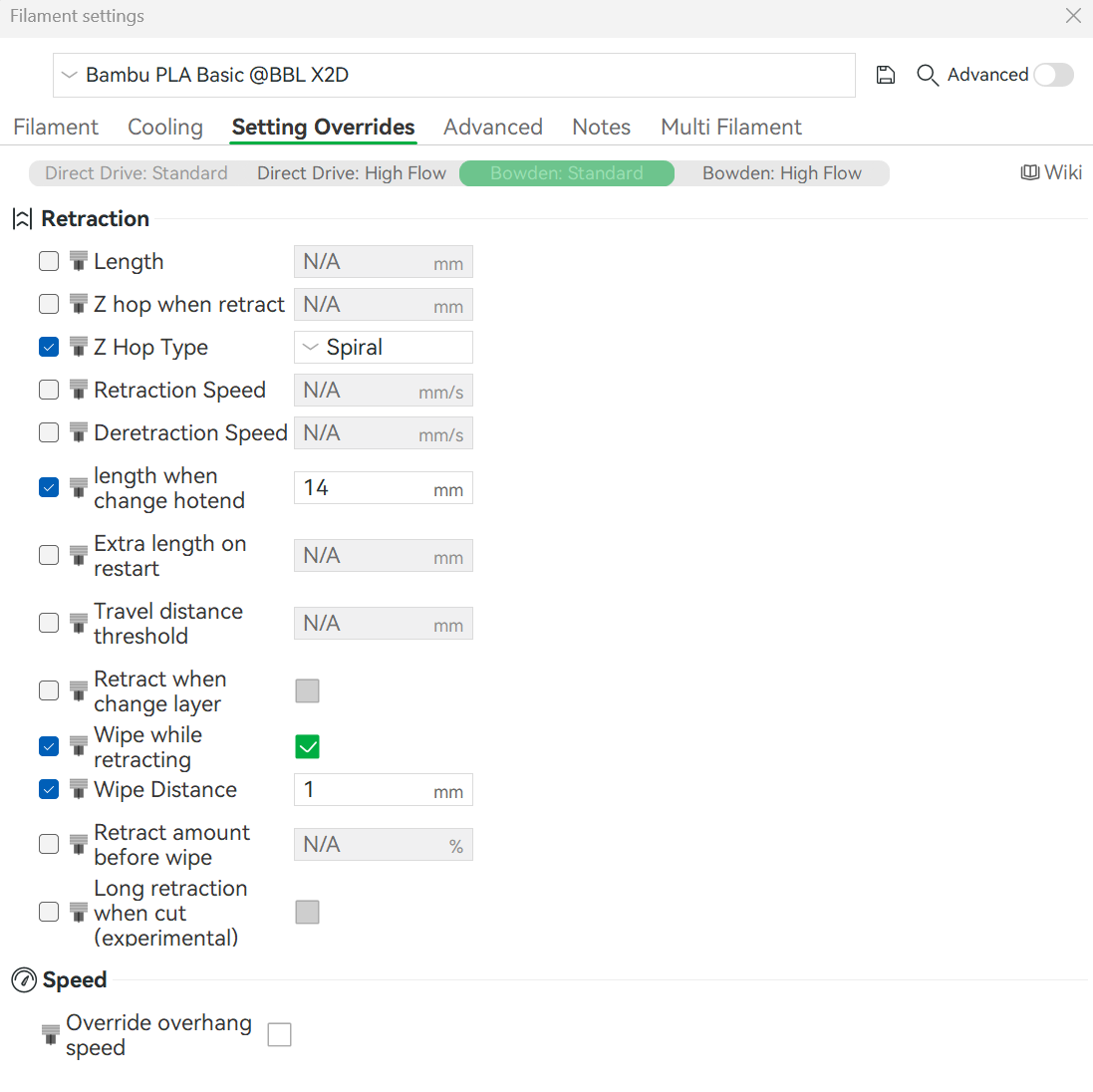
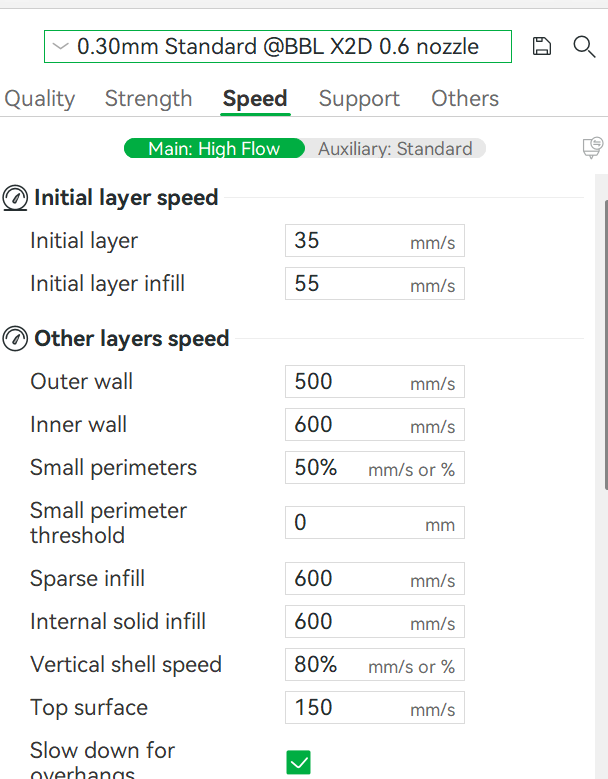
Nah man, I think they mean all the other settings that are under print settings and not filament settings. Outer wall speeds, infills, whatever. Some things there would actually be nice not to be bundled up as global settings and something like AUX nozzle outer wall speed clild be a useful setting to manually fine tune.
Awesome! (Damned character minimum)
I don’t know what to say.
Like, the settings override section is fine for some things but the Bowden retraction distance you NEVER want to change, no matter what filament. It’s about the behavior of the bowden drive, not the filament passing through. And you can only use a select few types of filament in the second nozzle anyway. In the “Printer” settings, the big icon with the printer picture, click on the diagonal arrow when you mouse over. Retraction should be in there.
Anyway my point is that the retract settings are not correct on the second nozzle, no matter if you change them in the filament override section or the printer settings. I wish there was a community thread with everyone’s ideas about how to fine tune it. I would be a lot happier with the printer if I could nail that down.
Also, you can’t even, or couldn’t buy Bambu filament. I have Jayo Matte PETG (which is the same as Sunlu/Tecbears") which is what I usually print in. The stock settings for Bambu PETG HF work perfectly. For the main nozzle.
I received a damaged HD2 because of FedEx but Bambu Labs worked with me supplying everything that I requested for repairing it Glass side cover etc. as I didn’t want to send it back and risk another one being damaged being shipped. It worked well for a thousand hours and then a layer shift developed. Didn’t get much help as far as insightful outside the box thinking and repetitive suggestions that were already performed on the machine. I reached to sources within the United States And these people are great as they spent as much as 40 minutes on the phone with me. They have been very creative with their thoughts on what the problem could be. There is an option to drive 3 hours one way from where I live two different states The same driving distance as they don’t receive or ship outs It has to be dropped off. Once over some health issues and some time which I have very little of I’m going to address this machine. Love their software. As far as the U1 Snapmaker printer is concerned I purchased one and there’s a wonderful cover you can print on printables by Ikealler That went together with clips a clever magnet idea for multiple positions of the front plexiglass cover. There is also the option to put side plexiglass or polycarbonate in even the back to make it a solid enclosure. I am quite pleased with the outcome of it. Thank you for all the information you shared. I do enjoy my previous flagships X1C wish for purchased a couple years apart. The older one developed some issues and it’s now dedicated to an external TPU .6 nozzle and the P1S purchase a few years ago I use for prototyping and quick small parts. I’m just disappointed I spent so much money and now have somewhat of a paperweight sitting in my bedroom.
Well, how is all that text related to the topic of the thread? 
Hey man, if I get to share my stream of consciousness let bro here do it too
We should welcome everyone here 
I will say that there is updated firmware from the Beta side of things for the X2D (and the H2C). I downloaded them yesterday and updated both of my printers.
One thing I’ll add to this is that I noticed my Z axis screw got loose and that was a little concerning… and affected print quality, but only a little bit.
The X2D still does not print as well as the H2D or H2C… so I’ll be curious as to what future firmware revisions fix or improve the quality of printing.
I’m a little annoyed that the right nozzle pretty much requires Bambu filament to have a prayer to print well / with quality. I’m going to verify it, but it is annoying that there is no calibration for that with respect to non-bambu filaments.
Interesting. Are you sure this hasn’t gone to final release. I thought there was a firmware update for the X2D’s just a week or so ago?
Thank you for this! It is exactly the type of review I wish most YouTubers would do. I was on the fence about getting this as my first 3d printer, but Im opting not to do it based on this review. Now Im eyeing the H2 series, H2D or H2C, the price difference is not that huge between the 2 and I want to be able to print in just about any filament (but mostly the engineering ones) and the multi color option is very attractive.