New P1 Series Firmware Available for Public Beta Testing!
We’re excited to announce that firmware V01.10.00.15 for the P1 Series is now available through our Public Beta Program.
How to Join the Beta
To access the beta firmware, simply join the Beta Firmware Program via the Bambu Handy app under Me → Beta Firmware Program.
Once enrolled, the update will be pushed to your device gradually.
 Want to Switch Back?
You can leave the Beta Program at any time by disabling the option in the app and installing the latest official firmware version.
Feature Optimizations:
- Security updates.
- Fixed an issue where saved Dynamic Flow ¶ calibration profiles could not be selected in filament settings when using an E3D high-flow hotend (requires Bambu Studio 2.9.1.70 or later).
- Fixed occasional frozen screen.
- Fixed an occasional MQTT verification failure prompt during printing.
- Fixed an issue where forgetting a Wi-Fi network could cause the device to restart.
- Improved stability in certain scenarios and fixed several low-probability issues.
Farm Manager Compatibility & Optimization:
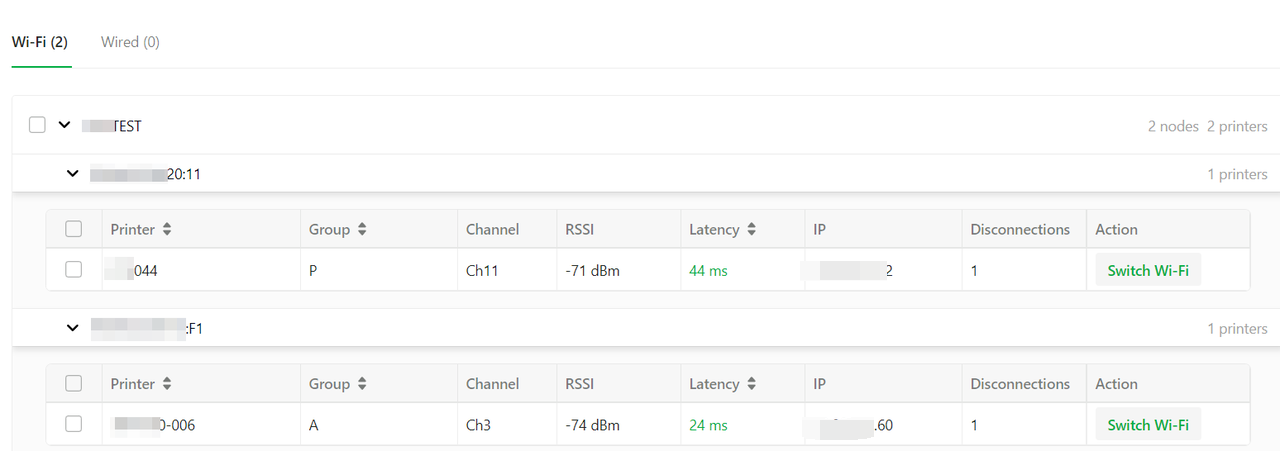
Based on real-world usage scenarios of the Farm Manager software, this firmware release includes dedicated optimizations to the network connectivity, file download, and task synchronization mechanisms for large-scale device fleets.
- Support for network status reporting and remote Wi-Fi configuration
When connected to Farm Manager, the printer now supports reporting network status such as the RSSI (signal strength), channel, and latency of the currently connected access point, enabling centralized monitoring on the software side. It also supports receiving remote Wi-Fi configuration commands from the software, eliminating the tedious process of modifying settings on each printer’s screen individually during network migration.
- Dynamic heartbeat status reporting frequency
When there is no change in print status, the heartbeat push interval is dynamically extended from 2–3 seconds to 10 seconds. Without compromising the real-time accuracy of status updates, this effectively relieves concurrency pressure and frequent retransmissions on wireless networks (2.4G), improving link stability in densely deployed printer environments.- Optimized model file download mechanism, saving 3–5 seconds per download
For each download, one proactive HTTPS request to query the file size from the server has been eliminated; instead, the server now configures this directly when issuing the command, saving 3–5 seconds of preparation time per download. When multiple printers launch tasks concurrently, this effectively reduces queuing delays and improves overall download throughput.- Optimized file resumable download mechanism, reducing time spent on repeated connections
When network fluctuations cause a model file download to fail and trigger a resumable download, the retry process has been optimized. This avoids the prolonged download times caused by frequently re-establishing HTTPS connections in the previous approach, making file resumption more efficient and stable when the network is unstable.- Optimized download-free reuse logic for cached files, with added integrity verification
When Farm Manager initiates a print and a historical cache file with the same name and length exists on the SD card, the cached file is reused directly. To address the occasional issue of “unchanged file size but corrupted internal data” caused by SD card damage or file system anomalies, the system performs a full MD5 calculation and comparison before reusing a file without downloading, ensuring the absolute data integrity of the print file.- Adjusted and deprecated the legacy queue task synchronization feature
Because the legacy queue synchronization approach had limitations—such as the inability to perform AMS filament mapping on the printer’s screen—and consumed additional wireless bandwidth in large-scale deployments, the firmware now discontinues this approach in alignment with the evolution of Farm Manager 3.0.0 (the printer will no longer sync and display the task queue locally). This effectively reduces wireless network load and ensures network stability in large-scale environments. A redesigned task synchronization and scheduling solution will be introduced in the future.Known Issues:
- On P1 series printers with a standard nozzle, when a Dynamic Flow ¶ calibration result is created manually in Bambu Studio version 2.9.1.70 or earlier, the new result is incorrectly identified as an E3D high-flow nozzle profile. As a result, it cannot be selected in the filament settings for the standard nozzle.
- Update Bambu Studio to a version later than 2.9.1.70, and manually created Dynamic Flow calibration results can be selected normally.
- If updating is not possible for now, run the Dynamic Flow manual calibration process first — the resulting calibration can then be selected normally.
Notes:
- Bridge Firmware Requirement: If your P1 series printer firmware is below 01.09.01.00, you must first perform an offline upgrade to the “Bridge Firmware” (01.09.01.00) before upgrading to any version higher than that.
Please also note that if you find specific issues, bugs, or suggestion for improvement, we would appreciate it if you can share it via the Beta Feedback form.
