Both of my printers are having the same issue: the screens freeze after a while, whether they are printing or not. Sometimes the screens freeze after a half hour, sometimes it’ll take hours.
If it’s printing it will continue, thankfully, but there’s no way to pause, monitor or stop a print without physically turning off the printer.
Been working with Bambu for over a month and have taken steps like replacing the panels and various cords, disconnecting the light and camera, resetting the devices, updating firmware, going back to previous firmware, replacing the memory cards with better ones, etc.
The problem continues. Anyone else have this issue and figure out a solution?
I haven’t seen this yet, do you have any after-market accessories on yours? Fans/lights/biqu stuff?
Absolutely nothing. Just the basic units with nothing added but high-quality memory cards.
It’s so very frustrating. And that it started happening to both my p1s and p1p at the same time (after being largely dormant for about 4-5 months) is extra weird.
have you tried unplugging not just turning off that worked for my p1s
As far as I can tell, this isn’t fixed yet. I can reproduce this issue even without an SD card installed at all, so it’s unlikely solely related to bad SD cards.
Yeah, I’m starting to think this is a bad AP board. I’m going to submit a ticket for that.
I too am having this issue. I have tried a new SD card, rolling the printer’s firmware back a version, printing without the SD card. Nothing has helped.
This is locking up?
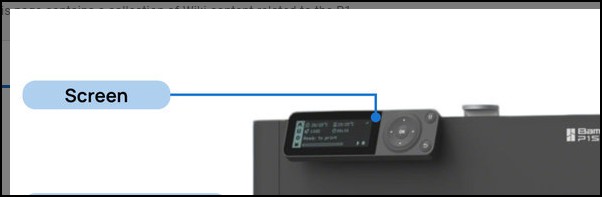
Did you just get the printer. I seem to recall having to connect a cable and snap the unit into some retaining slots on the printers case. Its been a while and I do not recall the exact procedure for doing that.
Whether you just got the printer or have had it for a while, that would be my first step because that plug connection location is not user friendly.
I’m having same problem. Intermittently I come back to P1S and find the screen is locked up. Display is normal but buttons don’t work. Needs a reset. Bambu Studio can initiate a print. Anybody solved this?
Welcome to the forum.
How full is your SD card? Also a failing card can cause
similar issues. Try reformating the card via the display and see if that solves the issue. You can also try using a different SD card.
I’d heard that can cause a problem. It wasn’t that full if I recall correctly, maybe 1/3… I checked it some time ago but hadn’t tried messing with mini SD card. I just re-formatted now - will see how it works. Thanks for advice!
I just started having the same issue but on 2 different units that are over 6moths apart in age and on different surge protectors. One unit freezes more often then the other.
I unplugged the units and installed a new micro SD card - neither helped.
I also noticed when they start up after full shut down, they are completely silent - I thought i remembered them making some noises on start up?
They do still finish prints just fined, but LCD is not functional and they can not be found but studio.
All firmware and software is updated