P1S Struggle with PETG

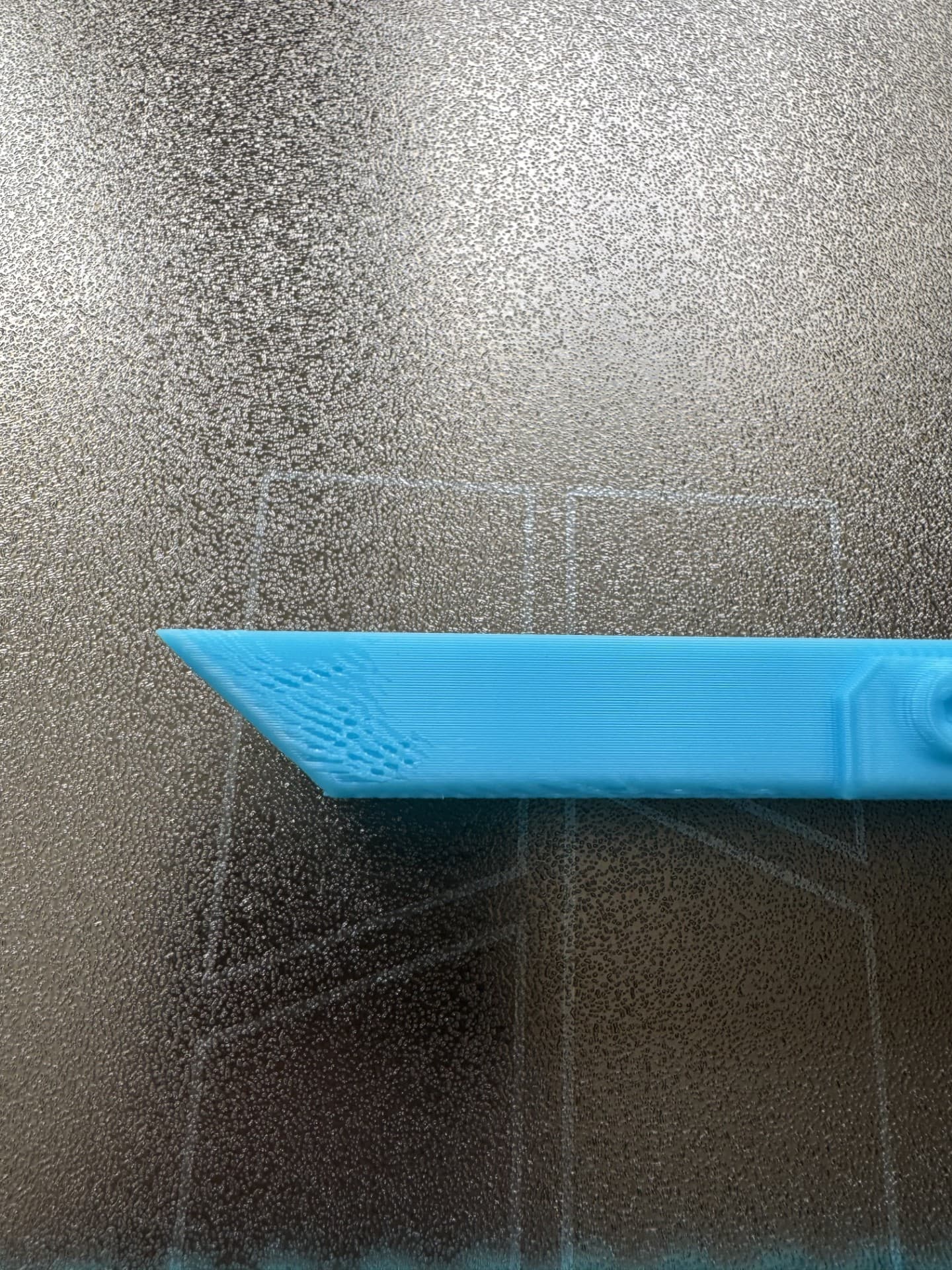
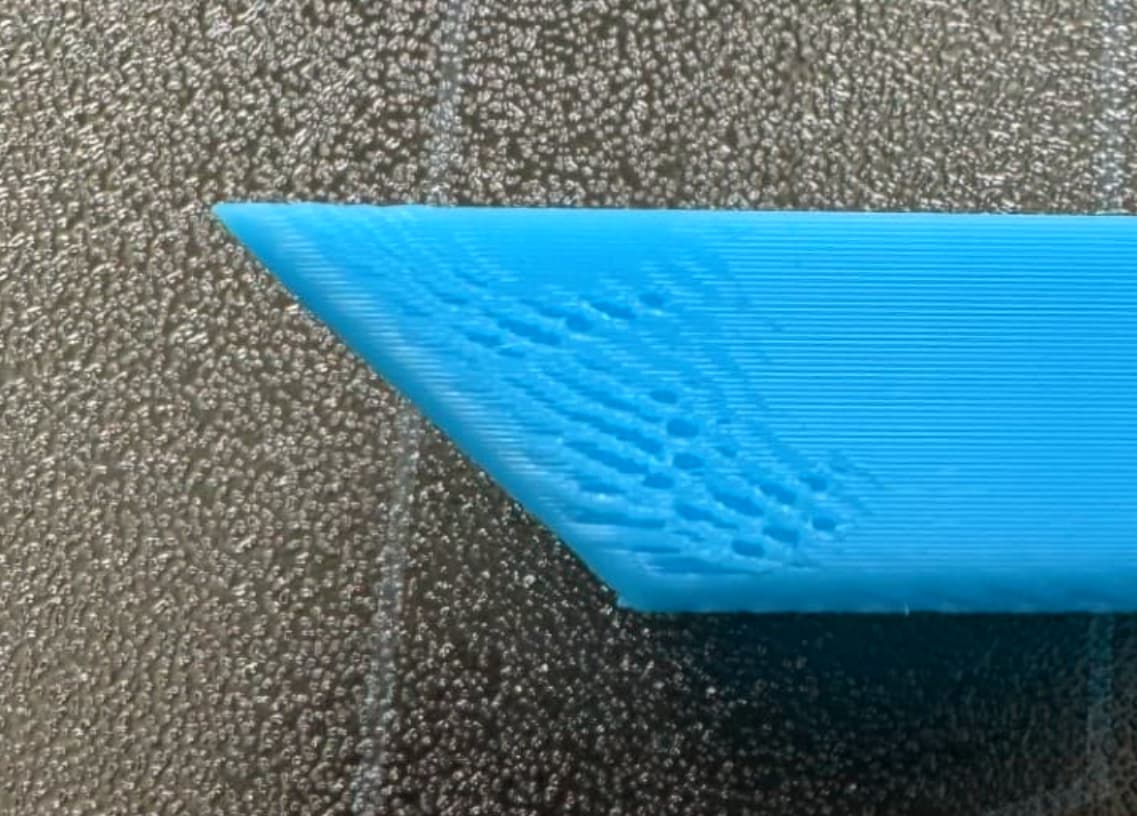
I really struggle to print decently with PETG. I use SUNLU PETG and I even dry the filament in my S4. I also followed the calibration guides and well it still looks bad? Some people suggest slowing down the print, so I followed some guides again and the print starts stringing alot.

I even printed a temp tower and saw that the temp should be around 250. But still I dont know what I am doing wrong here? Can someone help?

The Grey one is when I print it at a lower speed!


Slowing down is usually quite well rewarded by PETG. While drying, in my experience, is pretty much mandatory.

Regarding stringing, you could try to enable “wipe on retracts” and increase retract speed (Bambu recommends up to 60mm/s for its PETG HF).

But it looks like your calibrations are a off. That top surface looks underextruded and both flow and pressure advance could be part of the root cause for the lower pic.
In my experience, it is helpful to leave plenty of room regarding the max flow.

:crossed_fingers: & :four_leaf_clover:

3 Likes

Is there a setting to tell the print slowing down by like certain percentage? WHen I look up some guides about PETG settings some people change a lot of speed settings…

Thank alot tho, I will try to recalibrate again.

It could also be your retract distance. I was getting air pockets in my petg until I fiddled with retract distance, almost sounded like water bubbles popping and was at a small distance after a start. I usually use 45mm/s retract 40mm/s unretract, and around 1mm distance. Originally I was doing 1.6 but getting bubbles, I dropped the distance by 0.1mm until I stopped getting bubbles

1 Like

I agree with @EnoTheThracian I also have other observations.

The two specific areas that come to mind is pressure advance and flow rate.

Evidence of faulty Pressure advance.

Note: Try this quick fix before anything else. Reformat the SD Card. There are reports that a faulty read from a marginal SD card has been diagnosed as also causing this kind of issue. The theory behind this is that printer filament flow pauses and stutters because it struggles to read a block on the SD card. One thing worth trying is reformatting the card or replacing it. It’s a quick fix at any rate.

This one is a little easier to interpret. You will want to re-run a flow rate calibration.

This too adds more weight to that argument. It looks like the nozzle is running out of filament at the end of the stroke.

Are you using Orca Slicer and have you tried to use it’s baked-in calibration tools?

Also, another quick fix experiment in lieu of slowing down the print is to go into the filament settings and reducing the max flow rate. This will likely have the biggest impact on the last image I noted above.

In Orca, their is a test specifically for Max Flow Rate. But for experimentation purposes I would just set it to 10mmÂł/s for now.

The Orca test varies the GCode to change the flow rate for each layer. View their tutorial if you’re not familiar with it.

7 Likes

Thx alot for the fast analysis of my faulty prints.

  1. Is the only option for a faulty pressure advance to format the sdcard? I recently swapped the card out (default one was a lexar 32gb). Now I am using a amazon basic 128gb one but I already placed an order on a sandisk extreme pro which is coming in tomorrow. The filament should be dry since I was drying it in my dryer and it was stored afterwards in my ams and my hygrometer was saying 10% maybe lower, since it cant go lower than that.
  2. I am using bambu studio and I will recalibrate again, it might be that I didnt do it properly since I am fairly new to this. And I will try to reduce the volumetric speed down to 10 and see what happends!

Is it highly recommend to use orca over bambustudio?

Friendly tip: You’re wasting your money here - the Bambu controller only supports up to 32GB. Also, while Amazon Basics can be fine for a lot of things, you’re not really saving anything, and their gear is usually built by the lowest-bid contract manufacturer.

Lexar, despite the brand recognition, is a Chinese knockoff at this point. They don’t own their own IP, so you have no idea what you’re actually getting.

For low-stakes stuff like trail cams, Arduino projects, or Raspberry Pi tinkering, I just grab the cheapest cards on Amazon. But for anything that matters - my phone, my camera, or my Bambu printer - I only use SanDisk or Samsung. Both companies own their IP, so you know exactly what’s inside the card.

And at 32GB, the price difference between a no-name card and a trusted brand like SanDisk or Samsung is usually under a buck. Worth it.

The Bambu autocalibration utilities were an absolute game changer back in 2022. Now… they are falling behind.

On the subject of slicers: Orca Slicer is Bambu Studio, but recompiled with numerous quality-of-life improvements - including built-in calibration tools that Bambu has been quietly copying back into Studio. Both share the same code base, but Orca is developed by 3D printing enthusiasts who put users first. Bambu Lab, on the other hand, force-feeds its own vision, even when it’s outdated or broken. Just look at the dozens of obsolete, unreliable filament profiles from 2022 that are still part of the downloaded version. Bambu’s strategy seems to be: throw it against the wall and see if it sticks. If it screws the user? Too bad. Here’s a link to the Chinese business philosophy of “Chabuduo” (差不多) - or, as we’d say in the West, cutting corners and cheating the consumer.

You can run Orca side by side with Bambu Studio - but only if you haven’t updated to the controversial “Bambu Connect” firmware. You can read about that fiasco here:

Try out Orca Slicer after you’ve had some experience with Bambu Studio. You may never need the advanced features that Orca offers, but it will look and feel exactly like BS - except you’ll have more control. For example, Orca lets you choose the landing page so you can skip the cluttered MakerWorld ads - and mark my words, ads are coming to Bambu Studio eventually.

Since Bambu is now deprecating many of the features that P1 and X1 users relied on, the folks at Orca - who were once supported by Bambu - have effectively said, “no thanks.” As of January this year, it’s unclear whether Orca will remain compatible with future Bambu firmware but since there is no downside to using both, give Orca a try and judge for yourself.

Here’s the direct download link.

2 Likes

Well, you could try Silent Mode but I usually just set all printing speeds to 60-80mm/s in the slicer when printing my remaining PETG Basic.

But I dare say that the majority of issues are best addressed in the manner proposed by @Olias . My money is on flow and PA being off, but the SD cards do indeed do very, very strange things beyond my comprehension :joy:

2 Likes

Thank again for the help man! My new sdcard is coming tomorrow.

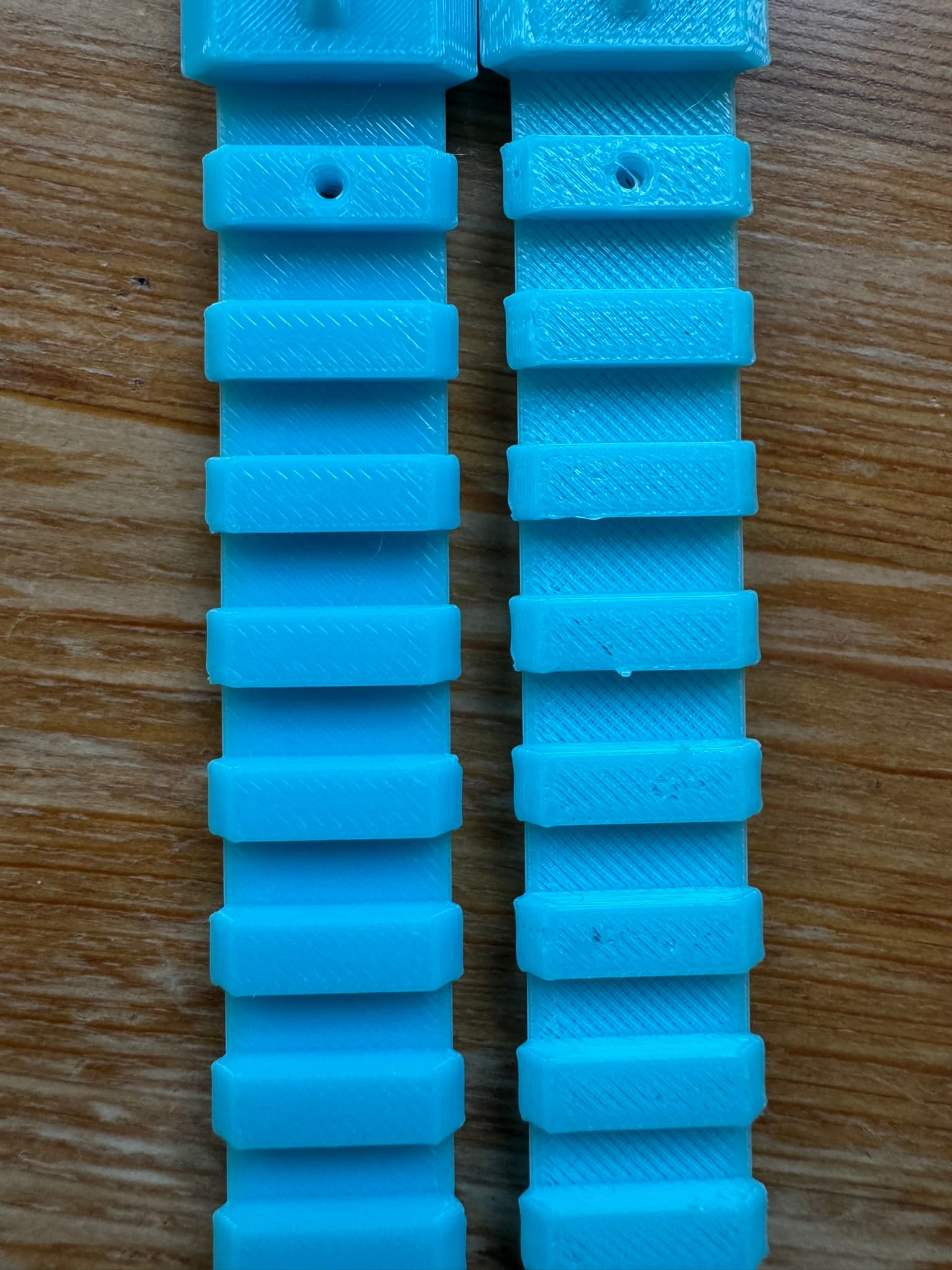
I did a recalibrate and here are the results, right was the old one and left the new one. It is way better! On my second pic, I still have those little holes. I read about that I should probably decrease my retraction lenght a bit? Its at 0.8 at default so I am trying now to lowering it down maybe 0.1 per print and see how the print will look like?


2 Likes

These bursted bubbles are in the same layer.
I think it is more of wet filament than retraction or SD card reading problem.

Drying filament in the oven could take days to fully dry, in some extreme case.

I am pretty sure I dried my filament in my S4 for at least 6 hours and then it was sitting in my ams for 2 days with a humidity of less than 10%. But you could still be right.

Do you perhaps know what is causing this overhang issue here? Which I have lately? Is that some cooling issue?

Looks like a curling defect to me. Additional drying may help with that. 6h is a bit short for new/wet PETG as it is quite sensitive to moisture.
Once dried fully, you may also improve curling behavior using adaptive layer heights. Aim for a halving of the layer height at overhangs.

:crossed_fingers: & :four_leaf_clover: