中文版在下方。
Hi everyone, we’re thrilled to announce the release of Parametric Model Maker v1.1.0! This is a significant update focused on improving the user experience for everyone. We’ve completely redesigned the platform’s interface from the ground up to be more intuitive, powerful, and beautiful.
A Fresh New Look: The Redesigned Interface
The first thing you’ll notice is the brand-new look and feel. We’ve moved away from the old layout to introduce a more modern and user-friendly experience.
-
New Home Page: Say goodbye to the “Community” pop-up! We now have a dedicated home page that beautifully showcases trending, most downloaded, and latest models. This provides much better visibility for your creations and makes discovery easier for all users.
-
Redesigned Editor: The model customization page has been completely refactored. It’s not just about looking better; it’s about being more functional. Users can now easily view the model’s description, see stats, and engage with comments, all within a cleaner, more organized layout.
For Our Creators: Key Changes to Your Workflow
While the platform looks different, all the powerful features you rely on are still here—we’ve just adjusted their access points to create a cleaner interface. Here are two important changes to note:
- Code Editor Location
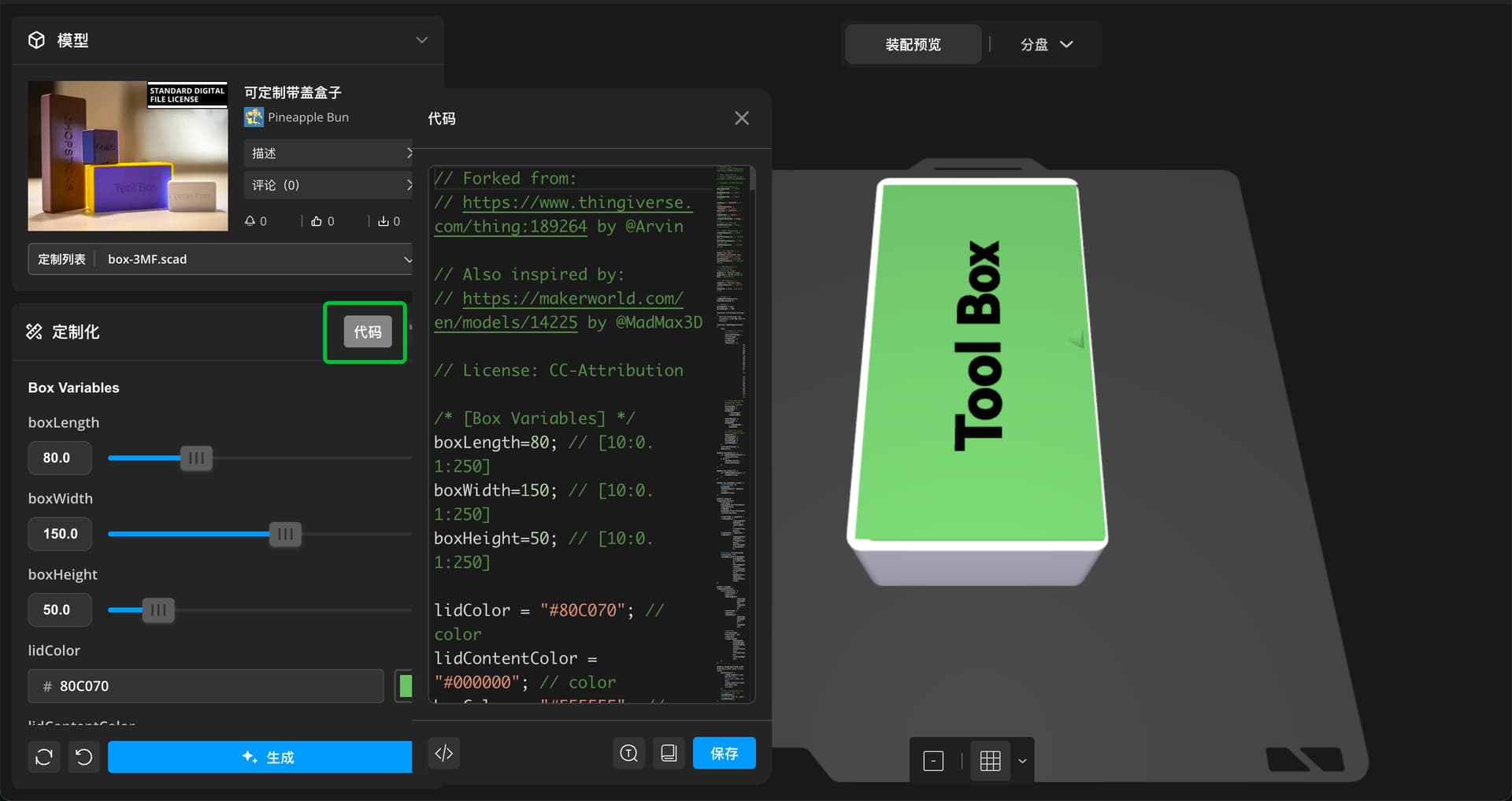
To provide a simpler experience for users who only need to adjust parameters, the code editor for OpenSCAD models is now collapsed by default.
- How to Access: When viewing a model that allows code editing, you will now see a Code button on the left-hand panel. Clicking this will open the familiar code editor, allowing you to make and save your changes.

- Testing Your Models Before Upload
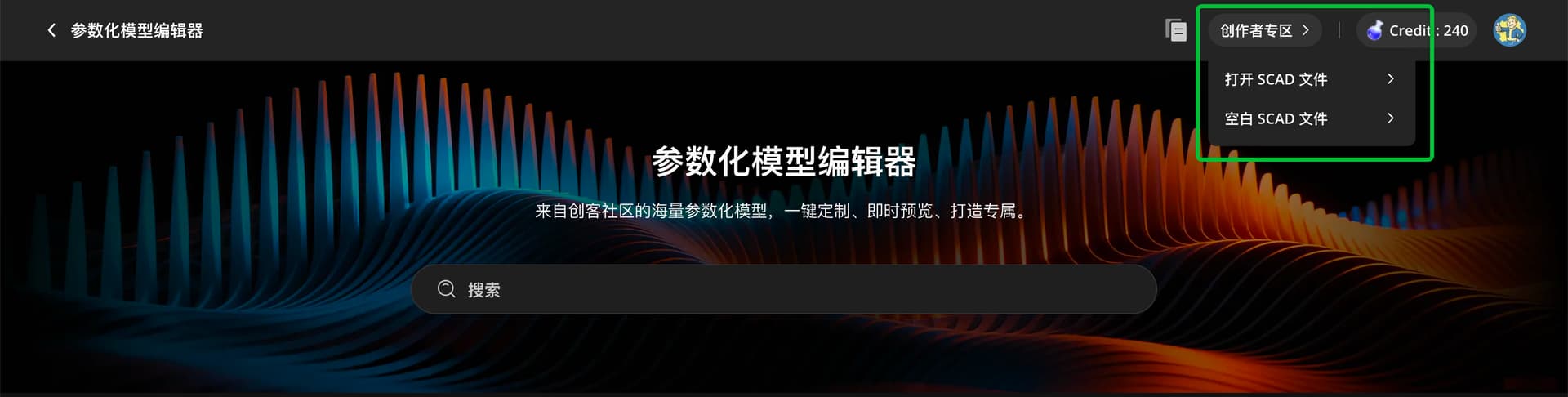
Testing your local .scad files is now more streamlined. We’ve integrated this functionality into the new Creator Panel.
- How to Access: Click on the Creator Portal button on the top navigation bar. From the dropdown menu, select Open SCAD File. This will take you to the editor where you can load and test your model directly in our environment before you decide to upload it.

OpenSCAD and Libraries Updated
To ensure you have access to the latest features and bug fixes, we have updated our backend engine.
-
OpenSCAD Version: We are now running a version based on commit
c8fbef05ba900e46892e9a44ea05f7d88e576e13. -
BOSL2 Library: The popular BOSL2 library has been updated to version
99fcfc6867e739aa1cd8ffc49fe39276036681f1.
This update is all about building a better foundation for the future of Parametric Model Maker. We believe these changes will make it easier for users to discover and customize your amazing work, and for you to create and test your models more efficiently. We can’t wait to see what you create with these new tools!
Happy modeling!
Chinese Version 中文版本
各位创作者们好,参数化模型编辑器 V1.1.0 正式发布!这是一次重大更新,旨在为所有用户提升体验,并为我们宝贵的创作者们优化工作流程。我们对平台界面进行了彻底的重新设计,使其更加直观、强大和美观。
焕然一新:全新设计的界面
首先是全新的外观和感觉。我们摒弃了旧的布局,引入了更现代化、更友好的用户体验。
-
全新的首页: 告别之前的“社区”弹窗吧!我们现在有了一个专属的首页,可以更好地展示流行、最多下载和最新的模型。这为您的创作提供了更好的曝光度,也让所有用户更容易发现新模型。
-
重新设计的编辑器: 模型编辑页面已完全重构。这不仅仅是为了更好看,更是为了功能更强大。现在,用户可以在一个更整洁、更有条理的布局中,轻松查看模型描述、统计数据和评论。
致我们的创作者:工作流程中的关键变化
虽然平台看起来不一样了,但您所依赖的所有功能都还在——我们只是调整了它们的入口,以创建一个更简洁的界面。以下是两个需要注意的重要变化:
- 代码编辑器位置
为了给那些只需要调整参数的用户提供更简洁的体验,OpenSCAD模型的代码编辑器现在默认是折叠的。
- 如何访问: 当您查看一个允许代码编辑的模型时,您会在左侧面板上看到一个 代码 按钮。点击它将打开您熟悉的代码编辑器,让您可以进行并保存更改。
- 上传前测试您的模型
现在,测试您本地的 .scad 文件变得更加流程化。我们已将此功能整合到新的创作面板中。
- 如何访问: 点击顶部导航栏的 创作者专区 按钮。在下拉菜单中,选择 打开 SCAD 文件。这将带您进入编辑器,您可以在我们的环境中直接加载和测试您的模型,然后再决定是否上传。
OpenSCAD 及库更新
为确保您能使用最新的功能和错误修复,我们更新了后端 引擎。
-
OpenSCAD 版本: 我们现在运行的版本基于 commit
c8fbef05ba900e46892e9a44ea05f7d88e576e13。 -
BOSL2 库: 广受欢迎的 BOSL2 库已更新至版本
99fcfc6867e739aa1cd8ffc49fe39276036681f1。
本次更新旨在为参数化模型编辑器的未来打下更坚实的基础。我们相信这些变化将使用户更容易发现和定制您出色的作品,并让您更高效地创建和测试模型。
我们迫不及待地想看到您用这些新工具创造出什么!