PETG HF: fuzzy skin hides seam on vertical walls but not on 45° overhang

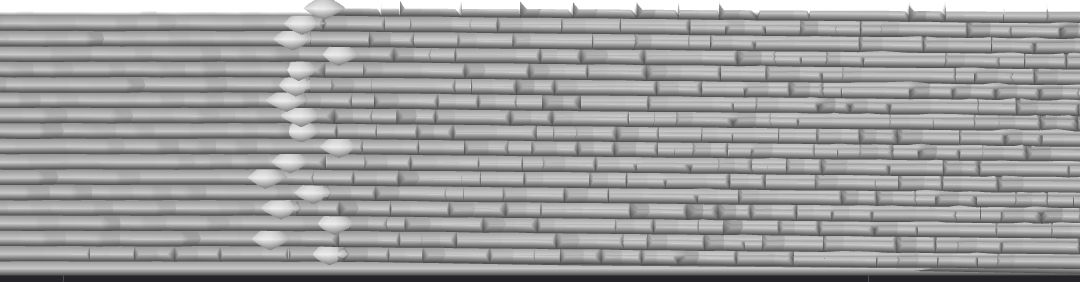
PETG HF seam on 45° overhang persists through everything — fuzzy skin hides it on vertical walls but NOT on the overhang (X2D, 0.4 High Flow)

TL;DR

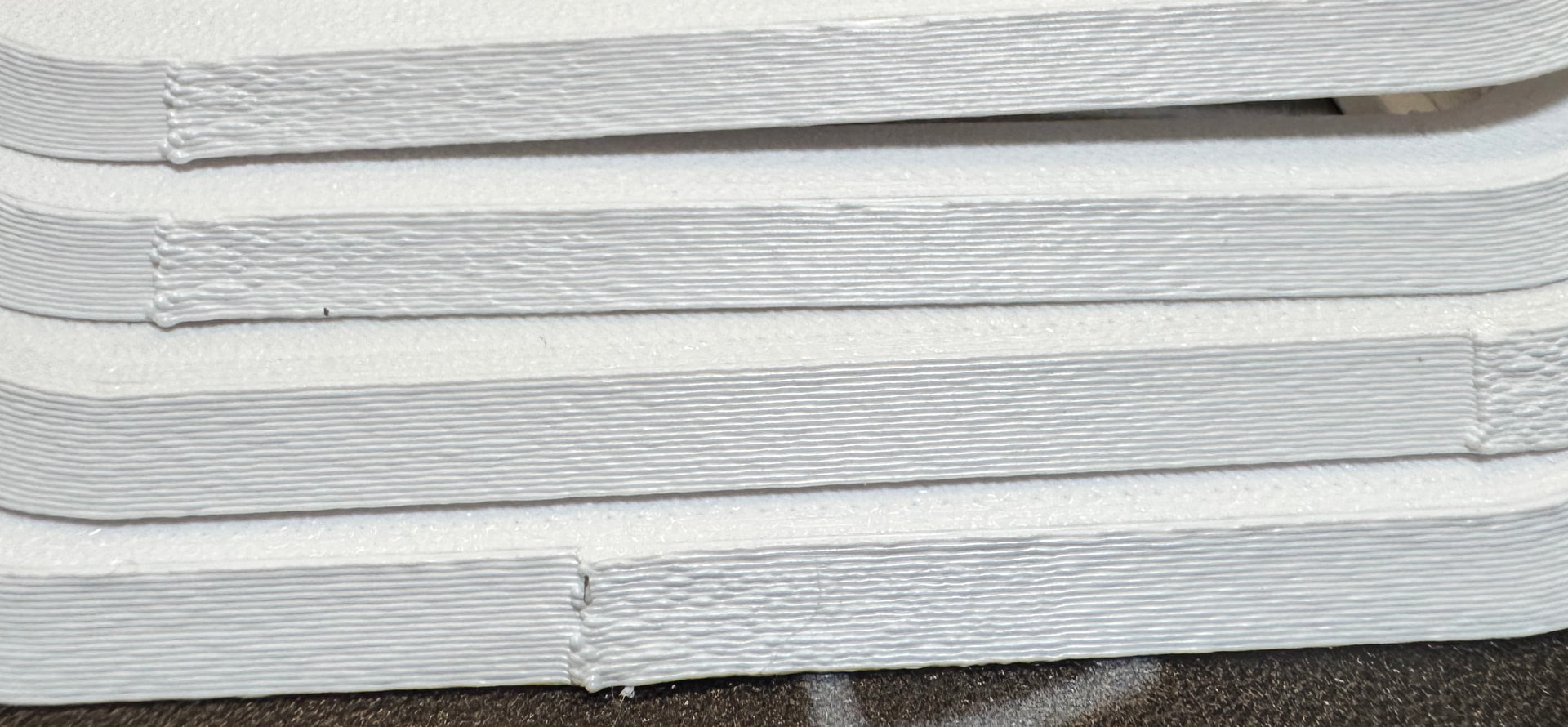
On an X2D with the 0.4 High Flow hotend, printing Bambu PETG HF, I have a seam/witness line on a 45° overhang that will not go away. The key clue: fuzzy skin completely removes the seam on vertical walls, but on the 45° overhang the same line is still clearly visible. The defect is unchanged by print speed, line width, and scarf settings. Looking for people who have actually solved PETG HF seams on sloped surfaces on this machine — not generic “slow down” advice, which I’ve already tested.

Setup

Printer Bambu Lab X2D
Hotend 0.4 mm High Flow
Filament Bambu PETG HF
Layer height 0.20 mm
Wall generator Classic
Wall order inner / outer / inner
Slicer Bambu Studio 2.6.0.51
Filament state Dried, kept in AMS 2 Pro; chamber RH reads 14%

The key diagnostic

  • Vertical walls: fuzzy skin removes the seam entirely. Clean.

  • 45° overhang: the seam/line is still clearly visible, even with fuzzy skin on.

That difference is the whole reason I’m posting. Whatever the defect is, it behaves differently on sloped surface than on vertical surface, and fuzzy skin’s surface noise is not enough to mask it on the slope.

What does NOT change the defect on the overhang

  • Outer wall speed: tested from 500 down to 100 mm/s. Essentially no change.

  • Outer wall line width: tested 0.6 mm and 0.42 mm. Same defect in both cases.

  • Scarf: Smart scarf, conditional scarf, threshold values (90°, 115°), inner-wall scarf on/off. No improvement on the overhang.

  • Seam position: Back / Aligned / Random.

  • Fuzzy skin: fixes vertical, does nothing for the overhang.

Filament moisture is not the cause: the spool is dried and stored in an AMS 2 Pro (chamber RH 14%), and the defect is fully reproducible regardless.

So the defect is independent of speed and line width, which to me rules out the usual seam-tuning answers.

Questions

  1. On a 45° overhang in PETG HF, is this line actually a Z-seam (layer start/stop), or is it layer banding / edge curling on the sloped surface that just looks like a seam? How do people distinguish the two?

  2. If it’s curling/banding on the slope rather than a true seam: what fixes it on PETG HF specifically — cooling changes, extrusion rate smoothing, something else?

  3. Has anyone gotten a genuinely clean PETG HF result on a 45° overhang on the X2D / High Flow combo, and what were the exact settings that did it?

I’d rather understand the mechanism than keep throwing parameters at it. Thanks.
1 Like

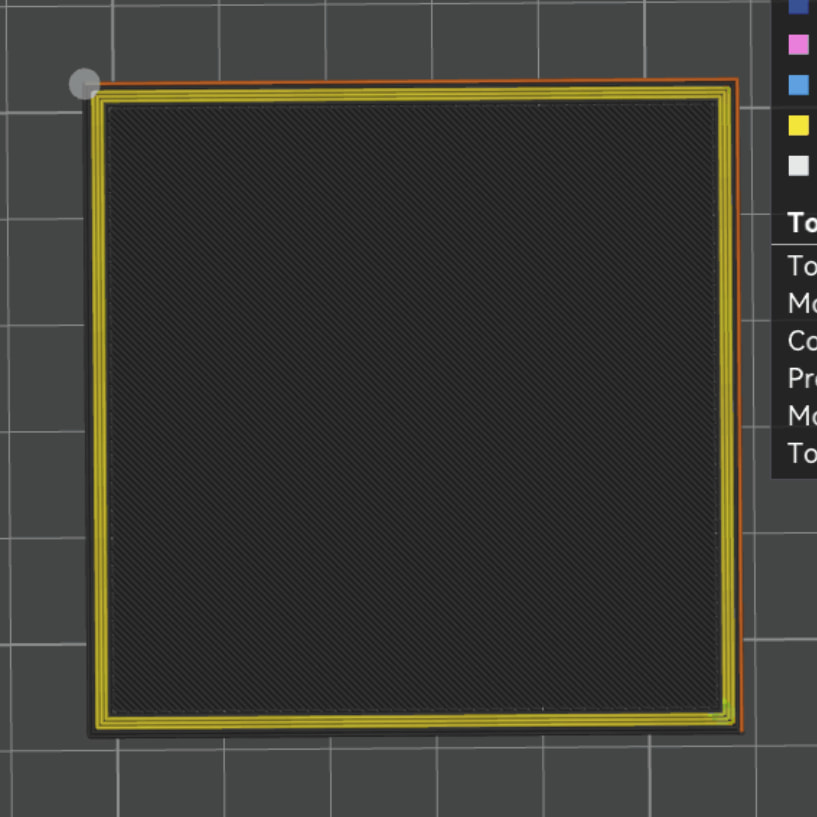
Pics of prints might be of use here, also slicer previews showing the same region

2 Likes

To my eye this looks like [pressure advance/flow dynamics/k factor/same-thing-diff-names] and/or filament dryness

It starts the extrusion line very overextruding, but then quickly evens itself out, which is kinda what happens with not-perfect pressure advance after a travel, and/or what happens with wet filament during any travel.

Any chance you can paint the seam on a non overhung part of the model? Or change to a more overhang friendly “inner/outer” wall order? inner/outer/inner writes the final two lines like this - outer wall printed with a gap [air to left and right] and then the final inner wall is placed:

Thanks. Painting the seam onto a non-overhung area isn’t an option here unfortunately - the perimeter is overhung the whole way around, so there’s no vertical region at that height to move the seam to.

The wall order point is well taken though, and I hadn’t framed it the way you did - outer wall laid down with air on both sides, then the final inner wall placed against it. That’s clearly the worst case on an overhang. I’m switching back to inner/outer to give the outer wall something to sit against, and re-slicing.

I’m running that alongside the manual PA calibration, since the over-extrusion at the start looks like the root cause and the wall order should help the outer wall behave better on the slope. Will report back on which one (or the combination) actually clears the seam column.

1 Like

Do you have a top down slicer preview showing the start points of the fuzzy outer wall?

I have a feeling that overlaying an overhang with a fuzzy skin will locally increase the overhang angle. While not usually an issue due to the short wavelength of a fuzzy skin - leading to additional support from the area the nozzle has already traveled over - this is not true for the outer wall start point. If the local overhang at the start would be pushed beyond supportless limits by a fuzzy skin wave peak, it’d be a mess…

:crossed_fingers: & :four_leaf_clover:

UPDATE / RESOLVED — root cause is the PETG HF formulation itself, not a slicer setting

Closing the loop in case it helps anyone hitting the same wall.

Short version

The seam defect on the 45° overhang is caused by the PETG HF (High Flow) formulation, not by any slicer parameter. Same part, same identical settings, swap only the spool: with PETG HF the defect is present; with regular PETG Basic it is gone — clean.

This held across every PETG HF I tried — Bambu, eSun, Sunlu — so it’s the HF formulation, not a single bad spool or brand. I also swapped printers (X2D and P1S) with the same settings and materials: same result on both, which rules out anything machine-specific (X2D continuous flow dynamics, the High Flow hotend, etc.).

What pointed there

@Bullocks and @EnoTheThracian were right about the mechanism: over-extrusion at the wall start point after a travel, consistent with pressure advance. Calibrating PA manually helped a lot:

  • Manual flow-dynamics ¶ calibration with the pattern method, value 0.03 for PETG HF, saved to the filament profile (and auto-cal disabled on print so it doesn’t get overwritten).

  • This took the defect from obvious to marginal — but not to zero.

The residual would not go away no matter what. So I isolated the one variable I hadn’t: the material.

The single-variable test

Identical profile, identical settings, only the spool changed:

  • Wall generator Arachne, line width 0.7, outer wall 500 mm/s, PA 0.03, fuzzy skin on (Displacement, 0.25 / 0.07).

  • PETG HF → seam/over-extrusion at the overhang start, irreducible.

  • PETG Basic (even a cheap generic spool) → perfect, including at 22 mm³/s flow.

Why it makes sense

HF formulations are tuned for low melt viscosity so they can hit high volumetric flow. That same low viscosity makes the pressure transients at layer start/stop (especially after a travel) much harder to control — the melt escapes before pressure advance can hold it. Regular PETG is more viscous and forgives those transients. On a 45° overhang, where the start point has no adjacent support, that escaping material is exactly what shows up.

Practical takeaway

For a cosmetic part of this size, the HF flow advantage is pointless: with the High Flow hotend on the X2D I get ~30 mm³/s on HF, but I get ~20–22 mm³/s on PETG Basic anyway (even 20 mm³/s with a standard extruder on a P1S), and the part is tiny — the extra throughput saves minutes, not hours. So for anything that has to look good, PETG Basic. Keep HF for large/long prints where flow is the actual bottleneck and finish matters less.

If you’re fighting a stubborn seam on PETG HF: before you burn days on parameters, swap to regular PETG and see if it just disappears. For me it did.