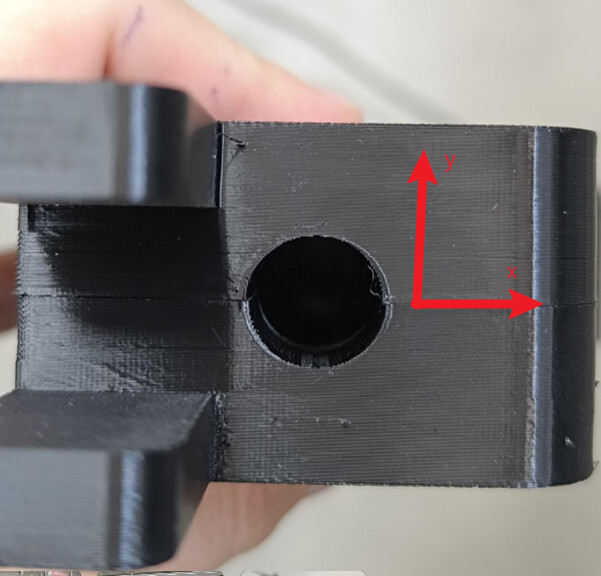
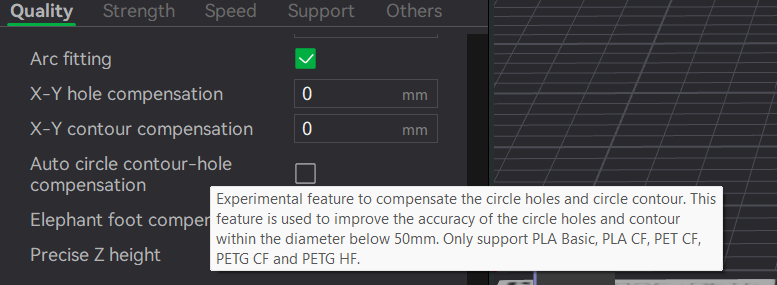
I’m printing with BambuLab H2S, and PETG purchased from SmartMaterials3D. I’m printing at 0.12mm of layer height. I have observed that my holes seem to be flattening out (check the picture): this is, that the X dimension is higher than the Y dimension, and it is not neglible. It’s kind of an eggy-shape. The printer is well calibrated and it doesn’t happen the same with PLA. Any ideas on how to solve this?
Aside from your layer shift, I think the issue is down to overhang performance - PETG prints at a higher temperature, it cools a bit more slowly, the print has time to sag more on the top…quarter or so of the hole.
Unfortunately, our holes must be as circular as possible, as we measure them with high-precision. I think it has to do with what @CarbonForge said about the temperature and the cooling, but I don’t know how to compensate this.
Dealing with what is causing the layer shift should probably be the first priority.
Printing in that orientation (horizontal to the bed) will not produce perfectly round holes. If you need them, post processing with an appropriate sized reemer is what I would do.
Does the part need to be printed in this orientation at all? Vertical axis holes are just always going to be better.
If it must be in this orientation, first, let’s make sure your material choice is the right one. You should be looking for a high speed PETG, these materials cool faster after being extruded and generally exhibit less sag. I don’t know anything about the filament you’re using, but it is the first thing you should look at.
Next, dial in your overhang performance for that filament - temperature towers!
Finally, if your result still is out of round, you may want to use supports, in that case use support for PLA/PETG as your interface material so you get clean removal.
If you truly need a super clean hole, undersizing and adding a reaming operation to clean up the bore may be the way to go.
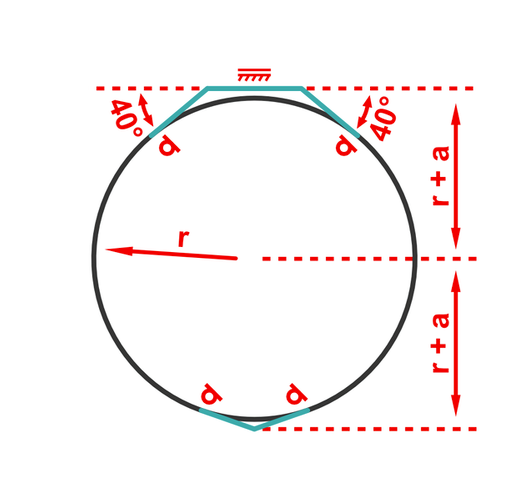
Some people have better luck with greater-teardrop shapes, but you can design holes specifically for 3d manufacturing if you orient that shape to the direction of gravity (as shown - gravity pointing down)
Which CAD programs have a feature that can make this type of hole automatically? I had a look at Onshape feature scripts (plugins) and was unable to find one.