PLA warping on flat surfaces

I have an h2c printing a large multicolor model split into multiple pieces.

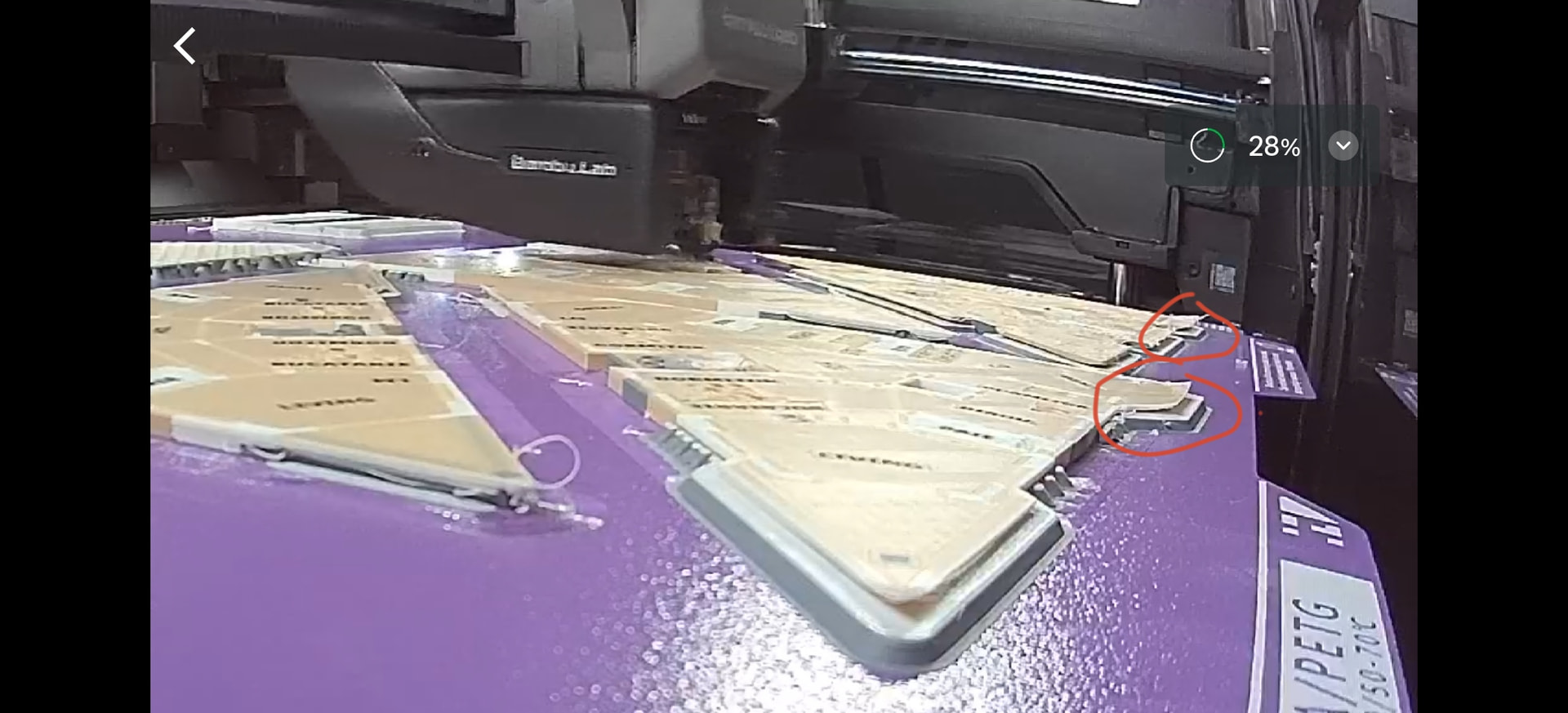
The first layers have no issues with warping or bed adhesion, nor do they have any issues with bed adhesion later on. The issue is on some flat surfaces the pla warps a LOT and then evidently so the print fails. Photo with red circles

Any idea how to make this not warp so hard? Maybe really high infill or higher layer height?

in the filament profile change chamber temperature to 41 degrees. this will stop the auxilliary fan (which isnt needed) and for me helps to reduce warping by a lot. but still low enough to not cause heat creep issues with pla (at least with bambu pla basic)

I am printing with 0.2 nozzle I heard this can cause issues when chamber heating?

Why are you heating the chamber?

I dont think we have all the facts here

This is PLA-on-PLA and its doing this? I kinda doubt that, or something is crazy bigtime wrong
image

Maybe share the saved 3mf file for analysis? If pics are 1000 words, 3mf is your doctoral dissertation

You’ve got some really weird stuff going on, as Bullocks said please post your 3MF.

While you’re at it, your induction hotend looks…odd. Could you share a better picture of your extruder?

Are you mixing PETG and PLA, or mixing different brands of PLA? What are the specific filaments you’re using?

Also,how dry is your filament?

to reduce warping.

41 degrees usually does not cause issues with pla.
To answer the questions:

The induction hotend looks really odd because some small fillament bits got molten on it, it just has to be cleaned but from what i searched it does not affect print quality.
The print is PLA with Support for PLA for interface.
Filaments are kept in 2 ams pro 2, around 20-30% humidity in them. The place i live doesn’t have much humidity either way, around 40% air.
The lifting is going on with the PLA and support interface.

And here is the 3mf. I kept only 2 of the prints since the file was too big.

You should not need elevated chamber temperatures. What happens when you don’t do that?

I have no idea if this is a display issue in my slicer, but according to the settings, you’re using PLA matte , PLA transparent, PlA suppport and something “55c”? It’s kind of a really wild mix…

But like I said, maybe it’s a display error, or do you really have a filament called “55c”?


There are really an extremely large number of settings that differ from the default ones - I can’t even analyze them all. Did you think carefully about each setting, or did you just play around with them?

There are also some inconsistencies: First, you set the layer height to 0.08, only to set it back to 0.12, which doesn’t make any sense at all. All the settings are designed for 0.08, and you’re telling the printer, “Go ahead and use 0.12” - meaning thicker lines and more material - but the rest of the settings are still optimized for 0.08.

Somehow… it looks like a total mess of settings.


The object also wasn’t optimized for 3D printing, but that’s just a side issue that makes it even more challenging. Something must have gone wrong during the export, too, but as I said, that’s just a side note


But I think the biggest problem is this:

You’re not using it as an interface anymore - as far as I can tell - please correct me if I’m wrong - you’re using it for huge areas - 98% - so your model basically floats like a piece of wood on water.

Your model is practically almost completely floating on support interface. If I’m seeing this correctly, everything that’s blue is support interface. There’s absolutely no way that’s going to stick anywhere.


Important steps:

  • Optimize the 3D model and export it correctly before loading it into Bambu Studio. Bambu Studio is not designed to correct errors.
  • Avoid inconsistent settings and, in general, a mess of settings.
  • Support PLA isn’t meant to be used on such large surfaces, meaning, in this case, about 98% of the total surface area. Try to reduce that to at least 70%. Although, with good design, the model could actually do without Support PLA entirely.

Here’s a second image to clarify: Your model isn’t lying flat; instead, there are extremely confusing and twisted sections floating freely: Everything that’s green is your first layer:

The model just isn’t flat, broken, or poorly designed. Actually, everything should be green.

For the 55c filament(it is all just default PLA named 55C I don’t use the basic PLA matt, might be export that added it back), it is 55c just because i wanted to overwrite the bed temperature to 55c. The mix of filaments with matt and transparent is needed, the support interface could maybe go. Most of the settings changed were trial and error, after looking at some other forum posts.

As for the 3d model, working on it and making it even more optimized is quite a challenge considering it’s coming from a BIM app, so the topology is quite a mess. I’ve edited it in rhino and then netfabb to try and make it printable. With such settings i was able to get quite good results in the past, now only this warping seems to be an issue.

I think when the .3mf was loaded in the model has automatically repositioned itself, when i load it in the majority of the first layer is solid, no weird 90% interface. I slightly lowered it in bambu studio until it cut all those small walls extruding downwards.

in the image attached you can see the first layer is mostly solid, apart from the few places where there are overhangs. Also i think the not lying flat is also an issue from the export, but I’m not sure how to check that 2nd image you provided, maybe it’s only on orca?

Also to answer the heated chamber question, I haven’t done it so far, was just asking if it would work with 0.2 nozzle.

I don’t know how i managed to do the 0.08 with 0.12 that’s something i certainly need to change back to 0.08. Somehow it hasn’t had any issues so far, apart from maybe this interface problem.

For the overhang with the triangle shape, would it be better to print with regular PLA interface perhaps, and lower the top Z distance so that it sticks better togheter?

Sorry, but what you’re doing right now - and I’m sorry to say this so bluntly - is pointless. You need to fix the model properly.

Here’s my car analogy: You’re trying to adjust the air pressure in your tires while your car’s engine is smoking and the axle is broken, and you ask, “Is that better now?”

First, you have to get the basics right - the fundamentals. Judging by the photos, your 3D model still looks completely unoptimized - and for no good reason at all.

It doesn’t make any sense to print a flat model with that much overhang and support. Why don’t you either cut it flat or, alternatively, fill it out?

There’s no point in screwing around now - think about the car comparison. You’re asking me about a few settings, while the 3D printer is practically screaming in agony because of your faulty model. And the mess with the settings only makes it worse.

Like I said, I don’t mean to be harsh, but here’s the thing: garbage in, garbage out.

The 3D printer isn’t the problem; it does exactly what you tell it to do, and in that case, it reproduces your mistakes.


But don’t get discouraged: You’re on the right track - now just make sure to fix the model properly! :grin: :+1:

Two possible solutions:


Cut off the edge sothe building is no longer floating in the air: You probably don’t want this because you want the outline of your building, but I’ll post it anyway:


…or add a base: Then you won’t need any support material either. In your case, though, you’d use a triangle; I just used a circle here to make it easier to visualize:


I’d go with the base method. That way, you won’t need any support material at all, no overhangs and you’ll still get the desired shape for your building.

As I said, there’s no reason to use support material or overhangs for a flat model whose only flaw is that it literally floats in the air due to some kind of model defect.

I’m not quite sure I understand either of the solutions. With the first yes it would fundamentally change the building. But with the second it would still change how the building looks by making it full underneath. The walls that are differently colored are needed so that they show where the structure of the building is(the beams and pillars).

Do you say that the main part of the building is floating in the middle? Or just those balconies on the sides? In the last image I see the bottom has a bunch of artifacts which I do not see on my end.


In the meanwhile these have been printed and they turned out alright, but with some stringing from the transparent pla.

Exactly that. Almost your entire building. Take a look at your first layer:

  • Green = Your first layer.
  • Gray: Your printer is printing in mid-air:

If you happen to be colorblind, let me know, and I’ll adjust it for you.


Congratulations, but you should really use this project to learn the basics - and I mean that in a helpful way. These are really the absolute basics. Otherwise, you’ll keep running into the same problem over and over again.

Think about it - you’ve got this absolutely top-of-the-line machine, and it all falls apart just because you can’t lay the object flat on the plate.


For example: How do I view the first layer? Check this out - it’s absolute chaos - the first layer:


This is what it would look like, more or less, once it’s corrected… The filament is touching the print plate. That’s the way it should be.

try to uderstand the basics of 3d printing.

elevated chamber temperature always leads to reduced warping.

as does turning off that silly auxilliary fan which does not serve any purpose, but to induce more warping.

the limiting factor is the softening temperature of the plastic causing heat creep/clog issues

with pla and the h2d you typically can go up to 45 degrees but I have found 41 to be a good setting, it also disables the aux fan, and is my standard setting for large flat pla prints.