I have an AMS 2 Pro on a P1P.
If I unplug the AMS and print using the external spool everything prints perfectly, not errors, no issues.
If I plug the AMS in and try to print the second spool runs wildly, it pulls the filament back and keeps going even though the end of the filament has come out of the feeder and is flapping around as the spool spins.
It eventually brings up the error message “AMS failed to pull back filament”.
When I try to feed the filament back into the AMS it gets as far as the little 4 way PTFE splitter and won’t go any further. The filament never enters the PTFE tube that comes out of the back of the machine.
I’ve checked the PTFT tube coming out of the back of the AMS and it’s completely empty. I checked the filament buffer and it’s empty, and I checked the tube going to the hot end and it’s empty.
If I remove the AMS and then print using an external spool it runs perfectly, so the issue must be inside the AMS somewhere. All that I can think of right now is that there’s a fragment of filament stuck
right in the splitter unit.
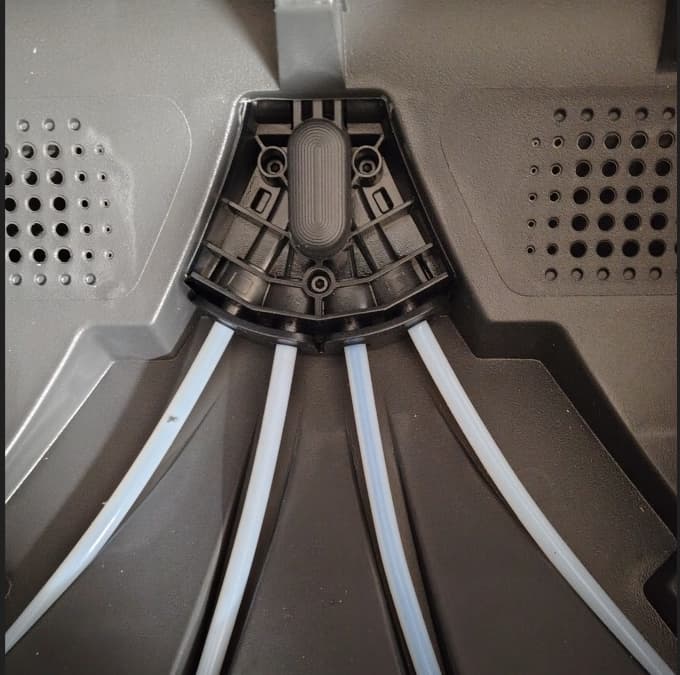
I tried pushing it through with some filament from the front, and removing the tube at the back and pushing it that way, but I can’t seem to get anything pushed through.
Does anyone have any clues?
This happens when I start to print using the AMS, regardless of which spool I use, it tries to retract the spool 2 and then stops, so I’m guessing that it’s the tube for spool 2.

