Print starts to fail after about 70mm height

This is a strange one and its got me stumped. Looking the the collectives experience :confused:

The hotend fan failed after about 1000 hours. Replaced it, ran calibrations, started a print.

Print failed.

I’ve not printed this model before so can’t say I know it prints. BUT, I have printed the section thats failing and it will print perfectly using the same settings in the same project so WTF?

Its PETG. 0.2mm, nothing exciting, 2 walls (with alternating extra) 12% infill (tried gyroid and grid). Doors are closed, base is SOLID, no warping.

What happens:

at about 70mm the texture starts to change
at 80mm defects start appearing starting with zits, then strings though the skin, poor corners, what looks like both under and over extrusion, then layer separation, eventually complete failure.

From about 70mm the layer adhesion starts to reduce.

What Ive tried:

Calibrated printer
Heat tower test (still good 250-260), tried all these temps.
Retraction test (went from system default to 0.4mm - no change)
Flow dynamics, minor adjustment of -0.004
Printed with 4 on the same plate and with 1, no change.

I have also just that top section, it prints perfectly (its really shiny material and probably looks bad in the pic but its good):
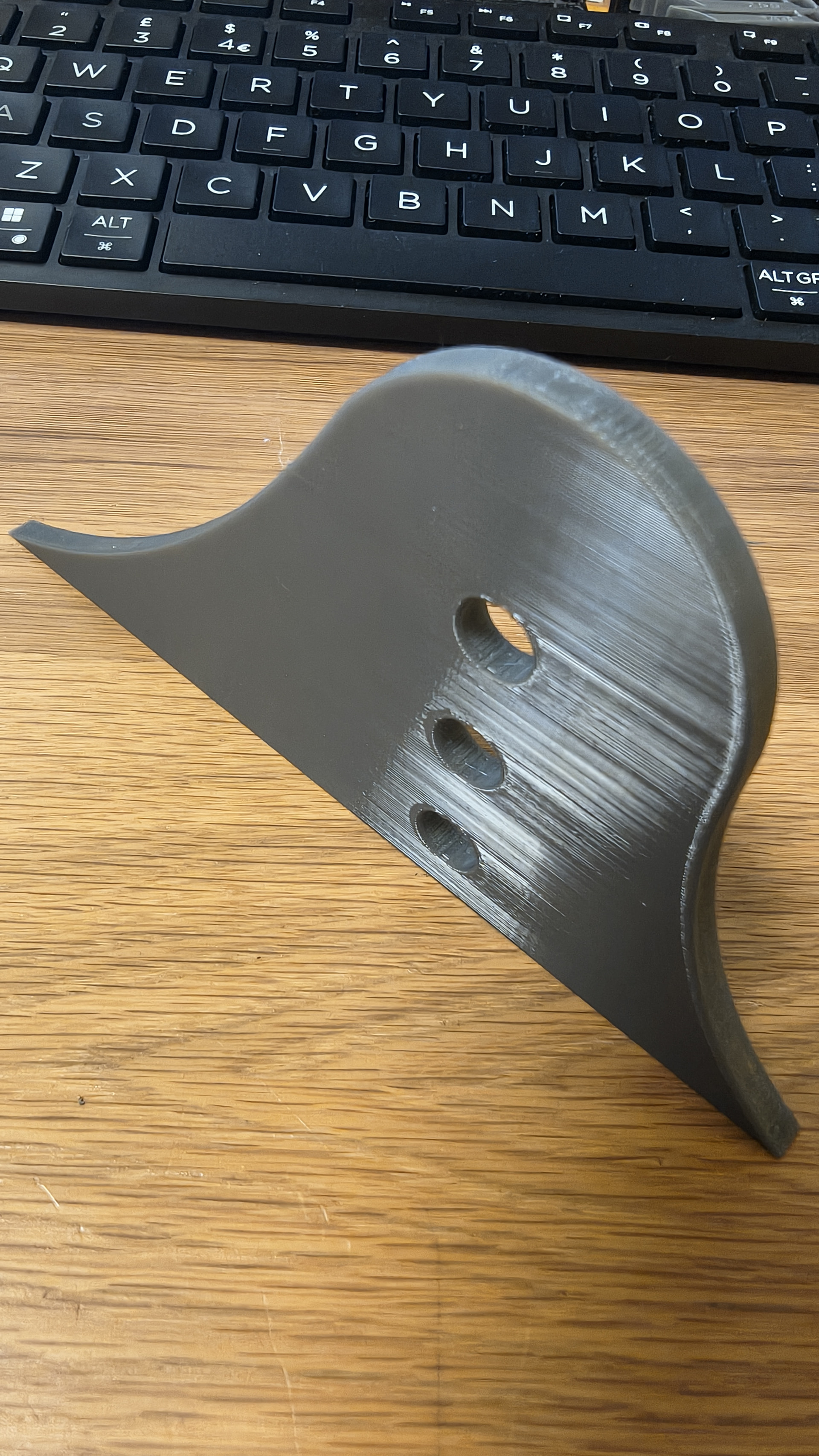
Ive also printed a 250mm cylindrical tower 25mm x 35mm and tried different speeds and temps during the print. That was also perfectly fine so it doesnt appear to be a Z issue.

Thoughts?

Only difference I can point at is that successful part only takes 1:20hr, the larger part nearly 4 hours. It takes about 2:40hr to get to the point it starts to fail. But when i had 4 on the plate it failed at roughly the same spot.

I could be heat creep. How hot is it in the area were you are printing. You could open/remove the top glass and/or open the front door.

PETG doesn’t generally heat creep, and the H2 series has an automatic vent that opens up when needed to maintain chamber temperature.

I suppose leaving the door open would be a good confirmation one way or the other.

Tried with the top cover open. The part warped badly and failed after about 20mm.

Just to be on the safe side, I’m going to ask a really obvious question:

When you replace the hotend fan, quite a few parts have to be taken apart on print head. You jiggle it, you shake it… Could the issue be that either the screws or the nozzle mount have come loose, or that the belt tension is incorrect?

This kind of thing often isn’t immediately noticeable during calibration, but becomes apparent when the print rises and the nozzle scrapes against the 3D model, for example, or when the belt tension can’t be maintained and a tooth skips.


And I hope that, given the number of hours it’s been in use, you’ve also considered that a nozzle is a wear part and that it needs to be replaced at some point.

Here’s the link to the subject matter in more detail: Did you know? Nozzles can wear down over time

Hi,

Yes, I considered that. The fan replacement doesn’t touch the belts or hotend assembly (heaters mounts, etc), its all on the back side of the carriage. However, from what I can see, literally every components’ cable is disconnected. I’d say there is a chance one isn’t correctly reinstalled could be causing a fault? But wouldnt the machine know that? It seems to know when a fan stops…

Part of the reason for printing the 250mm tower was to see if it was a motion issue. It doesnt seem to be. The tower (2 walls only) was tough, layer adhesion excellent.

The belts are taught and there’s no indication on the model that there’s been any x/y shift.

Regarding nozzle wear, yes thought similar but was initially thinking blockages so I had used the needle to clear the nozzle and performed several cold-pulls. I also swapped the left and right nozzles and it didnt make a difference. This was printed in the right nozzle which is rigid in the carriage. I havent tried putting the filament in the left nozzle (yet).

Looking at the parts more closely it looks like the filament went cold. But I also know the extruder throws an error when load goes to high which I’d expect it to if the nozzle stopped heating, but it hasn’t.

I might try another print tomorrow and monitor it, I’ve not watched it as yet. I suppose it could also be the filament (this was a recently opened roll of 5 of this that I had). I’ll put it in the dryer just in case.

Based on what you’re describing, you can pretty much rule out what I mentioned - which is actually a very good starting point for troubleshooting. Especially since you’re describing it in such detail. Then the problem must be somewhere else, of course.

That’s a good point; that could also be a possibility - oozing or stringing - which, in your case, might only be noticeable when you place multiple objects on the print plate.

PETG, in particular, is very sensitive to moisture. It really needs to be dried before each use. Maybe it got a little moist?

I do have a case open with Bambu from the hotend fan replacement and updated that case with this issue. Their first thought is that the 4 parts on the plate were too far apart. They also suggested the part should be in the middle of the build plate.

Ive been printing the last 2 attempts on it’s own, but not in the middle. I move parts around because I use an engineering plate with glue.

Ive almost never had a moisture issue with this filament. The only time I did was with stringing (no layer adhesion issues) and that was back when the filament would always be open on a spool holder.

It feels like a long shot that part of the spool is bad just when printing the top 70mm of the part, then when I restart the print the material is perfect again.

There’s always a first time…

…and as I said, PETG is particularly prone to this. Like you rightly pointed out, that probably won’t be the main problem, but still - it adds an element of uncertainty to troubleshooting. It’s a factor that can make troubleshooting more difficult.

Since you actually have to dry the PETG filament before every use anyway, it’s really no extra trouble. As I said, we can’t see how you store your filament, etc. The main point is to eliminate any additional factors.


However, Bambu is right - if the parts are spaced very far apart and your filament is stringing, and on top of that it’s moist, that could very well be the cause. Why this happens at a certain height: The problem builds up layer by layer, as tolerances and errors accumulate. Especially when dealing with multiple objects since the nozzle move back and forth from object to object in that case.


It probably isn’t just one problem, but rather many tiny faults that add up. The error that occurs at certain heights results from the fact that the individual faults add up. It’s like a house of cards collapsing.

You’ll just have to try to optimize as much as possible right now so you can then focus on troubleshooting to rule out other factors. If it turns out to be a bad filament, you’ll be frustrated that you spent ages looking for a problem in the wrong place.

Update.

Dried the filament.

Decided to start a new project, imported the model.

Selected the “0.20mm Standard” Process profile. Changed:
Alternate extra wall: true
Ensure vertical shell thickness: Partial (automatically offered to change)
Top shell layers: 6
Bottom shell layers: 5
Infill: 10%
Infill pattern: Rectilinear

Chamber temp was about 38C throughout. No warping.

The print was successful.

I have now updated the Process profile include:
Bridge flow: 2 (this was established during bridge performance filament testing)
Smooth coefficient: 2
Only one wall on top surfaces: Not applied
Wall generator: Arachne

These settings bring the Process profile closer to the settings I was using previously.

I have mirrored the part (which I need) and started a print.

The profile I was working with previously was inherited from “0.16mm Balanced Quality” with some speed settings taken from 0.12mm Fine. . The main differences between 0.20mm Standard and 0.16mm Balanced being much reduced motion aggression. This was an intentional decision, VFRs are visible on the “0.20mm Standard” Process print.

Sorted.

Went through all the different settings then returned to the initial project that caused the failure.

The failure didnt repeat so it looks like it was a filament issue.

Thanks for you input.