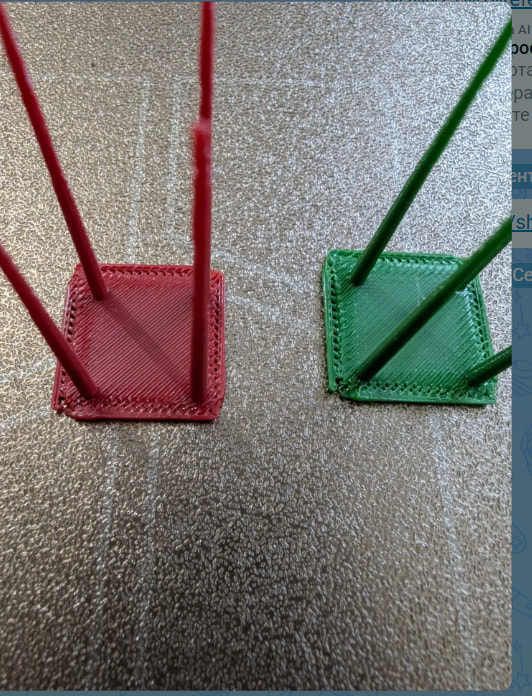
Have you recently calibrated your filament? Looks to me like both your flow and K factor may be incorrect.
The filament is fully dried and calibrated; the printer has saved settings, the bed is calibrated, and the hardware diagnostic tool was run. I also disassembled the print head to check for clogs and performed a cold pull—everything looks fine. Please help.
The picture posted points to an incorrect calibration. That is where I would start looking.
The thing is, the same thing happens during calibration—those jagged edges appear—so it’s impossible to complete the process. I’ve tried doing it, but there seems to be a different error involved; perhaps someone has encountered this before? I’m not a beginner—I have experience—but this is the first time I’ve seen something like this.
I concur that this looks like a drastic miscalibration of the pressure advance.
However, if it appeared suddenly and affects all filaments, I would not discount the possibility of nozzle induced errors like a clog or a bad temp measurement just yet.
On my X1, I always do a number of hex key cold pulls in a row to be sure. A single simple cold pull has rarely been enough in my case.
In your case, do you have another nozzle you can try?
 &
& 
Edit: Sorry Jon, I intended to reply directly to @Maria2
Yes, of course, I think you’re absolutely right. I have a brand-new nozzle, so I’ll install that. I recently changed the nozzle—I had a hardened steel one in there, but since I print with PETG, it was sticking a lot and really annoying me, so I switched back to the original nozzle (but a new one). I also have a second printer of the same model, so I can take a new nozzle from its kit and install it. Thank you very much; I’ll give it a try and let you know how it goes.
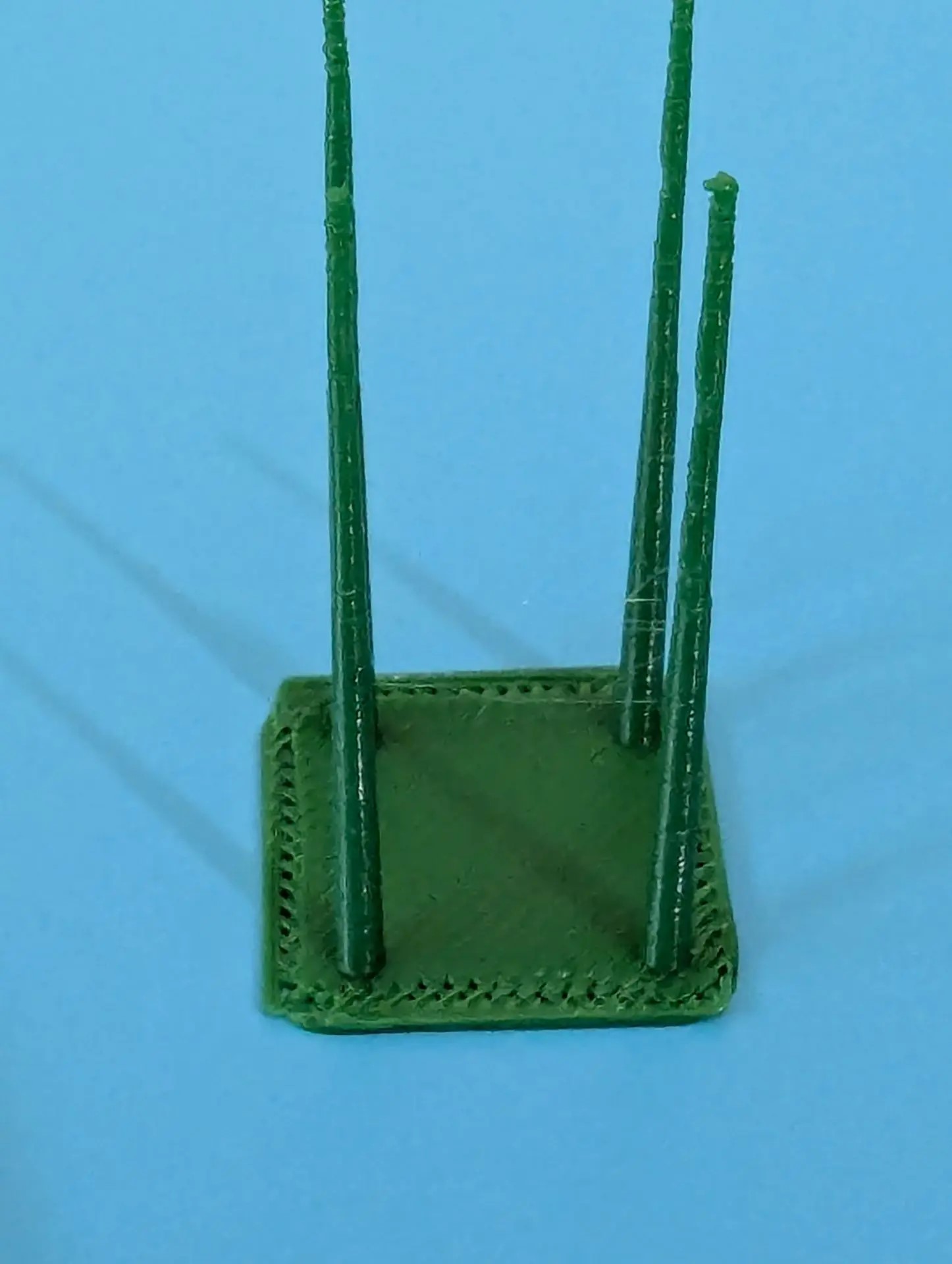
But you said above that calibration doesn’t complete? You also apparently changed nozzles just before the problem appeared? Did you change anything else between when it was working and when it quit working properly?
The printer had previously run for three 18-hour sessions without any issues. After I finished that print job and decided to start on other models, I swapped the filament, and this problem appeared.
Before thinking about failure chains and diving into the hardware replacement loop, could you share a few details about the model, filament and settings? Or even the 3mf?
Have you printed that file successfully in the past or does it print successfully on your other machine?
The top surface looks like a very wrong flow dynamics value but I would expect this to also lead to very bad spires. So I am wondering about top surface and filament settings.
On the hardware side, I am afraid it can be a rather deep and frustrating rabbit hole.
You have already replaced the nozzle so next up would be the extruder, PTFE path, extruder motor and TH board.
Hopefully, it is one of the former.
I once had a clog so bad, the extruder abraded the filament.
So after a number of cold pull’s, the nozzle was fed debris from the extruder, immediately leading to another partial clog which would cause renewed extruder contamination,…
In the end, cleaning the extruder thoroughly and also doing a number of hex key cold pulls before the next attempt got me printing again.
This is also a “good” opportunity to check the spring tension in the extruder as well as the extruder motor coupling. I have not had those issues but they can be quite severe.
In some cases, PTFE friction can become noticeable in the print.
Usually, the printer lets me know about the need to change PTFE’s by literally poking the filament in my eye.
But I have had a particularly difficult case with my X1 where not only the PTFE ends were frayed beyond recognition, but also the print head PTFE coupler was worn. If that is the case, you can take the coupler at the back of the same PTFE insides the printer and put it in the filament sensor. Replacements can be sourced from the set of 3 PTFE couplers for X/P series (6 single couplers in there which can be popped out).
Do not underestimate the trouble PTFE’s can cause. I once tracked an extruder overload error on my H2C from the nozzle, through the extruder, the buffer all the way to a badly cut PTFE in the new AMS2Pro… Got a spare buffer now 
Hope it is not something more serious like the extruder motor or TH board.
&
I don’t know, this is the first time this has happened to me. Tomorrow I’ll check it out and take the printhead apart completely. I sent an email to support with the files—maybe they’ll spot something.
It can help to provide this forum post link with the ticket. It gives background information and visibility.
Be aware though that earlier today Bambu posted a holiday period…
&
You might try swapping back and trying a print. Many who think their filament is dry sometimes have wet filament. Since you don’t say how you dry and how you are sure it’s dry, maybe it’s not?
It doesn’t look like water issues I’ve seen but with a filament swap it could point to some aspect of that filament spool you swapped in.
Support previously got back to me and recommended cleaning the extruder and printing from an external spool. I printed a test, and it looks perfect; the extruder also looks perfect—practically brand new—which means the issue lies with the AMS. I’m going to take it apart now.
Could you have the wrong tip size selected?
My friends, don’t look for simplicity in complexity. You can’t even imagine what I’ve done—naturally, only with the help of an assistant. If anyone is interested, I can lay out the full list of steps I took.
My friends, here is the full list of diagnostic steps that I have taken together with my assistant to uncover the truth. It was a massive investigation:
- Extruder inspection: I completely disassembled the extruder and the hotend on the faulty printer. Everything was in perfect condition, practically brand new, with no debris or clogs.
- Printing without AMS: I ran a test print feeding the filament directly from the external spool holder. The print came out absolutely flawless. This completely ruled out any issues with the nozzle size, extruder gears, or wet filament.
- AMS cross-testing: Since I now have two P1S printers, I performed a cross-test by swapping the AMS units. The brand-new AMS on the old printer produced the exact same catastrophic under-extrusion in the corners. Meanwhile, the old AMS on the new printer printed flawlessly. This proved that both AMS units are perfectly fine.
- Buffer and PTFE maintenance: I completely disassembled the Filament Buffer on the back of the faulty machine, inspected its mechanics, and replaced all PTFE tubes with brand-new ones to eliminate any hidden friction. The issue persisted.
- Flow dynamics calibration: At support’s request, I performed a manual Flow Dynamics (Pressure Advance) line calibration. The calibration lines themselves printed fine, but actual models printed through the AMS still suffered from torn layers in the corners.
- An important old symptom: I recalled that long before the under-extrusion started, this specific printer would periodically “lose” the first slot of the AMS (it would randomly detect and undetected the spool).
Final Conclusion:
The issue is 100% hardware-related and lies within the printer’s own electronics. When any AMS unit is connected and its motors put a load on the system, there is a voltage drop on the printer’s interface board/power stage, or the data bus sensor chip fails. Bambu Support has already recognized this as a valid warranty case and requested my shipping info to send replacement parts.