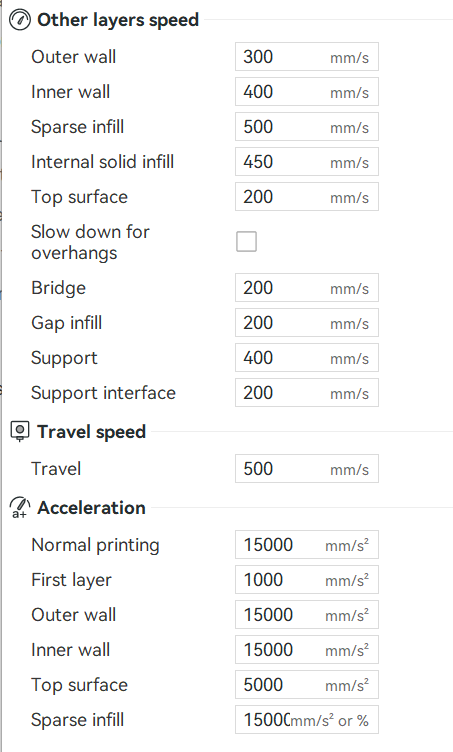
So I was working with a filament, ABS Bumat specifically, and somewhere after printing abunch I must have reset the speed. The filament rated for 60-90mm/s was then being printed at 330/200mm/s.
This resulted in a vibrating hum on long stretches being laid down. Then there was ripples across the top, and they felt like torn filament. (makes sense)
So keep an eye out for that.
I was going to request the devs look at this. This would suggest that any filament that is printed faster than intended, could be detected via the accelerometer used for the compensation during calibration.
So the printer could detect the vibrations and check with the user if defects are found.
Just a thought…
Those filament speeds stated by manufacturers are misleading, ignore them. What you need to respect is maximum flow rate, but that is related to how your machine can melt that filament, and with technical filaments sometimes printing slower makes it stronger (or helps with passive cooling), but that’s a different matter.
I believe those artifacts and sounds you heard was grid infill ripping apart and had nothing to do with the filament, so use gyroid next time and maybe it will print just fine at 3x the “rated” speed.
No, it’s the faster parts of infill. Gyroid does it too, leaves a pretty cool pattern though.
And yes, I tried multiple things, it’s the filament. One thing you have to remember, is a lot of filament is formulated for sub 150mm/s speeds because that’s been the hobby for the last decade and longer.
It’s like 10w40 vs grease, you just can’t get grease through a tube as fast as 10w40, ever.
I realized this morning what the filament surface reminded me of, the tearing.
Stretch out silly putty, and then as fast as you can, rip it apart. THAT sort of force happening over and over and over at a small scale vs a formulation that just doesn’t let you print faster…
Na, it was a month long investigation I had going on. I already deleted the video, might upload it again for reference. I was printing 4mm tall squares almost the size of the plate. It was the only filament I had that was doing it. It was printing great and then one day started doing what I describe earlier.
Customer support was helpful but still we never nailed anything down. Then I was referencing some properties and stumbled across the fact I must have reset the speed at some point on the filament so it was completely inappropriate.
In the meantime here’s a fun vid though
Well, 500mm/s and 20K acceleration is a bit different from the default. Just because the machine can move that fast doesn’t mean you should use it. There a reason why the “Standard” is the default.
The 500mm/s video wasn’t the problem video, the 2nd was.
The 500mm/s on first layer video was a fun other printing video I’ve produced.
I’m not aware of anyone else printing at 500mm/s. I wouldn’t think it’s a world-first though.
Ya I’ve looked around, I’ve seen that easily on layers other than the first, can’t say I’ve seen anyone else do it with the first layer though. I was curious about the K1 hehe, that would be just for a test though!