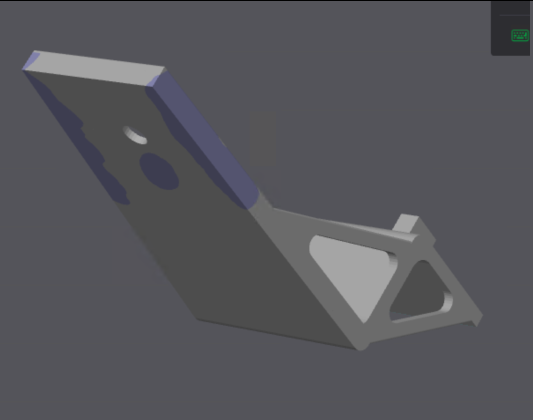
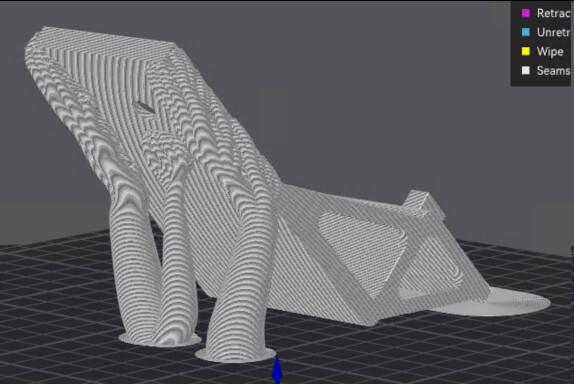
I got some slight improvement by tweaking some of the settings (see below), but still not getting tree support everywhere I paint it on.
The purple areas are where I “painted” support, and I want support in all those areas, even it technically it is below the automatic angle threshold for requiring support.
Here I’m using the Linux Bambu Studio to do the slicing, but IIRC I had the same issues when using the Windows Bambu Studio.
I started by using automatic tree support, but then I read somewhere that manual tree support would force the tree support onto the areas I painted, so I tried that. However, the pictures show that didn’t fully work either.
This shows I’m running the most current publicly released version of Bambu Studio.
I just now tried it in Windows Bambu Studio with the same result.
If you want to try yourself, the model is here:
It’s the third file, entitled “Cr-10 SE Nebula Cam Axis Holder.stl”
For strength purposes, I’m printing it at an angle so that the little slotted piece doesn’t break off easily:
Might be your version of Bambu Studio. I tried replicating your issue, but it worked worked just fine for me painting on supports. I’m running Studio version 2.2.1.58 on Windows 11. I even tried using all your settings to see if it would cause similar issue, but supports stayed where I panted them on
Maybe it’s the angle of the model? I have it sitting at a 45 degree angle.
2 Likes
@RandomKhaos First of all, thank you for your reply.
For which printer did you slice it? When I just now sliced it for the X1C, it gives the expected result:
i.e. On the X1C, it appears that forcing works like it should. If anything, probably too much because of the tweaking I did earlier trying to encourage it.
I think there may be a Bambu Studio slicer bug with the painted supports for the H2D, unless there’s something I’m overlooking, as it seems to be working for the X1C but not the H2D.
It was sliced for X1C. I went ahead and tried slicing again, but with H2D selected. It appears to work okay for me.
1 Like
Strange. I’m running the same version of Windows Bambu Studio as you are:
It’s even a fresh install.
Are you running classic or arachne?
It failed when I was running arachne. Then I switched to classic, and it seemed to work. Then when I switched back to arachne, it continued to work. That’s odd.
Well, just knowing that someone else has it working for slicing H2D on their machine was very helpful. Thank you! Evidently the problem is somewhere in my configuration. I’ll strip it back down to plain vanilla and then re-add until I can identify what made it go wrong.
Meanwhile, evidently the current linux version of BS lags behind the current Windows version, so I’ll stick with Windows, since that what you’re using and it’s working for you so that I can better hope to pinpoint where the fault may lay.
1 Like
I was using classic, but I did just try arachne without any issues. Sounds like you are running into a bug that might exist between versions. Sounds like you can at least work around the issue for now, but I am super curious what the culprit might be.
1 Like
I wasn’t able to piinpoint a specific setting that caused the problem because I wasn’t able reproduce the problem by starting with fresh print profiles and then “adding back”. Given that the problem manifested on two different computers, one running Linux BS and the other running Windows BS, my current guess, and its nothing more than that, is that somehow loading prior print profiles that were created in an earlier BS version from Bambu’s cloud somehow caused the problem/bug to manifest. Because it’s a closed system, I can’t pursue it further.
So, for now the workaround seems to be to start with plain vanilla print profiles on a current version of BS and then manually change the parameters to what they previously were in the legacy profile that was retrieved from the cloud. Save that and use it as the new print profile. Then delete the original source profile to guard against accidentally loading it again (and, besides, it no longer serves a purpose after respawning it as described).
Thanks again for your assistance. Without it I may not have tracked it down as easily. Just knowing that it worked on your computer helped tremendously in narrowing down where to look. 
1 Like
It’s the normal support expansion combined with tree hybrid. tree hybrid depends on multiple constraints so when you apply too many constraints… it gives up thinking
1 Like
All I know is that it seems to be working properly again. I had previously had exactly the same problem while printing this very large 1kg print object (a hat for keeping rain from dripping onto propane tank valves), which had to be tipped up on its edge at 45 degrees in both x and y in order to fit it into the H2D build volume:
14 inches in diameter, it would not have fit otherwise. This time I was able to add some targetted forced tree support to stabilize it, since it’s sitting literally on edge, without having to throw an entire forest at it:
Admittedly one could argue that I’m perhaps abusing trees by doiing it this way instead of carefully crafting supports in CAD and meticulously attaching them with sprou’s, but since this is more of a one-off I just didn’t want to be bothered with that if I could just let the machine do all the work for me. My time is expensive, but machine time is cheap, especially when I don’t need it immediately. I imagine we’ve all been in such a situation from time to time. Just throw it in the slicer with minimal effort, hit print, and come back the next day to pick it up. Indeed, no matter how I do it, this is roughly a one day print. A few hours more or less won’t make any meaningful difference.