As people upload different file types, some of which are not CAD files, trying to label this to match one scenario complicates things.
Assuming you are keeping three options, have them like this.
Open in Bambu Studio
Download 3MF
Download Files
This way the generic ‘files’ handles any file type supported today and the future.
It also doesn’t matter if ‘Download Files’ includes or excludes the 3mf file as the caption is fine either way.
Get rid of the sticky option.
Having a ‘sticky’ button makes it harder for new users as they will not understand why the way it looked when they first used it has changed and may think they no longer have access to the other options. New users aren’t as observant and explore less to find things.
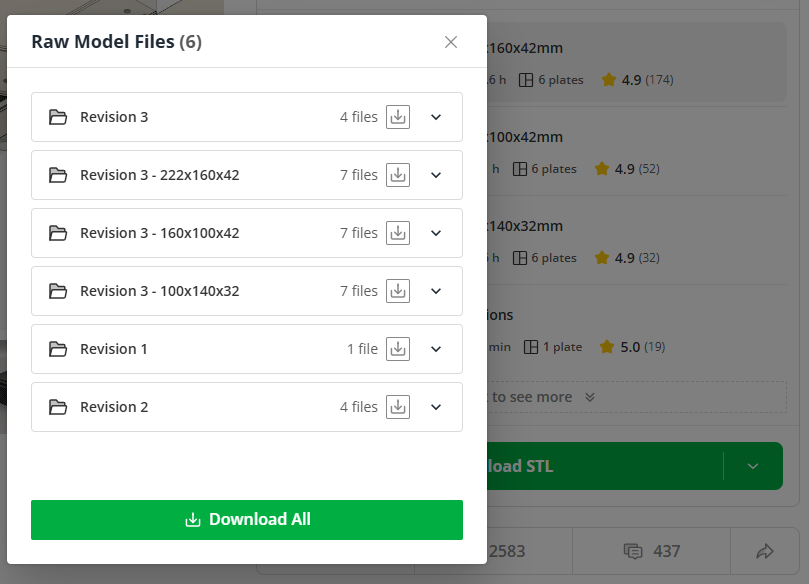
Thx for the response, i think this will improve the situation. On the other hand, the title of the modal should also be adjusted to match the label of the button.
Personally, I am with @MalcTheOracle to keep labels as short as possible, and
I also agree with @Uhl to not change the preferences on a single click.
If you plan to add more translations to the site at a later point - shorter labels will be beneficial as you will run into a space problem - where every character counts . Just to show an example in “German”.
2 Possible Translations
Download STL/CAD Files
Herunterladen von STL/CAD Dateien (variant a)
STL/CAD Dateien herunterladen (variant b)
I agree that calling it “Download RAW” can also be misunderstood and it’s not clear what to expect, as the Label did also not match the action triggered in the past as no download is actually triggered but the modal is shown. A more matching description would be “Show Source/Other Files” in that case.
From UX perspective there is also another problem/challenge. Interactions with the “Green Button” will trigger direct actions based on the selected profile, except for the “Download/STL” option that will show a list. But that one needs more investigations and probably bigger interface changes to get this one working.
So here are my suggestions:
If you feel more comfortable with “Download STL/CAD Files” - go for it, it will definitely improve the current situation.
Adjust the title of the modal to match “STL/CAD Files ()”
Please move the default action of the button to the user settings. It is really annoying to having defaults change based on a single interaction.
I have many models where I provide the fusion360 (.f3d) file so people can adjust the model to their own parameters.
Also, I now upload everything as 3mf files, even when I don’t have a print profile for it.
And the way it’s presented doesn’t make it look like there are other models than the available print profiles when it’s actually the case (today again I got a comment on one of my model that users couldn’t find the version for the pixel watch gen1)
And yes, they are adding support for f3d parameters to be modified within makerworld, but for now it only works for single part models.
Just came across this thread today, as I was unable to find the download option for the CAD files of some model. Did you perhaps forget to update the label in other language versions? German in my case. Or was the renaming never done in the first place?
 . Just to show an example in “German”.