Hello,
I have been having trouble with printing a hand knob. I would like to embed a 2-inch long 1/4-20 hex bolt in the knob, but the only way to drop the bolt in at a “pause” point is when there is no direct support in the hole and hex cavity that accepts the bolt. That is, I have tried to elevate the knob above the bed high enough to drop the bolt length in a hole and hex shape and then try to continue printing to embed the bolt head in the knob with a resulting knob with a centered exposed thread. I am using a Bambu P1S and have tried both manual and automatic support (tree and normal) but a support is invariably finds its way into the hole and hex cavity preventing me from dropping in the bolt without interference before subsequently embedding above the bolt head. I have tried the paint options to deliberately block support generation of the ceiling of the hex cavity, but interfering support is still generated. Again, I need external support on the knob overhangs, but need a clear vertical path beneath the knob to allow the bolt to drop-in. If anyone can provide suggestions, it would be a great help! Thank you community!
You have now used the forum enough to share images.
Please, share a photo of the model if you have already tried printing it.
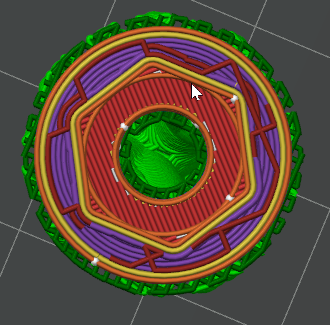
Please, also share a screenshot of the model sliced, from the preview tab. Make sure legend shows the line type view.
Can you design a ‘break away’ part of the knob to serve as a support?
I created a simple knob in Fusion, using a McMaster-Carr bolt as a cutting tool to create a hex cavity in a cylinder.
In Studio, I imported the model, added a small 2mm primitive cube off to the side, and merged the two objects, which let me elevate the knob (only) above the plate. I used the fill tool to paint the underside of the knob for manual supports, and the sphere tool to block supports on the top surface. The sphere tool paints a volume, not just the surface; make the pen size large enough to reach the top of the cavity. The cavity may not show red (support blocked), but the supports were blocked.
EDIT: New problem. I just realized the support under the knob will stop the bolt from dropping in. No time now to experiment further.. Maybe the small cube could be replaced with a thin disc on the plate, centered under the knob, to prevent supports being generated directly under the hole?
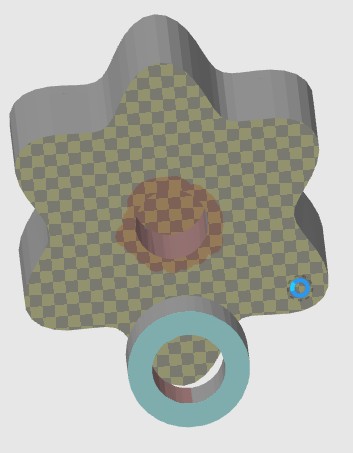
I made a knob in TinkerCad that is hovering above a open cylinder. I grouped them in Tinkercad to make them one part.
Painted a keep out for supports around and in the center hole of the knob on the bottom to make clear space for the bolt.
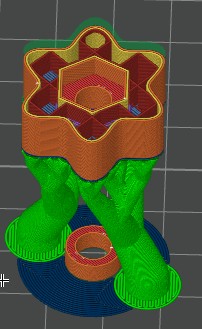
Slice and it looks like it would work. Just pause the print before the bolt is covered to drop it in.
Thank you for your response! Cool approach I will try!
I have looked on YouTube and will try their suggestions.Thanks for following up.
Appreciate and thanks for the help!