This is the dumbest problem ever. I stupidly bought Sunlu Easy ABS which prints at 225C-235C as specified on the roll. I tried to run it once with the normal ABS settings and it bulged before the hotend and clogged. Okay, so I went through and changed all of the settings to max out in the range specified by Sunlu. 90% of the time it stays in this range while printing, however when the print starts and when ever the printer decides to stop and clean the nozzle it overrides all of my temperature settings (I can see the max value change on the printer monitor screen) and sets a temp of 270C on its own and then drops back down to 225 when it starts printing again, but by then its clogged again and the stupid slicer overriding my settings have ruined another print. I’ll never buy this weird ABS ever again, but at the same time if I specify a max temp of 230C the slicer needs to obey that setting even when it’s doing one of its nozzle maintenance routines. I’ve taken my toolhead apart 4 times because of this bug because the filament gets too bulged to go in or come out and no matter how carefully I go through the settings with a fine tooth comb it always finds a reason to override what I have specified and run its own ABS settings making printing this filament impossible.
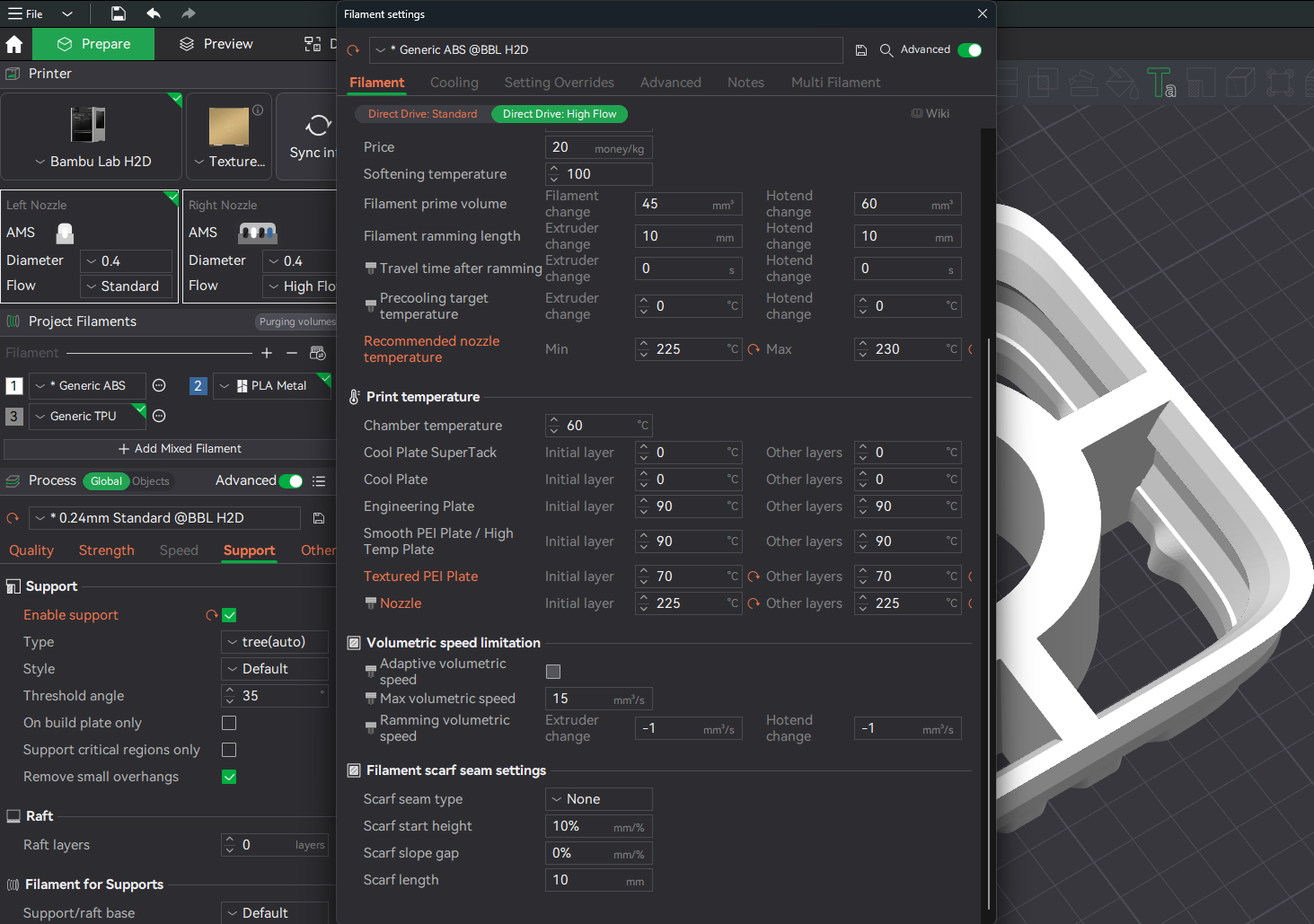
All of below is assuming it’s the flush temperature which is the issue… I think so from the problem description, but caveat emptor.
There’s a separate, optional, setting for filament flush temperatures. Typically this setting is 0 (zero), which means “use the filament’s maximum temperature for flush.” But if set to a non-zero number, it will override the flush temperature. There’s also a (newer?) setting for flush temperature when “fast” flushing is enabled (when the “purge strategy” is set to “filament saving” mode).
These weren’t exposed to the slicer UI until some relatively recent version (2.6 or 2.7 maybe). In recent versions, those settings can be found on the “Multi Filament” settings tab.
I checked the latest released generic ABS filament profiles and I don’t see the flush temperatures being overridden in them, but it would be worth a check. If using an older Studio, this will need to be verified by opening the filament profile file… save your customized profile with a new name, then find the .json file in your Studio data configuration folder and look for the following properties:
filament_flush_temp
filament_flush_temp_fast
If those settings are present and non-zero (in either the file or the UI) then change them… either to zero (so it uses max. nozzle temp.) or the desired actual flush temperature.
Having said all that, this could also be some bug with getting nozzles mixed up… for kicks you could try making sure the “Standard” nozzle temperature settings match the HF ones.
Finally, before printing anything, you can check which flush temperatures it will actually be using:
- Save the slice as a g-code file (File → Export → To g-code after slicing).
- Open the resulting .gcode file in any plain text editor.
- Search for the line containing “filament_flush_temp” (no quotes).
- Check the temperatures listed on that line… the actual temperature it will use should be the non-zero value(s) shown on that line. eg:
; filament_flush_temp = 0,0,250,0,0
HTH,
-Max
PS. To clarify, the special flush temperature setting described above is used for all pre-print flushing, even for single color/material/nozzle prints. I don’t know why Studio devs put the settings in the “Multi Filament” tab specifically.
as a workaround: would telling the printer it is petg (and then modifying generic petg profile) work? (or any other material that might be closer to your desired temperature range)
Building on Max’s suggestion, I’d separate the configured flush temperature from the temperature commands actually generated for this job. Before another print, export the sliced G-code and inspect the temperature changes around startup and nozzle cleaning. Does 270°C appear there, and what operation immediately precedes it? Please also share your printer model, Studio version, nozzle type, and screenshots of both flush-temperature fields. That would help distinguish a profile setting from a machine-specific routine. I wouldn’t switch the material identity to PETG yet, because that changes another variable. If the exported file already requests 270°C, a minimal reproducible project would make a much clearer bug report.