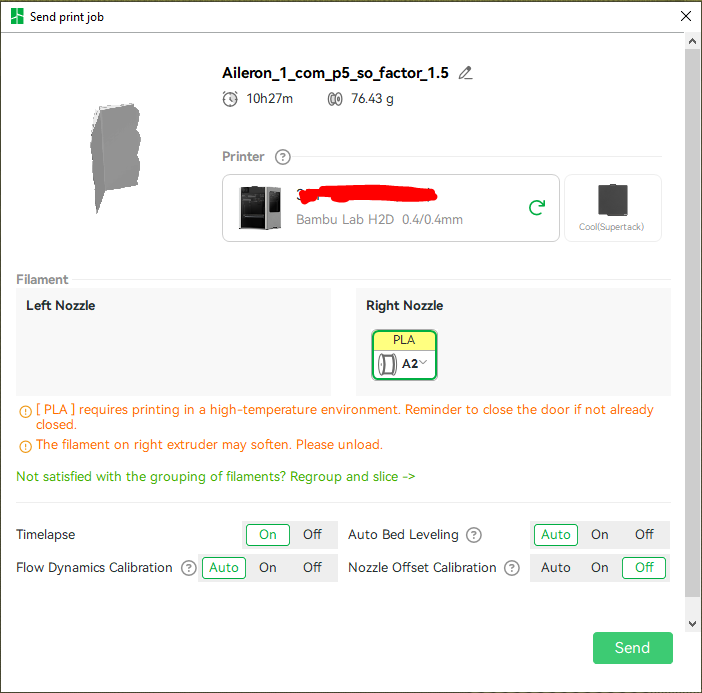
Why should I unload while it needs it to print
Something truly odd is going on there… PLA definitely does not require a high-temp environment. So yes it would soften… the second warning is actually correct… lol. But no, that makes no sense overall.
Is the filament profile being used adjusted for some reason to require heated chamber (or have any chamber temperature set in Filament → Print temperature?
Do you have other filaments in this project at al? Does it help to restart Studio or re-open the project. Does it do the same with a different project (and PLA)? Would be curious to see the project file if you can post it, though ultimately this looks buggy (assuming filament profile is OK) and should probably be filed as an issue at GitHub.
-Max
Are you running a custom filament profile that has chamber heat turned on?
Yes, but the warring is still not logical
It makes perfect sense when you recognize that these are two separate notifications (not warnings, they’re just informational) - each is displaying for perfectly logical reasons, and it’s absolutely due to the PLA profile you’re using having a chamber temp value selected.
There’s a hover-over dialogue in the chamber temp parameter that says what’s what:
Then, if you slice the plate with that filament selected, the first notification appears - which is perfectly sensible, you have a chamber temperature set so the printer needs the door closed to be able to achieve and regulate that temperature.
Finally, in preflight, the slicer contacts the printer to see what filaments it had loaded. If the slicer sees a low temp filament loaded AND you’re going to be printing with this special high chamber temp PLA, it recognizes a problem and tells you that.
Notice in both your example and mine, the loaded PLA is not the same as the high chamber temp PLA - it could be that if you create a custom PLA profile that requires an elevated chamber temp and sync it to the printer and select that as your loaded filament on the printer, this notification won’t appear.
The other option is just to unload that filament prior to the print.
Lastly, none of this stops you from proceeding with the print.