Dear Bambu Community,
First, I’d like to commend the developers of the Bambu Studio software. All my previous suggestions for software improvements have been implemented quickly and consistently.
Today, I am reaching out with another suggestion to improve Bambu Studio.
Specifically, this concerns how information is displayed in the “Device” menu within Bambu Studio (version 2.8.2.61).
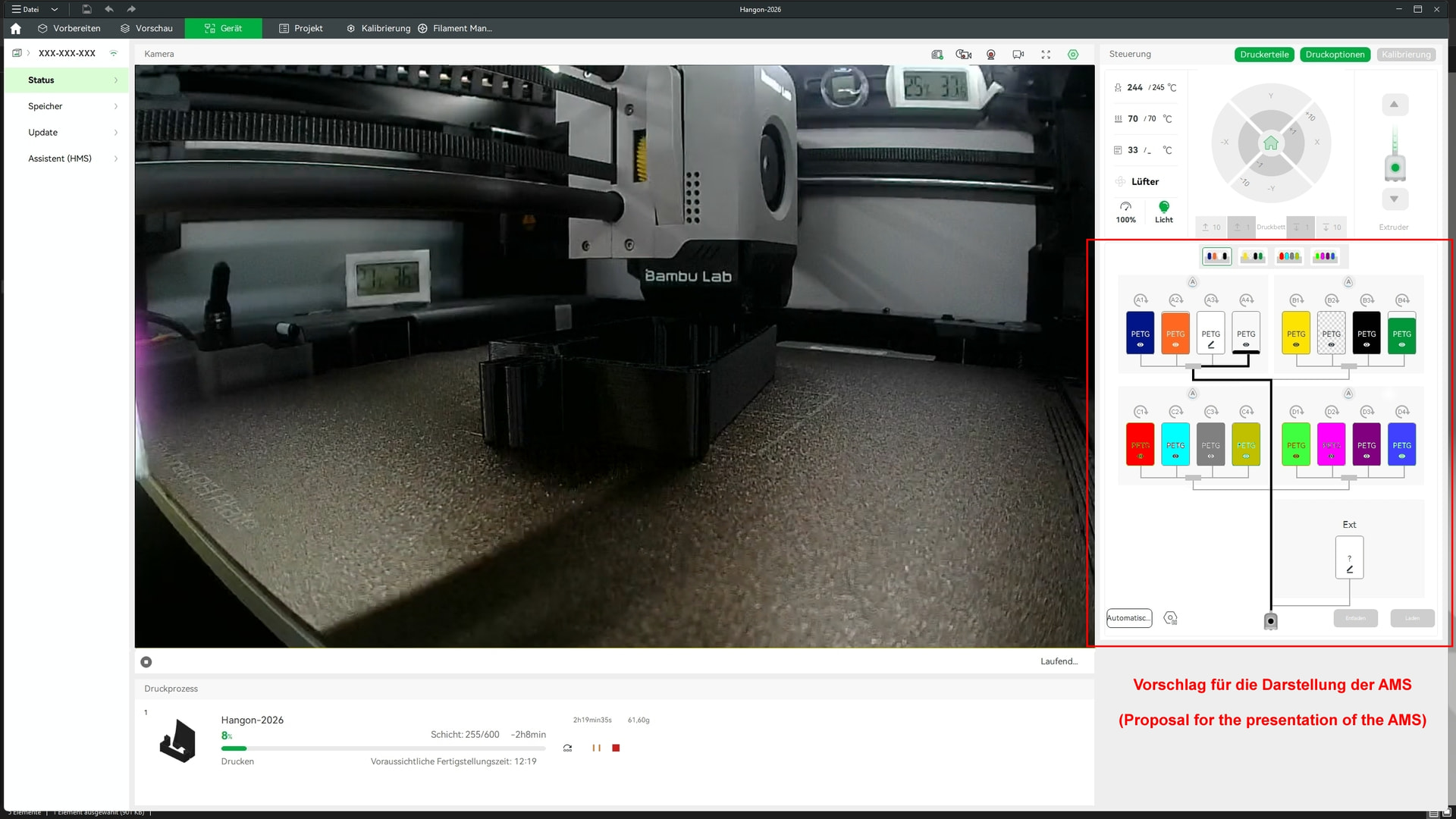
The proposal is described below using the Bambu Lab X1C 3D printer as an example (please see the attached graphic).
The Issue -
Bambu Studio features a “Device” menu that provides access to important information and settings regarding the 3D printer and available filaments.
When using multiple AMS units, however, only one AMS is displayed—regardless of whether that specific unit is currently in use.
To access information about the filaments in the active AMS, you must first select that specific unit (unless, by chance, it happens to be the one currently displayed).
This is not particularly user-friendly when working with multiple AMS units.
A better approach would be to provide a comprehensive overview of all connected AMS units and the filaments currently loaded in them.
Proposed Improvement -
Display all AMS units connected to the 3D printer (supporting up to 4 units).
An image illustrating the proposed improvement is attached.
I look forward to hearing your thoughts.
Best regards to the Bambu community.