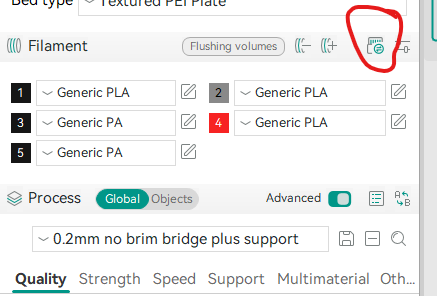
Is there a description of what the difference is between these two options in Bambu Studio when clicking the Sync button in the Prepare tab?
- Sync
- Resync
My understanding is that Sync sends your current config to the AMS and Resync pulls the configuration from the AMS.
I interpret this differently - all syncs are from the AMS to Bambu Studio (or Orca), and never to the AMS.
Sync: Assigns a System Preset or Generic Preset in the slicer only for AMS slots for which the filament spool has been changed. The presets (system or customised) for other spools/slots in the slicer will not be changed.
Resync: Re-assigns a System Preset or Generic Preset in the slicer for all AMS slots, effectively overwriting any custom settings.
After a Sync or Resync the System Preset or Generic Preset can be customised and saved as a new global or project-specific preset. Alternatively, a User Preset can be assigned to a slot.
I have ask that question before. Not sure what is meant by “preset”,
Looks to me what the difference is:
Sync: sends the command to the AMS to read the NFC tags. then pulls that into Bambu slicer.
ReSync: grabs the current settings From the AMS. If empty it doesn’t change Bambu Studio. Allowing you to load the filament before starting the print.
I have yet to verify this. Complicated by my Bambu Studio is not next to the printer.
Most of the time I use “reSync”.
I find the outcome unpredictable when using Sync (only changes) so always Resync (matches what’s in the AMS completely).

Even when opening/importing a downloaded project from Makerworld, I Resync as the project filaments are never the same as I have.
Thread necro…
I’m new to all of this but I really don’t understand what the role of telling the AMS what it’s loaded with is.
I have the AMS Lite and an A1 though - is it different? I can only choose a very limited amount of filaments on the AMS Lite directly - it doesn’t ‘see’ the filaments I create in Bambu Studio and let me tell it they’re loaded. I can tell AMS what is in each slot ‘generically’ - and also a ‘Dynamic Pressure Control’ setting - presumably that has come from the Calibration and shows relevant settings according to what filament type I’ve told it is loaded?
If I’ve got filaments in the model selected, with names and calibrated K values etc., when I Sync/Resync, they’re replaced with the ‘generic’ names from the AMS. If I then print, does the printer use the calibrated pressure control that’s assigned on the AMS - and the K value from the filament in the Slicer?
As for the filament itself, does the setting on the AMS matter - as the values etc. are all sent in the gcode from the model when ‘Print’ is selected isn’t it?
Ui all, I can’t seem to find the menus, pathways to resync the AMS. When I select a filament and load when the print starts that selected filament unloads and another one loads and starts the print. Any help would be appreciated.
B
The sync button that I believe is referenced in this thread is located here,
Also, make sure you choose what filament you want to print with in the slicer by selecting the model and pressing the number key that matches the location in the AMS. Then make sure that the correct location is shown in the pop up dialog when sending it to the printer.
Hope this helps