You no longer need to unplug the battery from the switchboard. I always felt like it was going to break one day, plus it hurt my fingers to pull it out.

However, this also poses a certain risk if you forget to flip the switch. In this case, the circuit board is constantly under voltage and can interfere with the charger.
It depends, of course, on what kind of charger you use, but since these batteries are like little bombs (regardless of the manufacturer, that’s just the nature of these things), I would always use a charger that detects irregularities.
It is already critical to leave batteries in 3D-printed objects while they are charging due to the heat, risk of explosion and possible vapours. This is fine until you have seen these things explode and then decide to use fireproof surfaces.
No advertising, but something like this:

Isn’t that designed for bare cells?
A cable is OK, but not a solution as it is liable to incorrect installation.
It also requires a means to access the cable, this could be a port, but not ideal amd could have someone bridging the pins.
A much better solution would be a board with a charging solution build in with a USB C socket that can charge and continue to power during charging.
They have a board available for sale, albeit not directly suitable. It is an example of how it can be done.
This is a board as one part of many.
This an example of a solution, not the solution itself.
I have no idea if they manufacture this themselves (or indirectly by a third party) or simple a product they resell.
This board has an in (li-ion battery), an out (a ZH1.5 cable) and a USB C socket. The board contains charging circuitry, which would stop overcharge issues (hopefully).
For CyberBrick, we should have a smaller board (this one is small, but they can be smaller), it should support XHR 2.54 connectors (the power standard of CyberBrick boards).
The board itself doesn’t need to have a built in USB C socket, it could utilise a cable to USB C, this would let us move the USB C socket according to the model’s design.
They sell one already, although a better one using a much smaller plastic casing for the socket and a simple means of adding the socket to a model. Some grooves in the casing that will allow a design to snap around the socket so it locks into the model and can’t be removed easily by enthusiastic kids.
In addition to this they must sell. XHR2.54 to PH2.0 cable and small board, these are still surprisingly not available as a product item.
Variants of these two.
The current connectivity of CyberBrick and power is annoyingly limited.
Being able to connect to the rechargeable board (independent of CyberBrick power) to add different features would be very useful.
Connecting to the Power Distribution board, would also help.
Being able to power CyberBrick (transmitter and receiver) by mains directly would be a huge improvement.
To be honest, I had to think about what you meant. I guess you’ve seen only the picture? As I said, that was just an example.
Bambu writes in their description that they have installed an overcharge protection device in their battery: “Overcharge and Over-discharge Protection: Protects the battery from damage caused by excessive charging or discharging.”
You can either trust it, or not and use an external charger additional monitoring. Of course, the matching one.
Either way, the argument remains that there is a certain risk involved in using the cable from OP. It is never a good idea to short anything, which unfortunately can happen due to the set-up. It doesn’t have to happen, but it can.
I am also a little cautious about this: normally, the batteries come with a external protection circuit. As I understand it, this protection is supposedly built into the battery itself. I may be completely wrong here, so please correct me if I am.
Example:
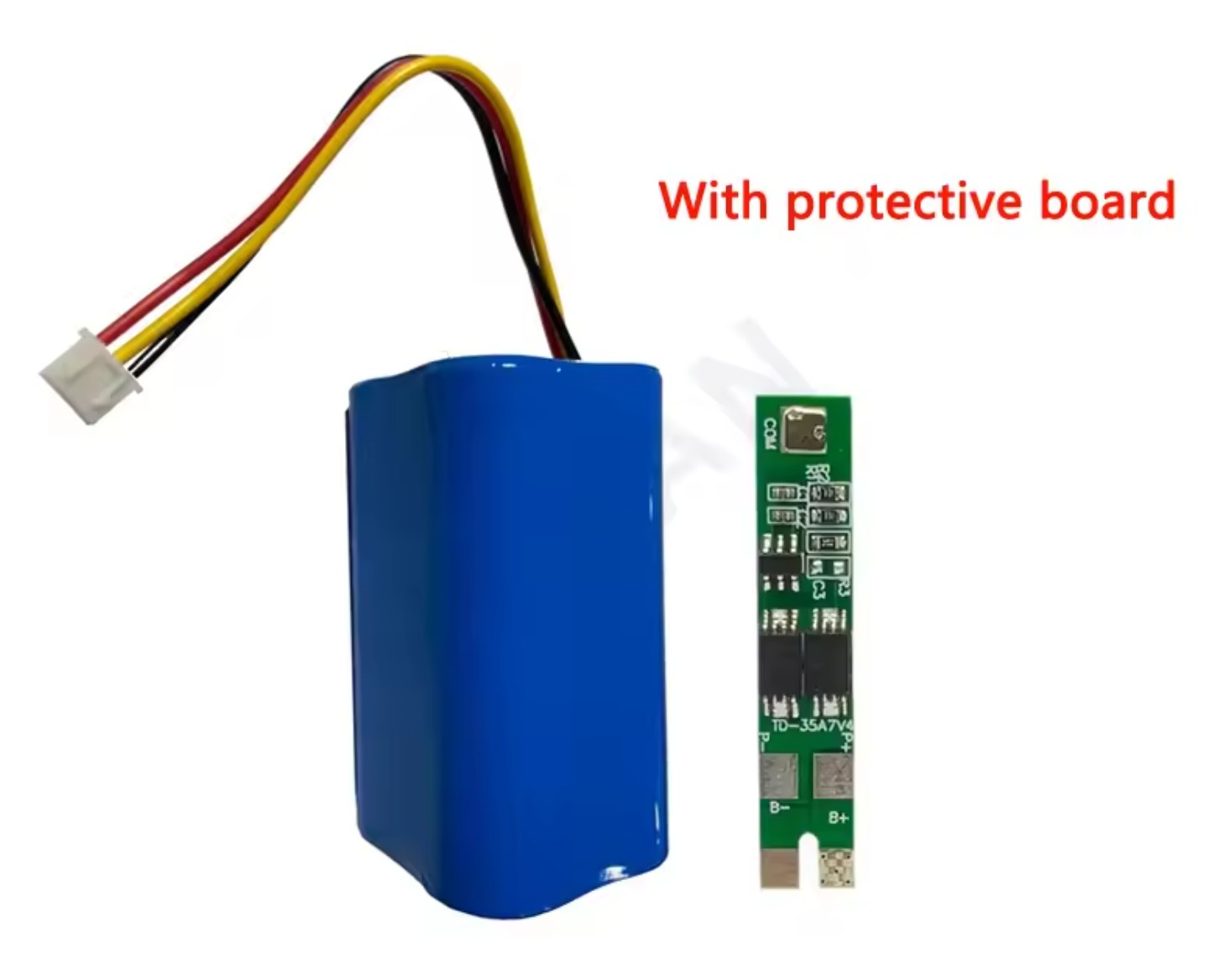
Installing the protective circuit board directly in the battery is rather, let’s say, unfavourable, as a defect of the battery could damage the circuit board and render the protection ineffective. So I am torn: good if there is protection, bad if it is installed in the battery.
But as I said, maybe I’m just being critical as an electronics technician, because I’ve seen these things explode, and not just once.
We often see reports of them exploding.
A major incident started after just one explosion and took out most of a data centre.
We can’t stop all incidents, but we should try.
Yes just saw the picture, I don’t know anything about RC batteries, I just assumed from the picture seeing that it had balance (individual cell) charging connections, and this suggested to me that it wasn’t expecting to see a BMS on the battery.
I am an EE, but literally any savvy RC hobbiest would know more about than me. Just saw the picture and thought “hmm, looks like it is expecting access to the individual cells, RC batteries are probably bare”. And as you mentioned the cyberbrick batteries are known to include a BMS (and do not have access to the midpoint cell connection).
I replaced the image with another one. This should avoid any confusion. Cheers for letting me know. 
Lithium cells come in both protected and unprotected configurations. Although the protection is always provided by a separate circuit board. Lithium multi cell packs can come the same ways. One circuit board might serve multiple cells in a larger pack.
These battery protection circuits (Battery Management System) prevent cells from being over charged or over discharged, which are the two things that are mostly likely to result in a battery fire. They go open-circuit when either condition is violated.
Cylindrical cells come in a type called “button top”, where the BMS circuit is directly under the positive battery “button” electrode.
The downside of this type is that current draw is usually limited to a level that’s much lower than the battery can actually deliver. The connection to the battery is made with a device called a FET, and large FETs are needed for high currents. They’re big and expensive. So what’s in the battery is small and limited. A battery might be able to deliver substantially higher currents than the BMS will allow.
I’m pretty sure the Cyberbrick battery is protected. So you don’t need a fancy RC battery type charger, just a wall wart with the correct voltage/current rating. The BMS takes care of all the other complexities for you.
For RC batteries, which are not protected because the currents drawn can be quite high (I have a large scale T-28 prop airplane that pulls north of 125A at wide open throttle, but there are guys out there with models that pull over 200A), the rule of thumb is to never charge them inside a model. Always remove when the model isn’t being flown. You want to be able to see the pack, because the cells swell up before they catch fire. If you can see them, you can do something about it before disaster strikes.
These unprotected packs need a “balance charger”, one that is capable if measuring the voltage of each individual cell in the pack, and adjusting the charge current so that all the cells reach their max charge level with none going over the max. There’s nothing to protect them in discharge except the model pilot paying attention to battery voltage and landing before it’s too late.
These are prismatic cells (rectangles) not the cylindrical cells in the CB battery. Soft plastic envelopes that puff up like balloons. The cylindrical cells in the CB battery pack have a steel sleeve and they can’t really swell up, so there’s not a lot to be gained by charging them externally. You’re relying on the BMS to protect you whether you can see the batteries or not.
So there’s no big reason not to charge the battery still installed in the model. Even if you forget to power off the electronics. The worst that will happen is that the battery won’t charge (or maybe discharge further) because the electronics are drawing all the juice. But the cell’s protection should keep anything bad from happening.
Thank you for the detailed description. For my part, I remain cautious. I’ve seen too many of those ‘protected batteries’ pop. Well, sometimes it was the customer’s fault, but sometimes it was also a technical failure. From toys to portable entertainment electronics. I’ve had all sorts of things on the table for repair and analysis.
Just two months ago, there was a case when a battery blew off in a bedroom during the night. Whereby one should not imagine this as an big explosion: actually, hissing and fumes escaping, followed by extreme heat
I can only advise everyone, regardless of the type of battery or device: Do not charge in rooms where you sleep and, if possible, place on a fireproof surface.
I completely agree with you. I was just suggesting an idea, and I’ll provide the full details of the solution later (I’m still waiting for some parts to arrive).
When I use it, I do need to turn off the main switch first before connecting the charger. You’re right, it is risky to leave the switch on.
So, in the design, a mechanical structure could be used to ensure only one function is active at a time (either charging or operation). Of course, redesigning the circuit board could also achieve this, but I was considering wider accessibility, as well as the cost and learning curve.
I hope to find a solution that lets everyone have fun easily and enjoy the process, rather than turning it into a difficult or laborious study. Of course, ensuring safety is a priority at the same time.
The simplest and quickest way to implement this would probably be a smal relay. As soon as voltage is applied for charging, the connection to the circuit board is disconnected and connected to the battery. That would be one electronic component. As soon as the charging voltage is removed, the relay falls off and battery reconnects to the circuit board.
You just have to make sure that it has an opening and closing contact.

I think instead of a relay a switch with 2 positions is the easiest to make the splitter “safe”, one for charging/off, other for “use”
It’s actually a feature in most battery management circuits I’m familiar with - they monitor temperature while the batteries charge and adjust charge rate as necessary to not cause venting or other issues.
And are they built directly into the battery, or do you mean external ones? I couldn’t quite follow your comment because I didn’t know which of the two you meant.
I was referring to the external ones. There are batteries with some smarts built in but similar deal. Monitoring battery temp during charge gets more important especially when batteries can be so flammable.
Thanks for the reply, now I know what you meant. I agree with you 100%.
I saw some a few years ago (batteries with electronics built in) and was impressed but also noted how much cell volume was lost to the electronics. Looking now there seems to be some on tiny boards that only take up a mm or so.
Don’t really know what to think of them as haven’t really looked into them but if they help keep batteries un-flamed it’s probably good?