EDIT :
I had to check the wiki because I wasn’t understanding what I was reading. The thing is, I had always been using the correct timelapse mode—Smooth—without really knowing its name. So when the pop-up suggested I switch modes, I figured I was using Traditional all allong and needed to switch to Smooth.
When I went to the settings and saw the difference in print time, I went back to the wiki to double-check. That’s when it got even more confusing—because after looking at the GIF that shows the difference between the two modes, I realized I had never used Traditional before. So I couldn’t understand why it was suddenly enabled.
Somehow, it seems like Studio decided to switch the setting on its own, because the print I did just a few minutes earlier was definitely on Smooth.
and that is the case for also all the print i did before, so another bug ?
The traditional timelapse records a pic at the end of each layer regardless of where the print head is.
The smooth timelapse takes a pic at the end of each layer with the print head over the poop chute.
Due to possible oozing during the photo shoot, the nozzle is then primed on the prime tower.
=> So there are more travel and priming moves with the smooth timelapse.
=> For thin, tall models where layer time becomes a problem, enabling a smooth timelapse can force additional cooling time, preventing overheat damage.
So then why does the warning suggest that the traditional mode may cause surface imperfections?
Also confused by this, if the camera is just taking pictures between each layer and not moving the toolhead or doing any other adjustments, how does this cause imperfections? I would assume smooth mode is more likely to cause imperfections, as we have to move the toolhead, deal with additional part cooling, and then use the prime tower to purge/clean potential oozing
Logically, it seems like smooth mode has more potential to cause issues.
I regard it more as a disclaimer regarding oozing rather than an actual oozing. Although the introduction of “ramming” may have something to do with it. There are certainly some related issues with the H2D which need to be addressed. Can’t really go into it though as I do not have an H2D.
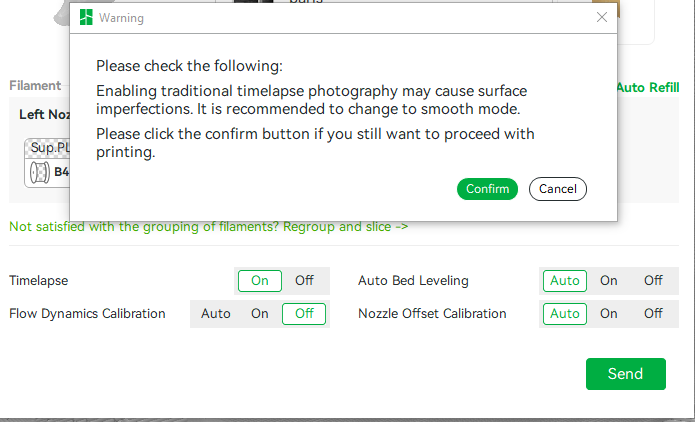
Timelapse traditional mode is just like normal printing, right? So if I turn timelapse off, I would still have this surface imperfection issue? Just got this prompt today, seems very weird and unintuitive.
timelapse mode can actually be exploited to be useful
if you’re using a material that really needs its layers to cool 100% without using a fan
you can just turn on timelapse and each time it stops for a photo it gives it a chance to chill.
As @flabbyorca mentioned, taking a smooth timelapse is a means to prevent particular types of defects. While thay are vexing when they occur, they tend to be rare and mainly related to thin structures. A unicorns horn, small, spindly towers, that kind of thing. So most of the time, you’ll not actually have that risk with a traditional timelapse or wirhout a timelapse.
An interesting change is that it now mentions where to find the setting.
This didn’t pop up in the previous version, however, and the printer profile indicates ‘Traditional’ is default:
As @Anthony_Kinson and @EL5 have pointed out, this warning makes no sense. The print head doesn’t stop moving in ‘Traditional’ mode, while it does interrupt the print in ‘Smooth’ mode. If anything, it should provide this warning when the setting is set to ‘Smooth’. Just like OP, I also consider this a bug.
Which printer are you seeing this with and is it with a multi-filament print?
On an H2D, I see this message when I’m printing with multiple nozzles, and there are layers where one nozzle isn’t used and other layers where the other nozzle isn’t used.
For example, if I’m printing a 3 color print (red, white and black), with white on the left nozzle and red/black on the right, I won’t see this message if there is white on every layers. I will see the message if there are any layers that don’t contain any white whatsoever and there are layers without any red or black.
I think it has to do with the fact that the h2d has to shift the build plate up/down when switching between the left and right nozzles. If every layer always uses the right nozzle, it can take the photo when the right nozzle is engaged (or if every layer uses the left, it can take the photo with the left nozzle is engaged.) However, if has to take photos when different nozzles are engaged, the timelapse will be really janky with the build plate jumping up and down. So, then it has to do some kind of hybrid between “traditional” and “smooth” with the tradeoffs of smooth unexpected.
It’s an H2D Pro on my end. I think you’re on to something. It’s still either a weird way of communicating it, or just an obsolete message. They can take the picture at any given time after layer completion, the print doesn’t need to be running any different compared to printing without any video recording. With smooth mode, the print must always deviate, so that’s not supposed to be a recommendation in any case.
I do agree that the warning message used is extremely confusing and doesn’t make much sense. Perhaps someone from @BambuLab can take notice and clean up that message in the slicer.