Over the last couple of days my top layers were getting a bit messy and decided to use a 0.6 nozzle and move to a matte filament just to get the print done.
Unfortunately this failed. I am using some esun filament so thought that I would calibrate it first. I ran the mechanical calibration but when I tried to run the filament calibration, I could not select the EXT Filament or use the drop down for selection. I have rebooted the PC and switched the printer off for while and still no joy.
On the devise tab I have highlighted the external feed.
No updates since it was working a couple of days ago.
This has me stumped and the first real problem I have had in a year.
I think you are referring to the Bambu calibrations tab? Where the options are Flow Dynamics or Flow Rate ? Once you have your filaments proper in the Device tab, sync it from the Prepare tab. Then in the calibration screen below the text Filament for calibration are icons representing AMS and External spool. Once you select the external spool it will change and show you only a single drop-down selector labeled EXT.
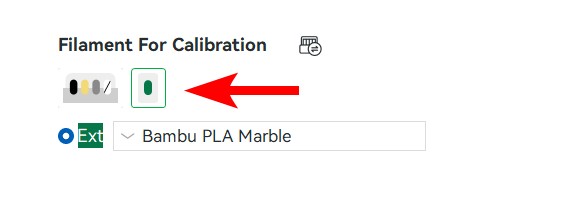
What do I do if the filament for calibration says it is Incompatible.
I’ve not seen an incompatible message before, but playing around I was able to cause it, so there may be other reasons / ways to see an incompatible message.
First, be sure to have your AMS and nozzle information sync’d. I have a custom profile for Amolen PLA Rock. This profile is for a .4mm nozzle only. There has been no profile created for any other size nozzle. In the calibration screen, selecting a nozzle diameter for any size other than .4 it reports back incompatible because I only have a profile for the .4mm nozzle.

Same incopatible when use generic filaments imposible to calibrate, only works with bambu filamament
I am not sure if this has actually been resolved. I am brand new to the 3D printing world (as of 2 days ago). I ran an All-In-One calibration test print (overhang, bridging, etc.) and needed to tweak some settings, but ran into this snag as well, messed around in the settings, and figured it may help.
- Go to Device tab
- Select the little pencil icon in the “Ext” box by the Unload and Load buttons
- Select “Generic PLA”
- Select the color
- Confirm
- Go to Calibration tab
- Select “Sync” button toward the top
- The filament should auto-select
- Calibrate
Thank you! This was very useful!
Thank you, this helped me a lot!
I just wanted to add some photos for future reference.
As you will see in the photos; my trouble AMS slot was A4. I needed to load a custom filament I created, named “INLAND PLA Tough”. This is on PC.
- On the Device Tab I clicked the pencil on slot ‘A4’ (photo 1)
- On the popup I selected my profile name from the drop down (photo 2)
- After clicking confirm, it was available to select from the calibration screen.
photo 1
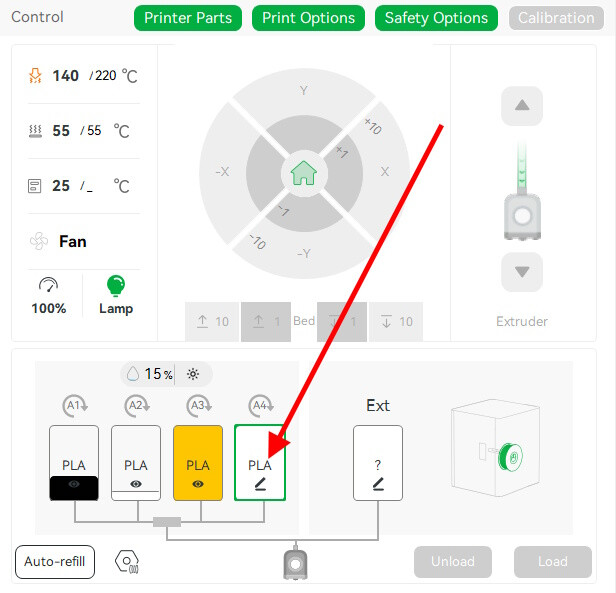
photo 2

Thank you for including the photos!! When I posted my original comment with my steps, it wouldn’t allow me! Not sure why?
So, thank you again!
Oh man, I never came to log in to the forum but I absolutely had to to thank you for this one. We owe you one!