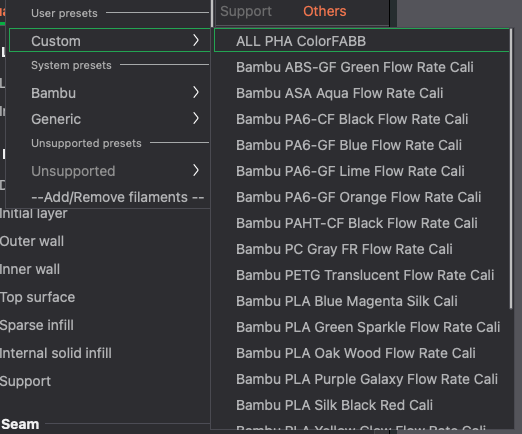
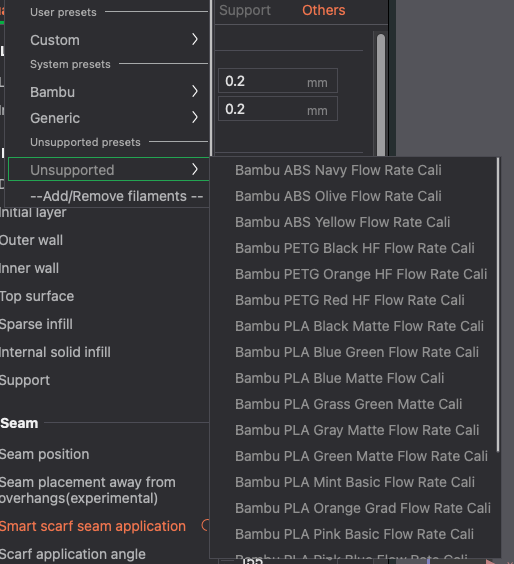
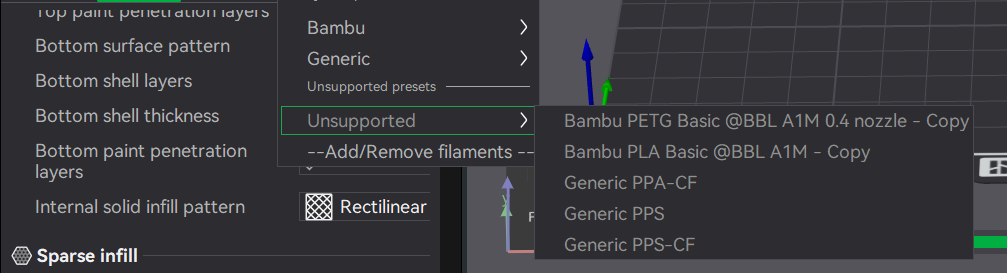
I am having a similar problem to other Bambu Studio users after the updating from v2.3 to v2.4 where my custom calibration presets are being listed as “unsupported”. What’s interesting though are that some of them are supported and some are not
Except for one filament (which is supported with both software versions), I am using all Bambu filament and a Bambu printer so I assumed it would all be compatible and within the bounds of the printer.
Overall, for the flow rate calibrations, I was just adjusting for slight under extrusion and usually the settings changed would just be a -5 and -1, for example, in the Flow Rate Calibration so nothing too drastic. Unless there was a significant change of flow rate calibrations between the Bambu Studio release versions?
I don’t know if this is something that changed between versions (I’m a new user), or is even relevant to the issue at hand, but I got quite confused because the filament presets seem to be tied to a nozzle size (or perhaps a printer with a specific nozzle size installed). Some instructions I’ve read about using filament profiles don’t mention this at all, which is why I wonder if there’s been some change. Adding extra confusion, the 0.4 nozzle presets don’t have the nozzle size in their name – only the others seem to do that (or some others, anyway). And any filament profiles I saved which don’t match the currently selected nozzle size are listed in the “Unsupported” category. It seems that to create a nozzle-specific profile with the BS UI one has to start with a profile specifically for that nozzle size (I’m guessing there’s a way to modify the JSON definition files directly).
Thank you! Opened up BambuStudio today and all my custom presets were gone, logged out/in etc and they didn’t come back. Finally found them in unsupported profiles. Googled that and came across your comment. For some reason the Nozzle size had changed. Changed it over to 0.4 and they’re all showing up again. So thank you!
Just updated to Version 2.6.0.5.6 and had the exact issue as Sang_cho. After seeing your comment I checked my settings, and the nozzle size haf changed. Switching back to 0.4mm solved the issue.