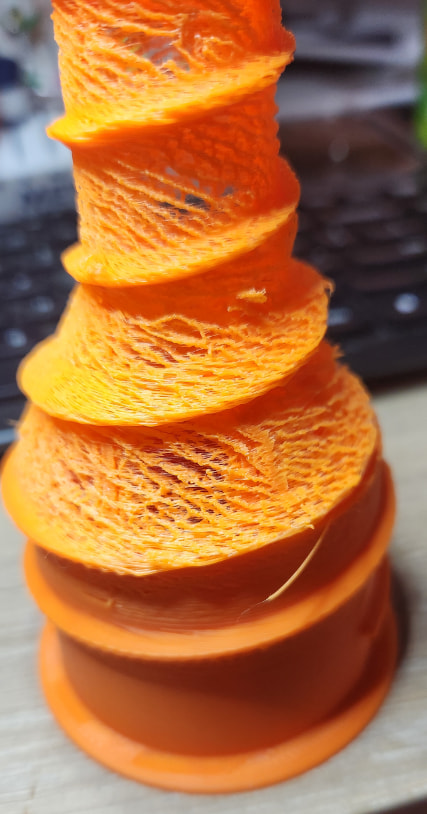
had several prints similar to this. Have yet to start tearing into what the problem is. Any clues. The part should be solid. It is obviously not extruding properly.
Tried default settings.
Have printed same with different parts failing.
Basic PLA.
my guess is I need to replace the PTFE tube again. But in the middle of a move and can’t get to my spare tube for the next few days. Any suggestions what to look into?
Small cardboard boxes, gallon size ziplock bags, any thing that looks like it would hold a small roll of ptfe tube honestly you probably have a better Idea where to looks than any of us.
If the pic is the first failure, I’d guess at heat creep => do a few hot hex key cold pulls,
check for filament tip wear marks => extruder cleaning.
Don’t let the chamber temp increase above 35°C for PLA on an X1.
If it is the PTFE path, just check and, if neccessary, trim the PTFE ends. You should have a few mm extra length available in those installed PTFE’s.
If you are unlucky and it is the ptfe couplers rather than (only) the ptfe’s, get your hands on the 3-pack of couplers from the Bambu store. They contain 6 individual ptfe connectors which are hard to source elsewhere…
Still not finding a solution.
Things I have tried:
Nozzle check, disabled the nozzle. applied new thermal grease. Did a cold pull. Tip didn’t show excessive ware. A new nozzle will be here tomorrow.
didn’t see ware in the PTFE tube. From nozzle to back, but replaced it.
disassembled filament gear drive. cleaned, and reassemble. Didn’t see problem.
checked PTFE in AMS. No smoking gun.
checked PTFE from printer to AMS. No ware, but replace with a slightly longer. removing a tight bend.
tried setting to draft and resetting all my override settings.
Tried different filament
A clue to the problem is when flow calibration is on, it lays down very little (compared to normal). This is consistent with the underexcretion shown in the picture.
The problem you have is called “under extrusion”. The extruder is not laying down enough filament creating the holes you see in the picture.
However, looking at your picture it starts out good. The problem only occurs higher up or after some time and gets worse over time or with increasing height.
So for some reason the extruder can lay down enough filament at the start but later on it cannot do it anymore. The question is why.
Something is changing over time (heat creep, bad thermister contact, blocked nozzle etc.) or with height (angle of PTFE tube blocking flow of filament etc).
It is on you to find out the cause. What is changing?
You have ruled out a lot of things by doing all this.
The one thing that could not been ruled out yet is heat creep though as it does not leave a contaminated end. Only a (partially) blocked cold end.
Be careful about your chamber temp. Do not let it exceed 35°C (lower if the filament may be most or contains particles like CF)!
Ar least the new nozzle should definitely be clear.
the latest print attempts the problem starts right away.
Chamber temp is between 25 -30 (24 is ambient while I was watching it never went above 25) door was open. So says the printer firmware.
It is not looking like it is “heat creep”. Only the tip of the filament looks like it melted. When I have see “heat creep” there is mis-shapen filament higher on the tip of filament from melting.
My current theory is failing motor. The worst part about it is I don’t have a spare. I have never seen one go out. Any suggestions for how to test? My only clue it might be is I have looked at everything else.
What temperature range should I expect from the nozzle. The printer is showing 220deg. I could measure it with my electronic temp gage. If it was 210 it should print ok, maybe not ideal, but nothing like the picture. I would expect the temperature tollerance to be less than a couple of degrees, probably less than 1/2deg.
And this is indeed a good indication that heat creep is not the (current) issue.
Hopefully not. But to test, you could try to remove the ptfe above the print head, the nozzle and use a piece of filament (30-50cm) to check. You can use the display to run it through the extruder.
My X1 has a readout fluctuation of less than 1°C. My H2C sticks to wirhin 2°C. That schould not be an issue. But it is a good idea to verify the actual nozzle temp. Degraded thermal paste for example can lead to difficult to diagnose issues. I have only had that once myself, but it is worth checking.
One of thee most difficult to diagnose issues I have had was a travelling clog. Following initial heat creep, filament abrasion in the extruder created a clogging reservoir in the extruder. Easy to resolve, difficult to spot. Hope it is this rather than a failing extruder motor. Keeping my fingers crossed.
I am following this thread in the hopes that I can learn what caused the print to print as it did. I think that it looks cool and would like to create objects that have that look to them. I have done experiments with printing in the air, for effect. This almost has that look, the filament not being supported from below.
You could give it a try by deliberately lowering flow. I think there was a post somewhere in the forum referencing this approach to deliberately create “textile” shapes.
a status update.
I replaced the nozzel and also the pcb next to the drive (for an unrelated problem, ordered a new nozzel, and also ordered a pcb to get free shipping. The connectors on the pcb where hard to put the connectors in) I mis-inserted the ribbon cable to it, and smoke tested it, releasing the magic smoke that made it work. (burnt out a component on the PCB on the back of the tool head.) Then it was back ordered. Currently I am waiting on the new PCB with the burnt component. Will post again once the magic is back where it belongs. Hopefully that solves the problem.
Keeping my fingers crossed that it was some problem with the nozzle.
I finally got the PCBs and back printing again. I think the problem was a clogged nozzle. the single cold pull didn’t solve the problem. still printing the first print after reassembling. The print is a 2 day print and should be done in the morning. Maybe it was a clogged nozzle, a bad thermistor or bad heater. The latter two could be intermittent. Replacing the full nozzle made sure it is solved.

 &
& 
