It would be nice if the slicer previews the location of the clump detection area on the build plate.
I just wonder if the sliced preview isn’t showing a path there.
Since one of the latest updates, I noticed the little purge line on the front is visible also, but 90% of it resides under the build plate. Almost like an iceberg
Ah, so that explains it. I’ve seen it and wondered what the heck it was.
By the way, the print came out fine. I was using pink PLA to provide throwaway printing support for the bottom of the white PETG rugged gridfinity organizer box. Just need to pop the rest of them out now. A good fit for the H2D’s two nozzle capability.
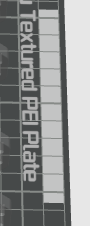
Reporting back: I figured out where the clog detection probing occurs. It’s shown in the preview area as the tiny filled rectangles behind the “Textured Plate” text:
Proof: that area only shows in preview when the clog detection probing is enabled, as well as positioning anything too close to it throws an error warning that it’s too close.
You have to go into the filament settings and change the amount primed for color changing there.That’s how you change.How much filament goes into the prime tower now
In a print like this I don’t think the prime tower is even needed. Just shut it off. The pla is just support and the petg is just for a gridfinity grid.