Where in either Bambu Studio or on the printer control panel can you determine which right nozzle is being used in the extruder?
In the “Print Plate” window, Bambu Studio shows the filament mapping (right vs left nozzle). If you have an AMS connected to the right nozzle, the filament mappings for the right nozzles would have two sections listed by color. The top one would say “A#” (the AMS slot being used) and the bottom would say “R#” (the nozzle number that the printer plans to use).
(Not in front of my computer right now to capture a screenshot.)
In Studio also on the Device tab, @ lower right one can switch between AMS/filaments view and “Hotends” which shows what’s in the rack and what’s currently loaded in “R” position.
On the printer it’s in the system controls tab (the faders/sliders icon) → Nozzle & Extruder → Hotends & Rack. H2C Screen Operation Guide | Bambu Lab Wiki
Oh and the actual rack position number of the currently loaded nozzle isn’t actually shown anywhere… one has to determine that based on empty slots. If the rack isn’t full to begin with, I’m not sure how to determine which position was loaded from!
HTH,
-Max
Thanks for the info, but when I look at my filament mapping, it just shows “R”, without a number. My rack is full, so by default I can interpret that since #2 is listed as “empty” on the filament mapping page, it must be #2 which is in the extruder, but I still don’t see anything that defines which hot end is actually in the extruder.
I just realized that’s probably what you meant and edited my post. I don’t think there’s a direct way besides “which is missing from rack” method.
It would be a handy feature!
-Max
Thanks again, I think I can figure it out!
A related question: Does each hot end always go back to the same location in the rack when the printer swaps, even if the rack isn’t full?
I’ve never noticed it switching nozzle positions, even with the occasional extra empty rack slots, and I’d definitely consider it a bug if it did… but most of the time my rack is full so that’s not much empirical evidence. I’ve not seen position mixups mentioned here or on GitHub issues, FWIW.
Cheers,
-Max
Thanks to you both, I’m still leaening!
Have you had the printer read all nozzles?
New to H2C, but doesn’t one space need to be open for the tool in print head when it changes out?
I think I read that somewhere in setup. If not, I can install an additional head 
I could use an additional head sometimes… like Zaphod. I’d like mine to be detachable though, for practical purposes.
Yea one rack slot needs to be empty. The OP is looking for which rack slot the currently mounted nozzle is normally stored in, when not mounted. When there are still 5 nozzles in the rack, then obviously the mounted one is from whichever slot is empty. But there’s no real way to tell if the rack isn’t fully populated.
Cheers,
-Max
Yep, so many strange things. Did you notice that AMS identity is OLD Chinese where the reading is from right to left? Hence AMS A is on the right and AMS B is on the right
I am not sure whether you mean to know if the rack is fully populated from looking at it or from the slicer.
If from the slicer, the only way I’ve found to do this is when sync’ing the printer. It will pop up a window for nozzle size selection. In that window, it will show all the slots with the nozzles installed in them. On that screen, one of the nozzles will be missing in the table. That’s the one on the head.
(Zaphod also had 3 hands, which is undoubtedly helpful at times)
As I mentioned originally, before I figured out the actual question at hand, the rack & nozzle details can be seen in the Devices tab, lower-right, by selecting “Hotends” button.
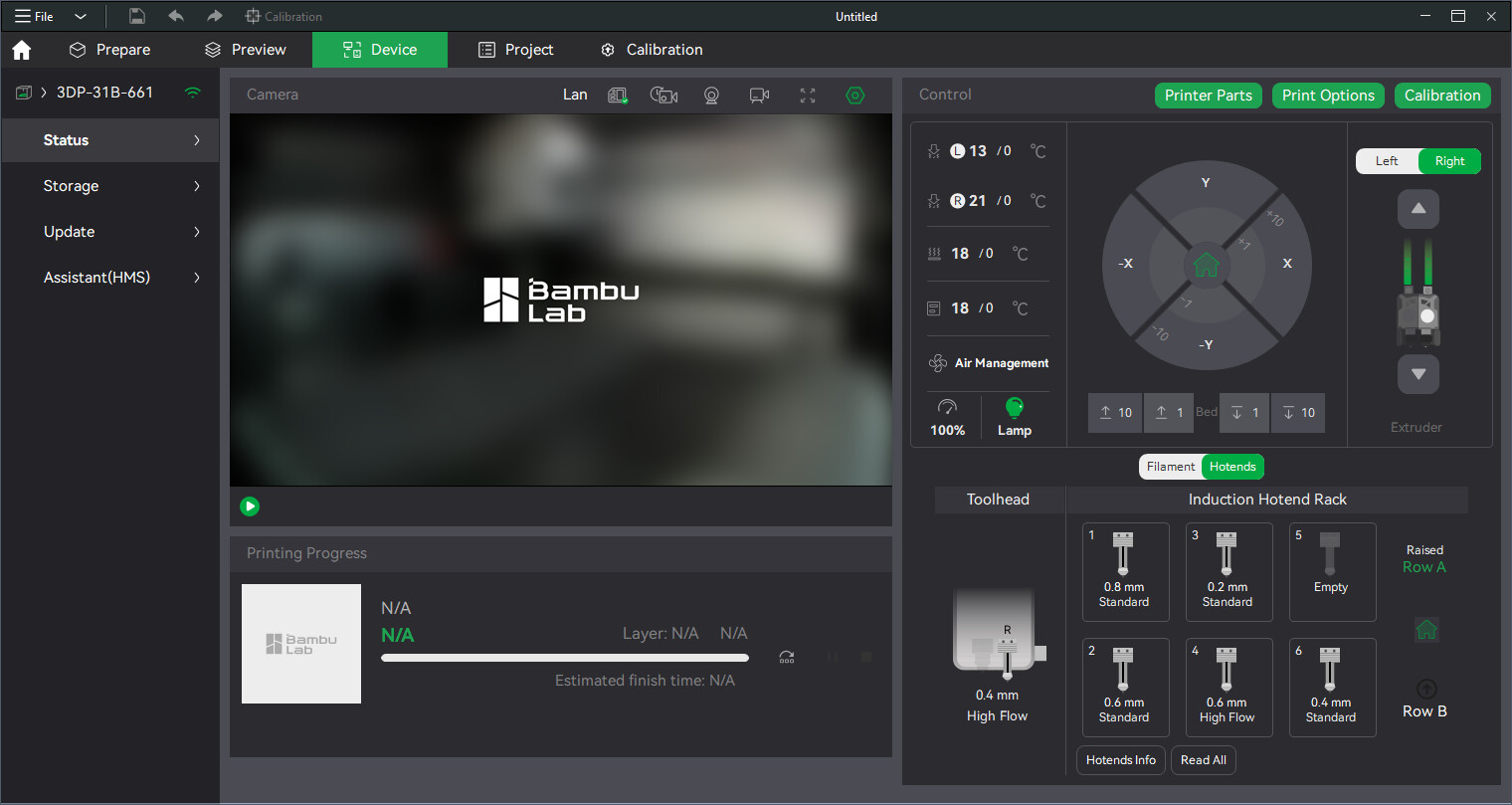
(Oddly it never shows what’s mounted on the left side… probably a bug.)
Clicking the “Hotends Info” button gives more details… although incomplete (eg. used time and last filament… I don’t even own white PETG Basic).
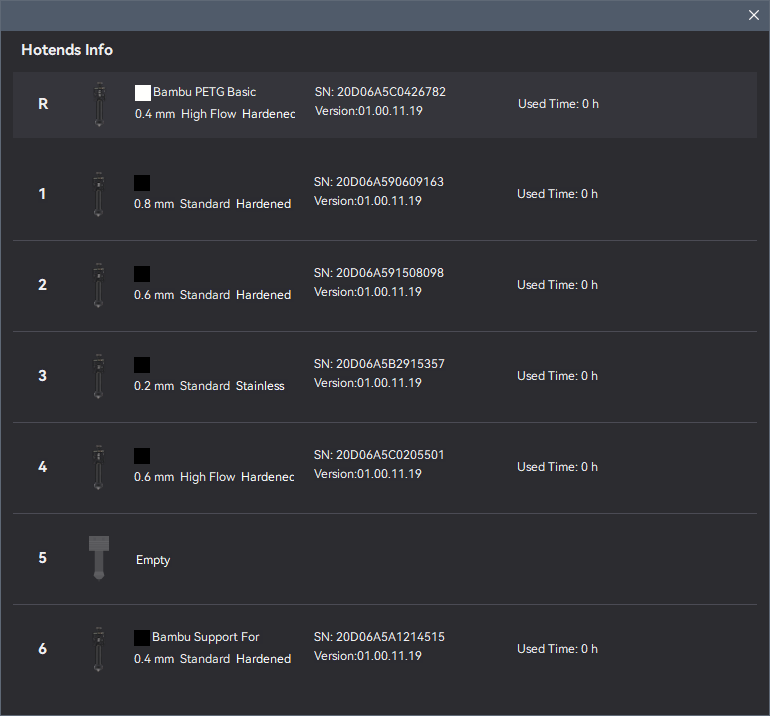
(And yes definitely sign me up for a 3rd hand… also probably less bother than arguing with a 2nd head.)
-Max