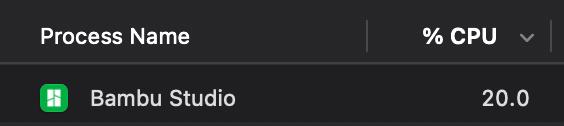
Why is Bambu Studio taking 20%+ CPU cycles while being "dormant"?

This is very suspect to me. Why should this app be taking any cycles when not in proper use, slicing etc? I understand every dormant app will take some resources, but for instance a big heavy app like Fusion 360 is only taking 0.6% CPU cycles? This is on an iMac M1

photo_2026-10-11 21.16.34

Anyone had a similar experience?

The networking module likes to crash on Linux and Mac. Likely that has gone into some kind of blocking loop. Usually you will get the “App has stopped responding” error after a while. You can use the advanced process explorer tools to investigate further.

What do you mean by suspect?

Suspect as in, you know when your phone gets really hot when you’ve been on the Aliexpress app suspect :winking_face_with_tongue:

But yeah, I hope it isn’t anything untoward, you just can’t be too sure these days, and it’s a big part of why people pay extra for a Prusa

Imagine believing that 5 EYES, or the USA, or the EU is not spying on you, and is not good friends with the police in your country. What is the PRC going to do, send Sun Wukong to kidnap you if you accidentally print something that looks like a gun part?

Mining crypto I guess ¯\_(ツ)_/¯

Tongue-in-cheek conspiracies aside.. you do know that the Networking tool is a separate process right? and that wasn’t eating up CPU cycles..

Studio, LAN-only, idle, 0 to 0.1% CPU here.
Fusion, idle, 0 to 0.4%

Platform : Windows 11 25H2 26200
Processor : Intel(R) Core™ i7-8700K CPU @ 3.70GHz
Memory : 31.8 GBRAM
Renderer : NVIDIA GeForce GTX 1070
Monitors : 3840x2160-115% TextScaling-115%

Is that with you freshly opening Studio though?