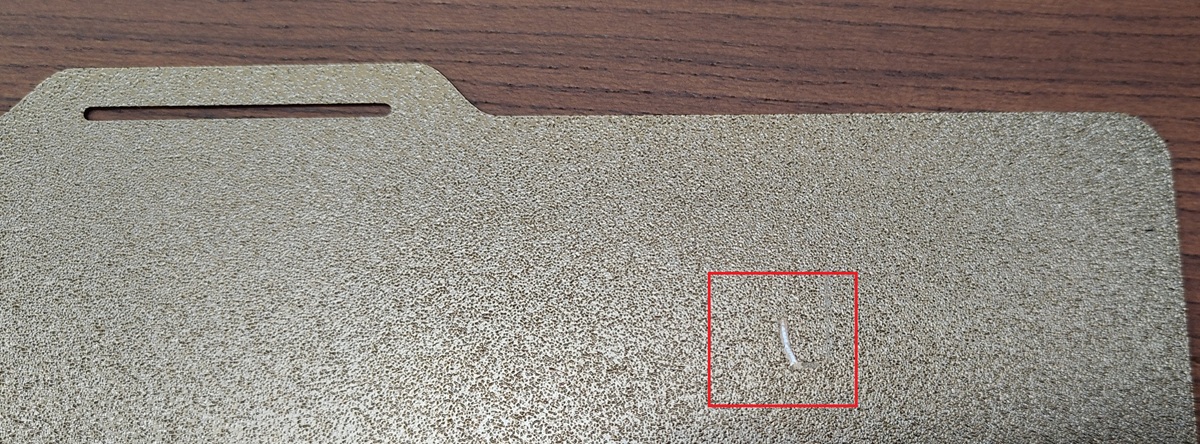
After more than 100 hours of normal operation, my X2D suddenly scratched the top-right section of the print bed when I initiated a bed-leveling procedure via the printer’s UI.
I launched the calibration function, I walked away the printer and after some time I heard a loud scratch sound, so I looked inside the printer chamber noting that the nozzle was performing its typical initial cleaning movements in completely wrong place (that you can see in the photo), tearing off the surface coating of the build plate.
It seems that the offsets following the homing process were incorrect, at least for the Y and Z axes.
I should clarify that the printer chamber was clear and clean, as was the nozzle (I found no plastic residue anywhere).
I then manually performed a homing operation and a bed calibration, both completed without any issues, as well as a test print.
Bummer. I wouldn’t be too worried about the scratch, but I’d be worried about whether it did anything to the head or other parts of the head movement hardware. That’s a pretty deep scratch. It would take significant force to cause that.
As I said, I performed a new levelling calibration and a couple of small prints, it seems to work normally, as it was before to scratch the plate on the other hand.
The real problem is that I have absolutely no idea what caused the printer to begin the nozzle-cleaning procedure in a completely incorrect position across all axes (at the very least the Y and Z) , so I expect it to happen again without any warning.
So my question is : has anyone else encountered the same issue, out of the blue, with the bed leveling procedure ?
Hasn’t happened to me after about 800 hours of print time. Judging by lack of any threads on this topic, its likely uncommon.
Are you sure it was the nozzle tip that made contact and not the nozzle cover? I suppose the nozzle cover would be badly damaged if it made contact that hard.
Not sure to have understood your point but i saw with my eyes the nozzle tip carving the plate PEI surface right after I started di listen the scratching noise, the weird thing is that the printer was fully unaware of what was happening and I manually stopped the calibration process.
My understanding here is that bed pressure sensor signals were not taken in consideration during that phase, where normally the nozzle tip is not touching the bed plate but the lateral cleaning surface.
I also own one A1 mini, one Anycubic Kobra 3 V2 and one Centauri Carbon (that self destroyed the hotend almost out of the box due to a bed assembly problem) with several hundred hours of printing activity each so I have some practice to understand what is going on.
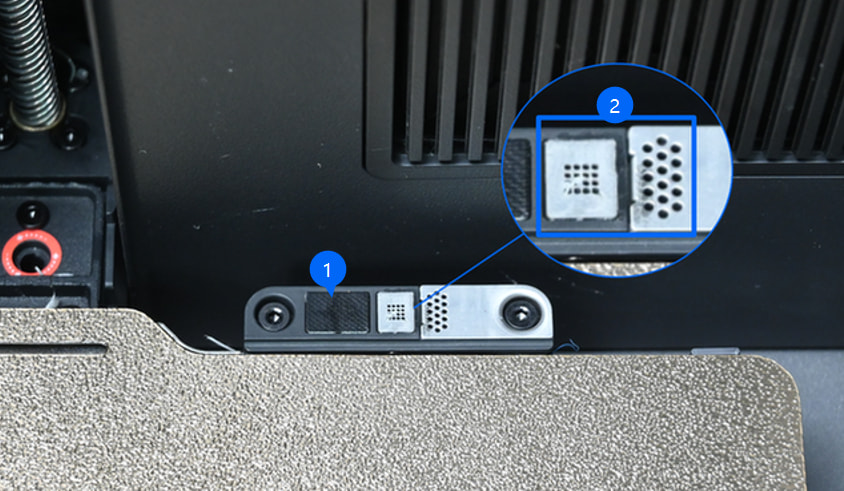
Exactly, not only the Z offset but also the Y offset because during the tip-cleaning phase the printer head was performing the usual tip-cleaning movements on the damaged bed plate section (that you can see in the first post image) in place of the dedicated pad that you can see in the image attached to this post.
I think we had few topics here for scratched plates from x2/h2 printers and if I remember well the reason was the Eddies sensor. But if it totally confused the X/Y/Z location this could be something new.
I have a similar scratch on mine. I wasn’t watching when it happened. It happened when I had less than 100 hours on the machine. A picture of mine would look a lot like yours.
Yes, it’s something different, it’s weirder because it’s not only a Z axes offset problem, the nozzle was in completely the wrong place during the tip-cleaning process, as if the head’s trajectory control had experienced a glitch. I wonder if the printer log data could be useful in some way, i will try to open a ticket.
After running a calibration, the next print started with a horrible grinding noise. When I checked the printer, the nozzle/head had crashed into the textured PEI plate and gouged a deep scratch into it.
I immediately powered the printer off. After restarting it and flipping the plate over, it has been printing normally again, but the plate is obviously damaged now.