Actually, I just found it in my mailbox, and I’m about to install it. The box is well printed
If I’m not mistaken, it comes all the way from the Netherlands, right?!
I got the heater installed, only took around 30 mins. Works great, brought the camber up to 60 C while printing something with PC.
Thanks for reporting back. Just to be clear, is this one the you mean?
https://www.aliexpress.us/item/3256807265531581.html?gatewayAdapt=bra2usa4itemAdapt
Yup. That’s the one. Tried myself too.
(later edit)
Came across this chamber heater, still on Aliexpress, but this time sensibly cheaper than the previous one, which is billed at 70+ USD.
Chamber Heater for Bambu P1S/X1C/P1P/X1 Heater for Bambu Riscaldatore for Bambu Lab x1c Accessories 3D Printer Chamber Heat P1S
US $42.75
EU 49,69€
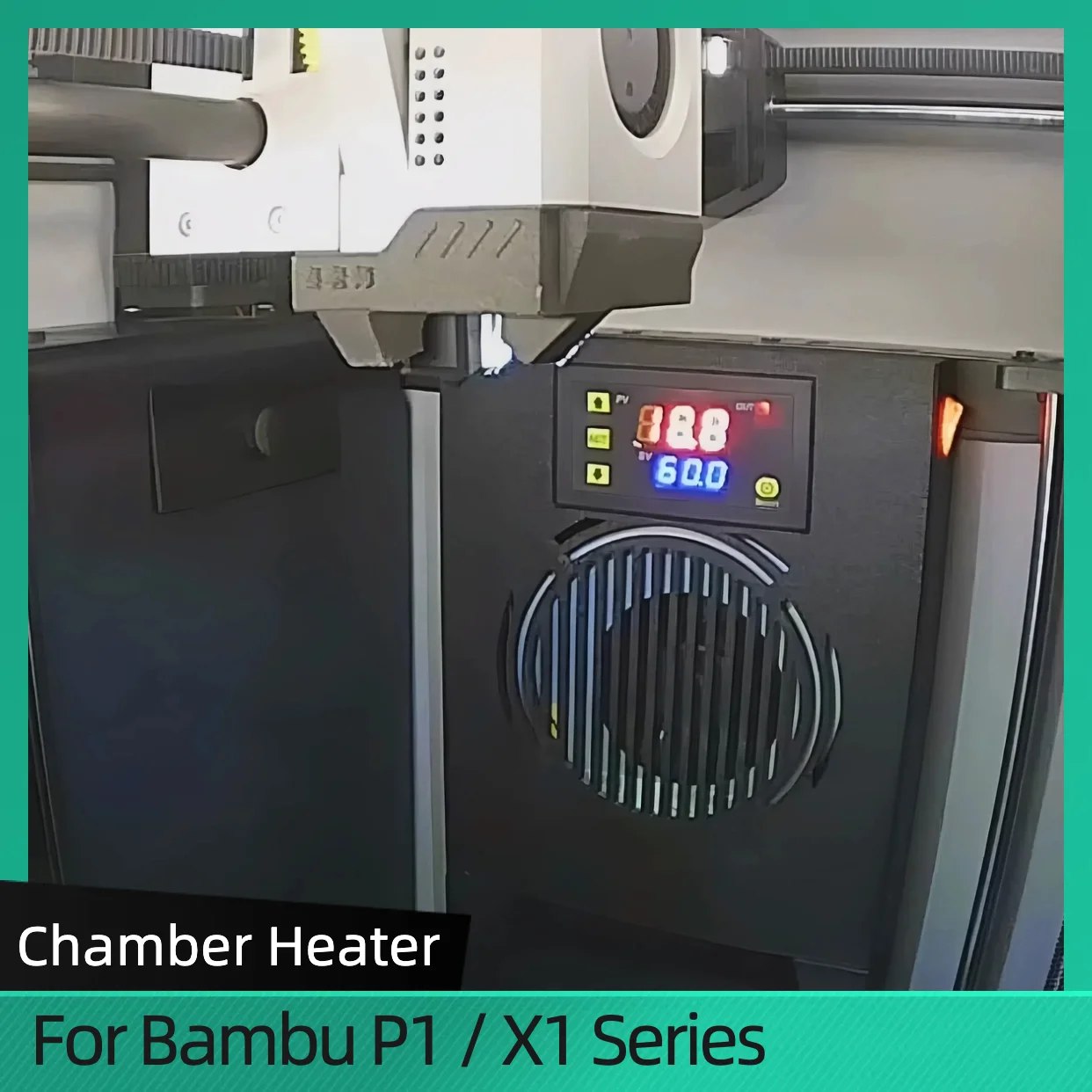
for those interested, it’s available here:
https://s.click.aliexpress.com/e/_oC1kqYv
I am determined to figure out a way to convert the heater parts from an X1E and have firmware control, somehow. There has to be a way, even if I have to use 3rd party software. But I can’t see there being much difference between the X1E firmware and X1C firmware.
You don’t sound very convinced about the firmware/software part. You’re definitely welcome to try, and see how it works out for you. I’m also interested (like many more on this forum) in jailbreaking my printer from Bambu’s controlling grasp, but to date few have come out saying they’ve achieved something in that respect. Perhaps you’ll be the one. Good luck and keep us posted on how it goes.
I know this is a couple of months later. But I purchased this heater on aliexpress and have been using it for a few weeks. I have it controlled by a gosund power plug that I can control remotely including the ability to set a shutoff timer.
With this and the bed it still takes about 15 minutes or so to hit 60 degrees.
I am pretty happy with the results. I can see the temperature during printing via the camera.
I always have it set to 60 degrees and it remembers the setting after the plug shuts it down. Which means I never have to touch the heater.
If I am gonna be away or going to bed, then I set a timer in the gosund app to shut off the heater after the print ends.
Does anybody know what wattage that PTC heater is? The previous one says 150W.
You can go as high as 200W. More than that could burn out you controller board.
If anyone is feeling adventurous the QIDI Plus 4 chamber heater can be purchased by itself… It looks thin enough to fit beside the bed but it probably needs it’s own power supply.
@PrinterMcgee
Yeah, it probably does because it’s estimated at 700-800W so you would probably want a LRS-800 power supply or something with at least 800W (preferably maybe 850 for some headroom since AliExpress heaters have a 20% tolerance). But if you could get that working that’s basically twice the X1E heater power. I think that you would have to do some insulation and separate the electronics and motors though
“…Qidi Replacement AC chamber heater…” That seems to suggest its powered by A/C (not DC.) Then it might not need any type of PSU (but likely would need an SSR to control on/off functions.)
4 wires and no specs whatsoever. Looks similar to an AC powered silicone heater… so two writes for hot/neutral, one for ground, and two for a thermistor? Of course, I’m just guessing. I can’t seem to find any specifications…
I spent quite a bit of time researching different heaters. Having used the X1E printer at work, being limited by the lack of heat at home for the X1C was disappointing. I wanted to be able to print ABS and ASA at home on my X1C without having significant warping. I looked around and its seemed like there were tons of European and Chinese solutions, but there were not any good solutions for the American market. Consequently, as an engineer, I decided to design my own. The hardware is about $50 and is available on amazon, the design is posted and ready to print on MakerWorld. Its 500 watts of power and heats up quickly. Holds temp really well. Let me know what you think.
Link to heater housing: X1C Chamber Heater 110V 500W with Auto Shutoff by Salty Designs - MakerWorld
I haven’t looked at it in detail, but it looks nice. How failsafe is it? That’s the usual concern that people eventually have. Not just how well does it work, which is of course important to even warrant consideration, but worst case will it burn down someone’s house if there are one or more unanticipated failures? To be fair, very little out there addresses this issue, at least not clearly, but I think it’s probably in the back of everyone’s mind, and anyone who settles that issue in an unambiguous way will probably have lots of converts.
Not saying you haven’t done that, but putting in the headline would undoubtedly help attract interest if you have.  Is that what you mean by “auto-shutoff”? “Triple redundant failsafe” would pull in a lot of views, I’m sure of it.
Haven’t submitted it yet for UL certification, but It’s safer than most of the heaters out there. Most of them have zero thermal overload protection. If you follow along with the install video, I’m pretty clear on the importance of installing a 142C thermal fuse above the heater. There is even a spot cutout for it in the model. In the event the fan stops blowing and it overheats, this will trip before the housing would start to melt, and far before any fire. The worst case would be a stuck relay in the control, the printer could overheat and damage an electronic component. You could drop the thermal fuse temperature further to reduce this risk, maybe a 70 or 90C, but it may trip during normal use.
I’m not prescriptive on how to wire it in, but I wired mine through the main power supply so it also uses the main fuse at the main power switch as well. I replaced the 6a fuse with 10a to account for the extra 500 watts, but the main switch is rated for 15a, so it’s within its rating. I chose not to cover this level of detail in the video.
I understand your concern with safety, I guess the safest option is to just buy an X1E, and leave everything along. But I’m more of a tinkerer, not in my nature.
Thanks! I was just trying to inject the notion into the general discourse. I probably should have posted it separate and not pinned it to your post, but what’s done is done.
I realize that posting anything often feels like a thankless task, so thank you for being a good sport about it.
For sure your 500w seems like an advantage, as many of the others are a mere 50w and reportedly take a long time to heat up the chamber.
Yeah no problem, probably good to have the discussion about safety anyway. There is always risks to adding heat. I can sacrifice a printer, but a fire is a different problem. Thermal fuse is typical to mitigate this risk.
As for wattage, 500 is a little more than you need if your box is insulated like the X1E. I think the X1E uses a heater that is 24v, but still about 350 watts. That involves a massive power supply that over complicates the solution. 500 watts at 110v works great for the sheet metal can that is the X1C. Install is simple and its heats at about the same rate as the bed.
Also, for what it’s worth, I think this heater works better than the X1E. I added a duct to the fan to pull air from the top, keeps the heat more even. But my box is also insulated with 1/8” neoprene, I don’t run the chamber fan with abs, and I sealed the crack on the left side of the door. Makes ABS a dream to print.
The X1E heater is rated at 380W, so that means ~16A.
Does your heater design work with the P1S?
I’m not sure. I’ve never had a P1S. I think they are the same frame and base, so it would probably work, but the auto off that uses the lidar cal tab on the right to turn it off. I don’t think the P1S has that, so you would just loose that feature. Give it a go and post your findings.