New bug, maybe not been reported yet but I haven’t scanned through any posts. On the filament library for Bambu Handy (account not bound to a printer) I have noticed an error. On the filament page for adding filaments it asks for current weight. Its suggest text is enter 0- 10000g which anything above 1000g is not accepted. I know noone will have a 10kg spoil but I believe 2kg spools are available??? Might be wrong. Fingers crossed this is an easy fix.
Hello,
I do not know if this is reported but on Handy v4.1.2 on my X1C, it no longer shows on the main device screen the statistics for the file printing (percentage, estimation, layer count etc), if the file has been sliced in Bambu Studio and printed locally (i.e not starting a print from Makerworld).
Reverting back to 4.0.2 fixes the issue.
Bambu Handy app v4.1.2 (android) - unable to type properly when replying in the comment box, alphabets don’t appear when typing.
On 4.1.1 and same behavior for my H2C. Shows fine for my H2D and A1 Mini, just not for H2C.
Bambu Handy app for Android version 4.2.2 no longer reports the layer count for my P1S. I don’t have an AMS and rely on knowing the layer being printed for color changes.
Problem: Bambu handy crashes when scrolling to the bottom of the filament library with PP filament added
Version: 4.2.2
System: Android
Steps to reproduce:
- Add Generic PP filament (Settings I put: Generic PP, color white, 800g original mass, 750g current mass, Name: Sunlu Natural PP)
- Go to filament library
- Scroll to the bottom of the page
The PP filament can be edited like any other, so long as I don’t scroll all the way. Additionally, PP filament does not get its own category.
Removing the PP filament widget causes crashes to no longer occur.
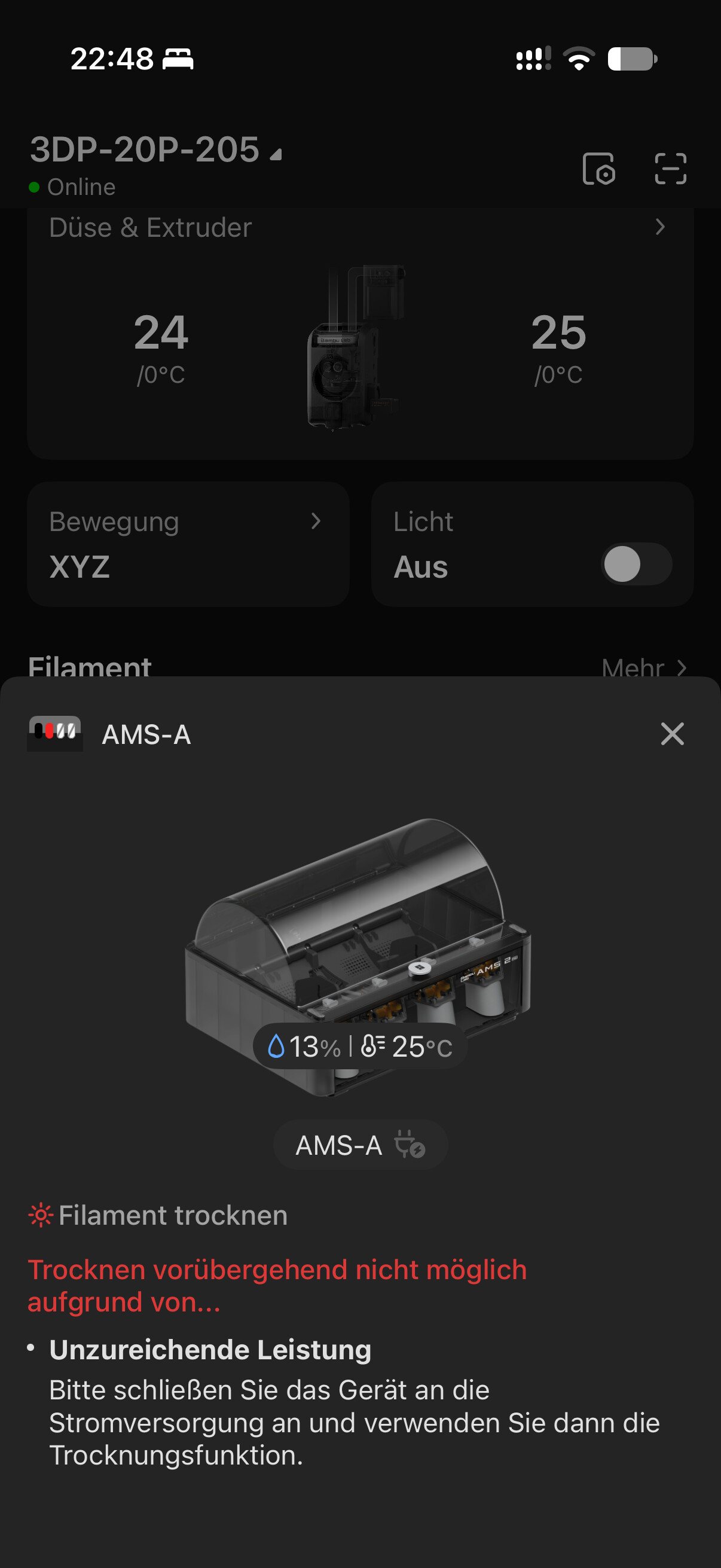
Problem: Cannot start drying on AMS 2 Pro (X2D) from the App, even if the printer is idle. (no power cable) the function worked in the previous version. From the bambu studio, it works. Just to make sure its clear, i know the power cable is needed to Dry and Print in the same time, but the ability to start drying from the bambu Handy while the printer is idle, was working right before the last update. Tried to restart the printer and the phone. no changes
Bambu Handy Version: 4.4.1
Platform: Android 17
Steps to reproduce:
- Open Bambu Handy
- On the devices tab, try to start drying on the AMS-A.
- Notice that an error says Insufficient power
Screenshot:
It didnt let me add a screenshot
Other information: Google Pixel 9 on Android 17
Problem: Bambu Handy is unable to see any files on SD card
Bambu Handy Version: 4.2.2
Platform: IOS
Steps to reproduce:
- Open Bambu Handy
- Select Devices
- Open Settings - Files
- Select Model
Handy gives the message:
Please check if the SD card is inserted into the printer. If it still cannot be read, you can try formatting the SD card. [17:1110130312]
This is happening on 3 printers, all P1S. One printer has a newly installed card. Bambu Studio can see the files just fine on all 3 printers, but Handy gives the above message no matter what I do. I have restarted the printers, formatted the card in one and replaced the same card with a new one with the same result.
Problem: Cannot use live activities
Bambu Handy Version: 4.4.2
Platform: IOS
Steps to reproduce:
- Open Bambu Handy
- Click on Devices during a print
- Swipe up to close Handy
Handy should add a live activity at the top of the iPhone with the progress, and also show on the lock screen. This is no longer happening on version 4.4.2. I have uninstalled and reinstalled Handy and have rebooted my iPhone multiple times.
I have also been hit with the same error message..
Cant see model files on P1S micro SD card and H2S USB stick. I have replaced them both 3 times and formatted them numerous times and still no luck.
Bambu studio can see both fine. Bambu handy has bugs.
Any luck with finding a solution?
Solution… Bambu Handy app update released today fixed it
I have a P2S with a AMS 2 Pro with the same issue. I have Bambu Handy version 4.4.3 installed on two mobile phones:
- Asus Zenfone 8 with Android
- Sony
I can start drying using the touch panel on the P2S itself and by using Bambu Studio.
Firmware versions:
P2S: 01.03.00.00
AMS 2 Pro: 05.00.22.22
Buffer for P2S: 01.01.16.19
But both mobilephones reports the same error when I try to start drying:
Drying filament
Unable to dry temporarily due to…
• Insufficient power
Please plug in the power and then use the drying function.
- Turned the printer on and off.
- I have emptied buffer, logged of, even removed and reinstalled Bambu Handy, no change.
- Started drying from the printer, and even managed to stop drying using the app, but I’m still not able to start drying using the app.
Bambu Handy app update released today fixed it