Checked it earlier today, all green, tried shutting firewall off completely together with windows defender, no result
Then if it were me, I’d try another laptop or computer, but I realize not everyone has a spare system lying around.
The important thing is that you’ve narrowed this down to a connectivity issue.
For now, try this: open a Command Prompt and ping the server.

If you want to do a continuous ping, leave the CMD window open and use this instead:
ping -t api.bambulab.com
This will ping continuously and show you in real time if your connection to the server is dropping intermittently.
Alternate approach:
If you’re on Wi-Fi, try switching to a wired Ethernet connection. In my own setup, I eventually abandoned Bambu Lab’s servers altogether because of these same connectivity issues. I stopped using Bambu Handy and switched entirely to LAN mode. My desktop is wired via Ethernet, and I intentionally stayed on firmware revision 01.07.00 to avoid the newer Bambu Connect authentication scheme, which only made things worse.
Granted, this route is extreme and removes access to Handy, but it produces a stable, reliable environment.
Unfortunately, Bambu’s connectivity has always been hit or miss, and I eventually got tired of chasing ghosts. I even had to add a mobile Wi-Fi bridge just to eliminate the last bit of instability caused by their network stack. Since then, I’ve gone almost a year without a single issue.
I know it’s too late to help with your current setup, but this is exactly why I’ve been telling everyone I know to stay away from BL hardware. My next printer will not be a Bambu Lab machine - for all the reasons we’ve discussed here.
I have the same Problem… in this Post…
The Ping is success…
PS C:\WINDOWS\system32> ping -t api.bambulab.com
Ping wird ausgeführt für api.bambulab.com [104.18.35.41] mit 32 Bytes Daten:
Antwort von 104.18.35.41: Bytes=32 Zeit=19ms TTL=54
Antwort von 104.18.35.41: Bytes=32 Zeit=4ms TTL=54
Antwort von 104.18.35.41: Bytes=32 Zeit=11ms TTL=54
Antwort von 104.18.35.41: Bytes=32 Zeit=6ms TTL=54
Antwort von 104.18.35.41: Bytes=32 Zeit=5ms TTL=54
Antwort von 104.18.35.41: Bytes=32 Zeit=4ms TTL=54
Antwort von 104.18.35.41: Bytes=32 Zeit=5ms TTL=54
Antwort von 104.18.35.41: Bytes=32 Zeit=10ms TTL=54
Antwort von 104.18.35.41: Bytes=32 Zeit=5ms TTL=54
Antwort von 104.18.35.41: Bytes=32 Zeit=4ms TTL=54
Antwort von 104.18.35.41: Bytes=32 Zeit=5ms TTL=54
Antwort von 104.18.35.41: Bytes=32 Zeit=5ms TTL=54
Antwort von 104.18.35.41: Bytes=32 Zeit=5ms TTL=54
Antwort von 104.18.35.41: Bytes=32 Zeit=4ms TTL=54
Antwort von 104.18.35.41: Bytes=32 Zeit=6ms TTL=54
Antwort von 104.18.35.41: Bytes=32 Zeit=4ms TTL=54
Antwort von 104.18.35.41: Bytes=32 Zeit=4ms TTL=54
Antwort von 104.18.35.41: Bytes=32 Zeit=4ms TTL=54
Antwort von 104.18.35.41: Bytes=32 Zeit=4ms TTL=54
Antwort von 104.18.35.41: Bytes=32 Zeit=4ms TTL=54
Antwort von 104.18.35.41: Bytes=32 Zeit=6ms TTL=54
Antwort von 104.18.35.41: Bytes=32 Zeit=4ms TTL=54
Antwort von 104.18.35.41: Bytes=32 Zeit=3ms TTL=54
Antwort von 104.18.35.41: Bytes=32 Zeit=4ms TTL=54
Antwort von 104.18.35.41: Bytes=32 Zeit=13ms TTL=54
Antwort von 104.18.35.41: Bytes=32 Zeit=4ms TTL=54
Antwort von 104.18.35.41: Bytes=32 Zeit=11ms TTL=54
Antwort von 104.18.35.41: Bytes=32 Zeit=4ms TTL=54
Antwort von 104.18.35.41: Bytes=32 Zeit=4ms TTL=54
Antwort von 104.18.35.41: Bytes=32 Zeit=7ms TTL=54
Antwort von 104.18.35.41: Bytes=32 Zeit=4ms TTL=54
Antwort von 104.18.35.41: Bytes=32 Zeit=4ms TTL=54
Antwort von 104.18.35.41: Bytes=32 Zeit=6ms TTL=54
Ping-Statistik für 104.18.35.41:
Pakete: Gesendet = 33, Empfangen = 33, Verloren = 0
(0% Verlust),
Ca. Zeitangaben in Millisek.:
Minimum = 3ms, Maximum = 19ms, Mittelwert = 5ms
STRG-C

I’m afraid you’re running out of options. It sounds like you’ve done everything possible short of testing on another system.
There’s one radical step we haven’t discussed yet: rolling back the firmware on your P1 to version 1.08 or earlier, then reverting Studio to a pre-1.9.2 release. There are reports that 1.9.3 make work but 1.9.2 or earlier are safe. Make sure to follow the uninstall procedure outlined earlier so that no remnants of the newer versions remain before reinstalling. This rollback removes the problematic Bambu Connect authentication layer from the network stack.
Alternatively, you could try running Orca Slicer side by side with BS with the P1 pre-1.08.02 firmware, since Orca doesn’t rely on Bambu Connect. If that works, then unfortunately you’ve reached the point where only Bambu support can intervene - and I know that’s not a pleasant prospect.
Couldn’t find a proper solution so I did system recovery on windows and it worked (settings → system → recovery → reset this PC), I did it with saving my files.
If someone with the same issue finds a better fix I’d like to know about it, that issue is pretty weird is I’m genuinely curious what causes it and how to fix it, but so far resetting windows seems to do the job.
Is it possible windows auto-updated something right before it stopped working? I’ve never used Windows recovery, does it tell you what date it’s recovering back to?
It’s just built-in windows reinstaller, reinstalls to the latest version, it doesn’t tell you anything, and I had regular updates completely disabled because they tend to cause issues too often
Gotcha. Well I’m glad it’s working again.
It is a bit late now that you fixed the issue with a Windows reset which is essentially an in-place reinstall of the binaries, but after reading the thread and steps already performed I would have suggested a quick reset of the Windows network stack with the command line “netsh winsock reset” followed by a reboot.
It doesn’t work for me either. It doesn’t work on my laptop either (Studio was never installed on it). Even when I open the app, everything freezes for about 15 seconds. But only when I’m logged in with my Bambu account.
So, now it’s too stupid for me.
I’ve been having massive problems for three days now, with no response from support, so I’m switching to the Orca Silcer. It seems to be working without any issues.
Maybe I’ll get a response from support sometime soon, otherwise I won’t use the Bambu Studio anymore.
With the new printer, I’ll also reconsider whether I really want to buy the H2S or switch from Bambu.
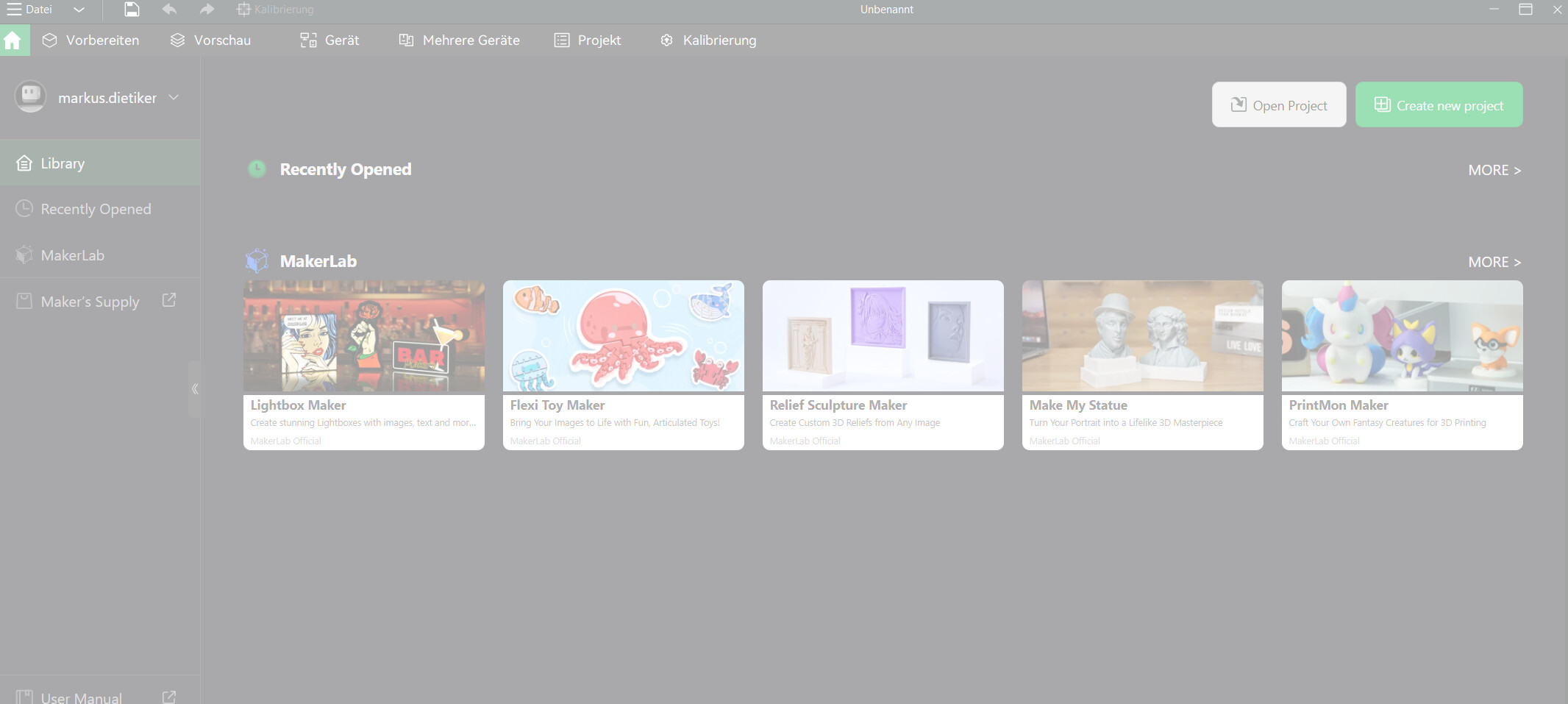
No response from Bambu Support, you say?

Say it isn’t so… the gold standard of customer care - that is if the yardstick measured how poorly they handle real issues. Anyone can ask for logs; real support looks more like this:
- Acknowledgment by a real human within 24 hours of opening a ticket (not an auto-reply).
- A meaningful remedy attempt within 48-72 hours. In other words, specific actionable information, not; “view this video”.
- If still unresolved after 3-5 days, a follow-up confirming the case has been escalated.
But most of us have seen this movie before, and we know how it ends. If there’s any consolation, you’re far from alone.
Freezing issue can be bad network, while my VPN is connecting I can’t start my studio at all.
I’ve put some more time into the analysis.
When I click on a link in BambuStudio, the program tries to establish a connection to that IP address on port 443. (8883 is AWS)
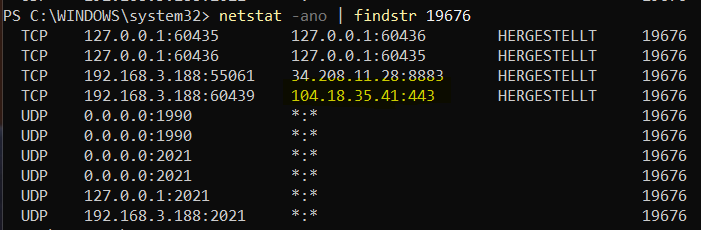
But it doesn’t work.
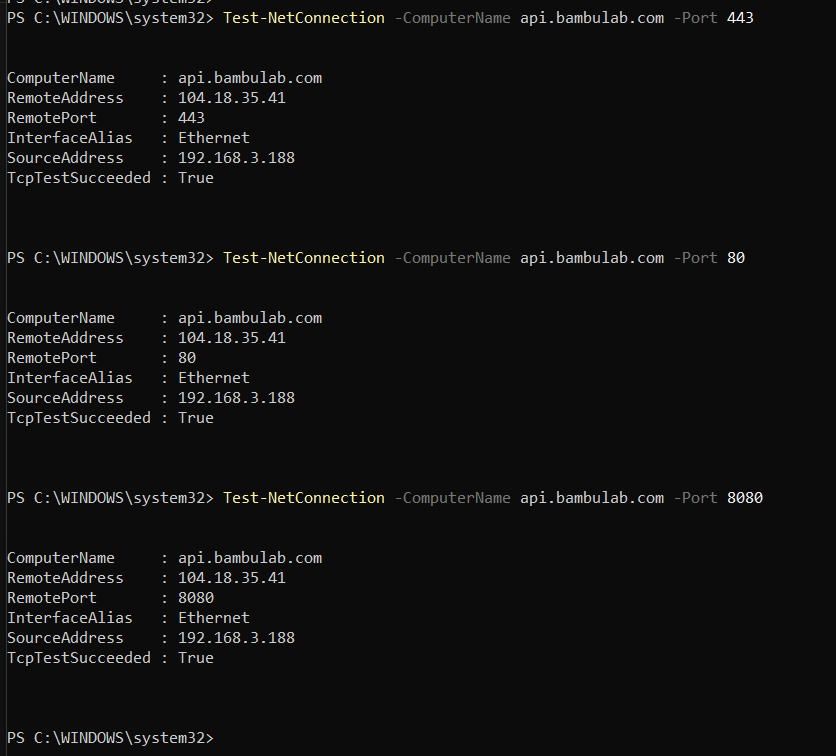
The IP belongs to Cloudflare

Things get interesting with port scanning

Didn’t they have issues with Cloudflare on October 3rd and set the status to resolved?
Maybe a coincidence, but I’m not looking for the error on my end anymore.
Let’s see what support says.

Cogent is an ISP. However, the IP address belongs to Cloudflare, which apparently uses Cogent’s network infrastructure.
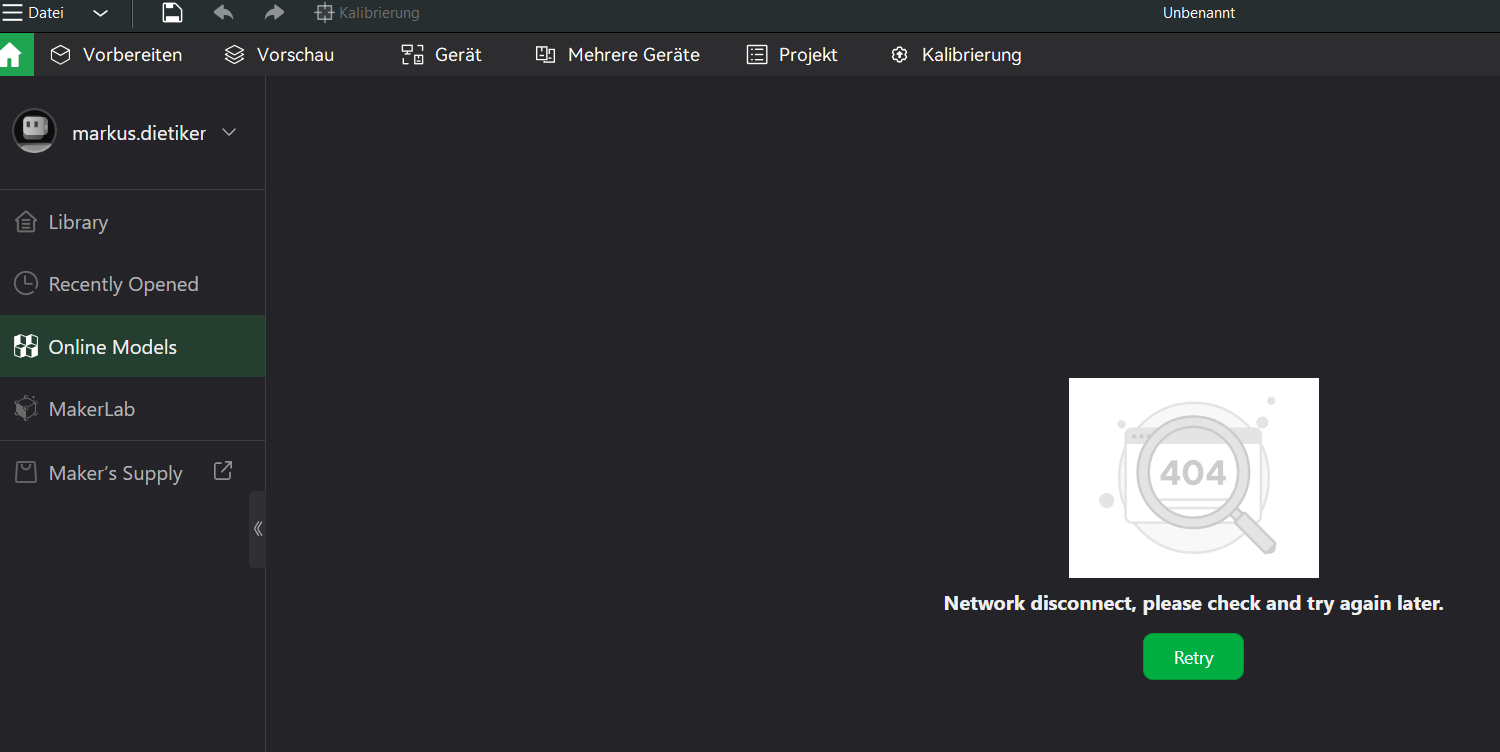
What IP address does Bambu Studio connect to when you access the online models?
Thanks for the extra sleuthing. It definitely points the finger back at Bambu Lab, though I doubt they’ll ever publicly acknowledge fault.
I don’t think this is a Cloudflare issue. Cloudflare is a service that makes websites faster, safer, and more reliable by sitting between the website and the internet. It blocks hackers and spam, speeds up loading by serving nearby cached copies, and keeps things running even if the main server goes down. It also encrypts traffic to protect user data. I used it myself when one of my sites was under a sustained DDoS attack. But as the “middleman” in the transaction, if the source site is misconfigured or its services and ports are unstable, Cloudflare can’t fix that. The old saying still applies: garbage in, garbage out.
Honestly, folks, I don’t know how much clearer Bambu can make their intentions. After more than a year of MakerWorld and its intrusive tracking, and now seeing the same playbook extended across all their services, it’s obvious they’re collecting user data under the pretense of “providing a customized experience.” That’s industry code for “you are the product.”
In all candor, everyone would be better off breaking the link between Handy and MakerWorld and treating them as separate, siloed tools within your setup. A simple step is to use different browser profiles for this forum and MakerWorld. And most importantly, move device control off their cloud entirely and run in LAN-only mode. Once you have it stable, you’ll be far happier, and Bambu won’t be able to claw back functionality as they tried earlier this year with Bambu Connect before the backlash forced them to keep supporting local access, for now. Note: I am not anti-cloud by any stretch, but Bambu’s bullying users onto their service should be taken as a clear warning sign.
I am still working with support to solve the problem. 
I’ve invested hours again in troubleshooting. I completely uninstalled BambuStudio, including the registry.
Then I installed Bambu_Studio_win-v01.10.00.89, and everything worked without issues. Then I installed Bambu_Studio_win-v01.10.01.50, and everything worked fine there too (including the http test).
Then I installed Bambu_Studio_win-v02.00.00.95, and now nothing works. The http test is broken.
Nothing works since version 2.
What changed in version 2?
@Dieti
I looked in your posts and may have missed it but what printer are you using and what is the printer firmware number?
thanks
Edit: also, did you try a newer version of Studio?
From looking at the files pulled from Github the date difference on the bambu-studio.exe file between versions 02.00.00.95 and 02.00.01.50 is only 3 days, which is a really short time span. Normally it seems it’s about a month difference on the file timestamp.
Anyway, you probably already have this and it’s been posted previously by some of the champion users on these forums, the link for downloading the bambu studio versions
Yet another edit: If you really want to see “What changed in version 2?” Look at the over view for that version on the GitHub download page.