I’d like the Slicing Result Colors default to “Filament” instead of “Line Type”.
How/Can I make this happen?
I too would love to change the default Slicing Result colors.
Thanks,
M
Same problem. I’ve downgraded to version 2.00 and it goes straight to “Line Type” by default now. I have no idea why it changed. They could at least let us choose.
Agreed. Why make us click extra mouse clicks. I don’t have an AMS so why the hell show me which filament is being used?!?! Line type should be the default and this should absolutely be a preference setting.
I am the opposite, mine now defaults to ‘filament’ and I would prefer ‘line type’. They should make this a “user preference” we can set to our liking.
same problem here with the latest slicer version. it’s always set to “filament”.
please make something in the general settings to set your prefered slicing result.
thanks
Same here, I would really like it to default to “Line Type” instead of “Filament”.
i guess this is a common issue.
i want line type as default
Same here, revert back to Filament as the default or all the users to change it.
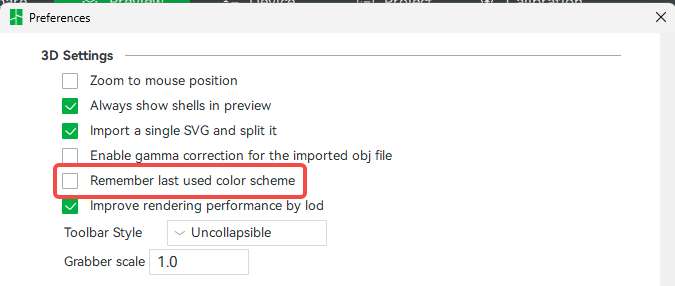
In Studio Preferences there’s a setting named “Remember last used color scheme.” This is in the “3D Settings” section (moved to “3D” tab in latest beta v2.8.1). Enabling this option will preserve the last selected slicing preview color scheme across application restarts. It is disabled by default. (Not sure when it was added but at least since v2.4.)
-Max
Thank you! You are my hero for the day!
How do u getting to - In Studio Preferences
thanks
On Windows & Linux click the arrow button next to the “File” menu on the top toolbar, then the “Preferences” menu item.
On MacOS click “Bambu Studio” item on the main menu bar, next to the apple, then “Settings” (similar to other MacOS software).
Screenshots for both are shown here: How do i open the preferences tab?!?!?!?
Once the preferences/settings panel is open, the option itself can be found here (though this screen may look a bit different in newer versions):
-Max
that worked
thanks for the directions to do it