I still search a way to deal with this small différence between X and Y.
Its a pity that the M290.2 Y don’t work. It’s the good way to solve the problem
May be I didn’t do it the right way…
I design all my parts, and used to deal with some issues like small holes during cad process.
But applying xyz differents scales factors on the parts acc to their material could make the model illegible…
I’m not ready for that …really hope to find a simplest way
I open a ticket on bbl support about M290.2 non fonctional
Regards
Thierry
Sorry, I didn’t read carefuly, you say to scale in the slicer…not in cad…
Same as you… its a pain…
Hope to use finaly M290.2 otherwise I will live with th xy shift…
Thierry
Hi, I have exactly the same problem with my A1.
I have it since 2 months and a lot of issues to resolve.
I have printed tons of calibration test.
I’m in 3D printing for a while and my other printer have 0.1 mm of accuracy.
The accuracy is very bad on A1 even with shrinkage compensation because the following problem :
There is a constant error on print of 0,1mm in X and 0.15 in Y size ! We can compensate with XY compensation a little but you lost detail in text and x/y aren’t the same !
There is a proportionnal error in X and Y direction that I can compensate with shrinkage and M290 partially.
There is a random error for a same size.
I have unmount the printer to align x/y/z axis becasue they weren’t square at all. The vertical rods also. Very bad control quality. Bambulab support doesn’t help because they say it’s shrinkage blabla…
I have loosen/ retighten belts etc…
All mechanical changes have been made.
So for A1 series, there are problems with X/Y motors and/or belts and/or motor drivers because I can’t understand the constant error that is so difficult to compensate.
Hope someone has the solution but it is not only shrinkage in my case.
Even print at end adn after cooling has this error.
I haven’t understood what do you mean by replace by a new one ?
Bambu support don’t understand or don’t want to understand that A1 has accuracy problems !
Yes really bad customer support.
The worst is the constant error as XY compensation could resolve it a little but for small parts, it increases all the size and nothing is good !
I think it’s backlash + motors : the problem is present on every A1.
I have had 2, and each has a constant error and not the same !
For measuring shrinkage, which in principle you might have to do for every filament type/brand, I prefer this:
It cleverly uses slots for properly aligning the calipers, which helps make the measurements foolproof. It’s my go-to model for shrinkage measurement. I only wish Orca could do automatic shrinkage compensation for x and y separately, rather than as a single number. Presently I just average the x and y shrinkage and use that as the plug number for orca filament print profiles.
I think filament compensation is intended only to adjust for the characteristics of the filament, not to adjust for mechanical printer inaccuracies. It does not matter what direction the filament is extruded, the shrinkage compensation should be the same.
Good point! IIRC, ideamaker and maybe some other slicers do facilitate separate automatic x and y shrinkage compensation, but by your argument they didn’t need to. On the other hand, if there is no benefit, it somewhat begs the question as to why they separated them.
Anyone reading this have any additional insight into this? If not, I’ll go with the Ikraus conclusion.
I would like to oppose this take. I never touch X/Y/Z e-steps/rotation-distance on my other printers and they all work perfectly well and printed parts fit together, even across multiple printers. Only the A1 Mini is incapable of producing a hole that is not at least 0.2mm too small.
I have been used to printers producing holes that are too small. Besides the X1C, my old Ultimaker2+ and the Prusa Mini at work do the same to a different extent. The smaller the hole, the worse. With the Ultimaker, by default I always made holes 0,2mm bigger in the model. Maybe there are printers out there that show this effect less.
And shrinking when cooling down is a physical fact. So if your other printers result in perfect dimensions, maybe they have the shrinking of PLA baked into the esteps from factory? Have you tested if ABS parts are also perfect? And CF reinforced material?
I’m adding to this. I enjoyed the speed of the X1C (I have 2 now) but since I’ve been working on a project that requires many small prototype parts ~40mm x 40mm it actually takes me longer with the bambu printers than using my Enders and my CR-10s. I have dialed in the flow and steps in the Creality printers to get consistent 0.05mm accuracy. The Bambu varies up to .6mm in x and y access.
Is there really no way to dial in the dimensional accuracy? I end up having to make 3 or 4 throwaway parts to get the dimensions dialed in. There has to be a better way.
Have you seen my calibration model and instructions above? Here is the link again:
For me that works perfectly and I think for many others too.
Compared to adjusting e-steps, that allows to compensate individually per material, while adjusted e-steps are only correct for one material.
Eg, I get quite different values for PLA, PETG and PC. I don’t use ABS and ASA, which would probably require far more compensation than the materials that I use.
Here is the link I found a few years ago it works great, I think it is more accurate because you calibrate for x and y separately because they do shrink different each direction.
You do also measure X and Y separately with my model, but there is no way to enter calibration separately in Orca Slicer and BambuStudio. If you compensate by adjusting scale, you can also do that separately for X and Y with my model.
But in my experience, if X and Y don’t have the same value, that is because of skew, e.g. X and Y are not perpendicular. If there is more difference than you want to accept, then I would correct skew first. There is a long thread about skew correction (which is a mechanical problem and can be compensated in the firmware through a GCode command). Anyway a big error in skew will probably impose much worse problems when mating parts than 1/10mm deviation in size.
In the description I have explained in detail the pitfalls of calibrating for dimensional accuracy and the ideas and thoughts that went into my model to prevent them. If you read that, you will hopefully agree that my model is far superior.
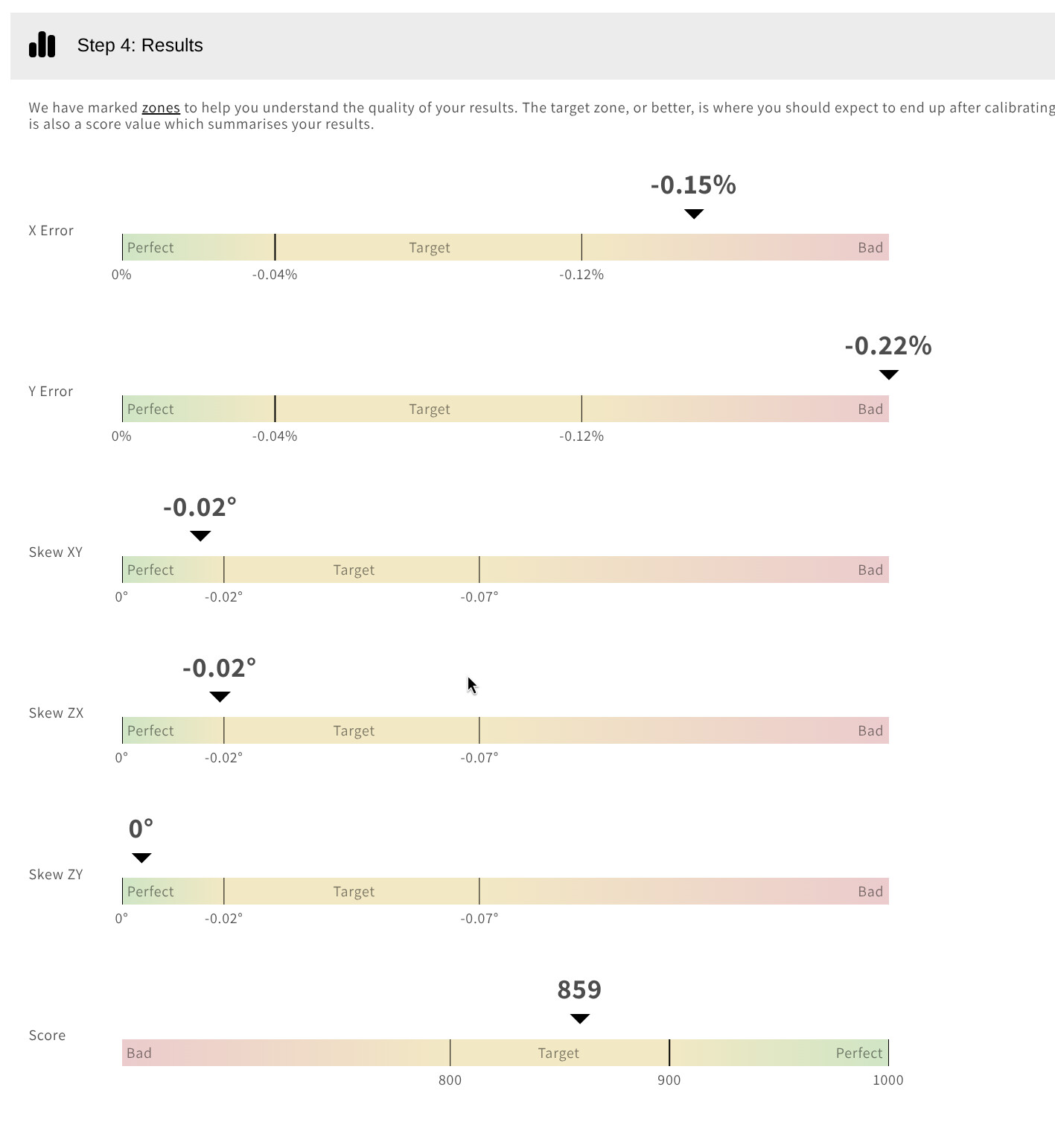
I have corrected my skew on my X1C but my X and Y error do not match very well. Could this be an e-steps issue at this point?. 100 mm calilantern. The -0.02 XY skew is not creating this either as pushing it up a lot higher doesn’t change the difference between X and Y much at all.
The part is symmetrical of course and measures inside and outside. My P1S X and Y error are matched.
Same here, we compensate X,Y and skew independently. Why there is difference in X and Y error is beyond me, but seemed relatively consistent for given material type. We just went with it.Possibly something about chamber temperature? We have simililar ratio between X and Y errors by the way. My 5 cents on the topic, good luck!
 …really hope to find a simplest way